
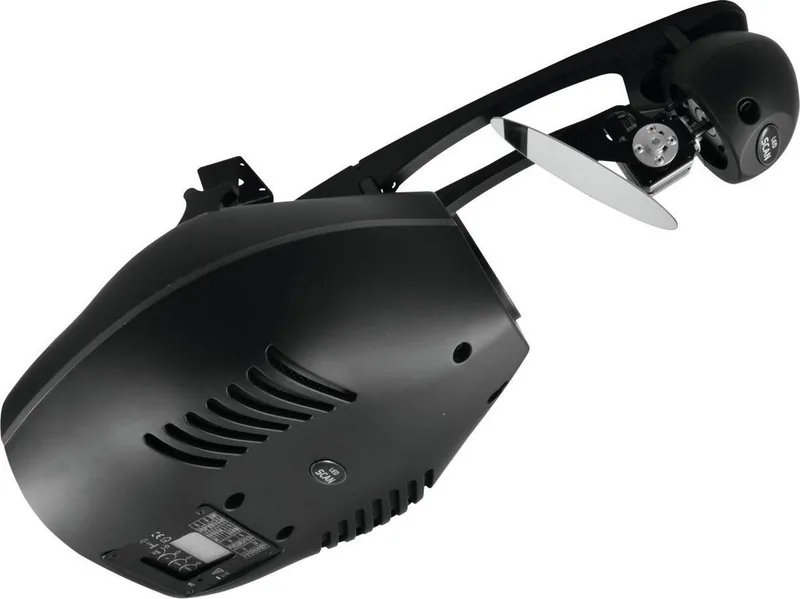
Futurelight DSC-60 Manual
PDF manual · 48 Pages
English



Quick check
Incorrect answer, please try again.
Chat with your Futurelight DSC-60 manual using AI
Get instant AI answers from your Futurelight DSC-60 manual
Ask anything about the Futurelight DSC-60. Answers come from this manual, with the pages they are based on.
DSC-60 Maintenance Schedule
Clean weekly to remove smoke fluid residues that reduce light output. Use a moist, lint-free cloth.
Clean monthly using a soft brush or cloth to ensure proper airflow.
Clean the color filters, gobo wheel, and internal lenses monthly with a soft brush or cloth.
Lubricate bearings of rotating parts every six months using a syringe with a fine needle. Avoid excessive oil.
Vacuum or blow out dust from the inside of the projector at least once a year.
Safety-related installations must be inspected by a skilled person once a year.
Safety-related installations must be inspected by an expert every four years for acceptance testing.
Free maintenance reminders
Timed to your purchase date. Always free, unsubscribe anytime.
Ask a Question
Do you recommend DSC-60?
Yes NoFrequently Asked Questions
It is a professional lighting scanner designed to create moving decorative effects with color, gobos, prism effects, strobe, focus, and dimming. It is intended for stages, clubs, theaters, and similar indoor venues.
Is this answer helpful?
The fixture supports two control formats: 12-channel mode and 14-channel mode. This lets users choose between a simpler setup or a more detailed control layout, depending on the lighting system and programming needs.
Is this answer helpful?
Yes. It can operate in stand-alone mode using built-in programs, and it also supports master/slave setups. In addition, it offers sound-active operation through the built-in microphone.
Is this answer helpful?
Yes. The scanner uses a slot-in gobo system that allows tool-free gobo exchange. That makes it easier to customize patterns and update the visual look without a complicated service process.
Is this answer helpful?
It must be installed indoors with proper ventilation, away from moisture and flammable materials. Overhead mounting requires professional rigging, a safety bond, and compliance with local safety rules.
Is this answer helpful?
The fixture can be set to blackout, hold the last position, switch to an internal program, or use sound-active behavior. This gives operators several fallback options when the controller signal is lost.
Is this answer helpful?
Advantages and Disadvantages
Advantages

- Bright 60 W LED output delivers strong visibility and a modern, energy-conscious lighting punch.
- Selectable 12/14 channel DMX modes make the fixture adaptable to simple or advanced control setups.
- Tool-free gobo system and interchangeable gobos allow fast creative changes.
- Built-in effects include color wheel, rainbow motion, prisms, frost, strobe, and gobo shake.
- Stand-alone, master/slave, and sound-active modes add flexibility for different venues.
Disadvantages

- Indoor use only, so it is not suitable for outdoor or wet environments.
- Overhead installation requires professional rigging, safety bonds, and strict precautions.
- Regular cleaning and maintenance are important, especially around optics and the fan.
- The fixture is designed for professional use, so setup and operation may be complex for beginners.
Product Specification
Mirror Type
1x Single Mirror
Light Source
LED
Power Consumption
150W
Beam Angle
13°
PAN Angle
180°
TILT Angle
45°
Color Mixing
Color Wheel (7 colors)
Effects
Dimmer, Focus (motorized), Gobos (7x rotating), Strobe
Control
DMX (14 channels), Music control, Master/Slave
Special Features
Gobo Shake
Dimensions
22.16x11.85x9.13in (WxHxD)
Weight
16.53lb
Product Description
Futurelight DSC-60 LED Scanner: compact power for dynamic lighting
The Futurelight DSC-60 LED Scanner is built for creators who want sharp movement, vivid color, and flexible control in one compact fixture. Using a bright 60 W LED source, it delivers a punchy beam with strong presence on stage, in clubs, theaters, and event spaces. If you are looking for a fixture that combines classic scanner character with modern LED efficiency, the Futurelight DSC-60 LED Scanner Manual reveals just how versatile this unit can be.
One of the strongest points of the DSC-60 is its mix of visual tools. A seven-position color wheel, UV filter, white, rotating gobos, gobo shake, and prism effects make it easy to build energetic scenes without adding extra fixtures. The scanner also supports motorized focus, dimming, strobe control, and smooth PAN/TILT movement, so the output can shift from subtle atmosphere to fast-paced beams in seconds.
Control options are another highlight. Users can run the fixture through 12- or 14-channel DMX modes, use it in stand-alone operation, or set up master/slave linking for synchronized effects. The built-in microphone adds sound-active possibilities, while the control board makes addressing and customization straightforward. For installations that need quick adjustments, the remote DMX addressing feature is especially practical.
Design-wise, the DSC-60 focuses on convenience and reliability. Its slot-in gobo system allows tool-free pattern changes, and the interchangeable gobo setup gives designers room to personalize looks. The automatic power supply adapts to a wide voltage range, making it suitable for different venues and touring environments. Combined with preprogrammed scenes and editable sequences, it offers a strong balance between ready-made effects and custom programming.
That said, the fixture is clearly intended for professional indoor use. It needs careful mounting, proper safety bonds, and regular cleaning to keep performance high. The optics, fan, and rotating parts benefit from routine maintenance, especially in fog-heavy environments where residue can build up quickly. Treated well, the DSC-60 can be a dependable workhorse for visual impact and repeat use.
Notes
- Best suited for professional indoor lighting setups.
- Use proper rigging and safety accessories for overhead mounting.
- Regular lens and fan cleaning helps preserve brightness and performance.
- Ideal when you want scanner-style motion with flexible DMX control.
Search for 67,706 Manuals online


Type-in Brand or Model