
Flex CA 10.8 Manual
PDF manual · 86 Pages
English



Quick check
Incorrect answer, please try again.
Chat with your Flex CA 10.8 manual using AI
Get instant AI answers from your Flex CA 10.8 manual
Ask anything about the Flex CA 10.8. Answers come from this manual, with the pages they are based on.
CA 10.8 Maintenance Schedule
Check the battery charger, cable, and plug before every use. Do not use if any damage is detected to avoid electric shock.
Remove dirt and dust from the housing using a paint brush or dry cloth. Never use water or liquid detergents.
Ask a Question
Do you recommend CA 10.8?
Yes NoFrequently Asked Questions
The charger is designed for original FLEX AP 10.8/2.5, AP 10.8/4.0, and AP 10.8/6.0 battery packs. Use only compatible original batteries with the correct voltage.
Is this answer helpful?
Approximate charging times are 40 minutes for a 2.5 Ah battery, 55 minutes for a 4.0 Ah battery, and 85 minutes for a 6.0 Ah battery. Actual time depends on the battery's remaining charge.
Is this answer helpful?
A flashing green LED means the battery is currently charging. When the green LED remains steadily lit, charging is complete and the charger is maintaining the battery charge.
Is this answer helpful?
A steady red LED usually means the battery is too hot or too cold. Charging starts automatically when the battery temperature returns to the permitted 0 C to 40 C range.
Is this answer helpful?
No. The Flex CA 10.8 Charger is intended for indoor use only. Keep it away from rain, moisture, and damp locations to reduce the risk of electric shock.
Is this answer helpful?
Disconnect the charger from the mains first. Remove dust and dirt from the housing with a dry cloth or soft brush. Do not use water or liquid cleaning products.
Is this answer helpful?
Advantages and Disadvantages
Advantages

- Supports FLEX AP 10.8/2.5, AP 10.8/4.0, and AP 10.8/6.0 batteries.
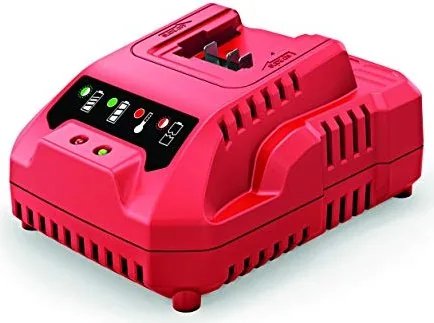
- Provides clear green charge-status and red fault-status LED indicators.
- Charges 2.5 Ah, 4.0 Ah, and 6.0 Ah batteries in about 40, 55, and 85 minutes.
- Compact 0.52 kg design with ventilation slots and a dedicated battery bay.
- Includes maintenance charging after a battery reaches full charge.
Disadvantages

- Compatible only with specified FLEX 10.8 V AP battery types.
- Designed for indoor use and must be protected from rain and moisture.
- Requires a 220-240 V mains supply, which may limit use in other regions.
- Charging is restricted to battery temperatures between 0 C and 40 C.
- Faulty batteries or chargers require inspection by an authorized service center.
Product Specification
Type
Charger
Suitable for
Flex
Battery voltage
10.8 V
Battery type
Lithium-ion
Weight
1.15 lb
Product Description
Flex CA 10.8 Charger - Read, Download & Print Free
The Flex CA 10.8 Charger is a compact charging solution designed for compatible FLEX 10.8 V battery packs. Flex CA 10.8 Charger - Read, Download & Print Free highlights the essential product information for users who need dependable charging support for their cordless tool system. It is intended for FLEX AP 10.8/2.5, AP 10.8/4.0, and AP 10.8/6.0 batteries, helping professionals and home users keep compatible equipment ready for work.
Designed for the FLEX 10.8 V Battery Range
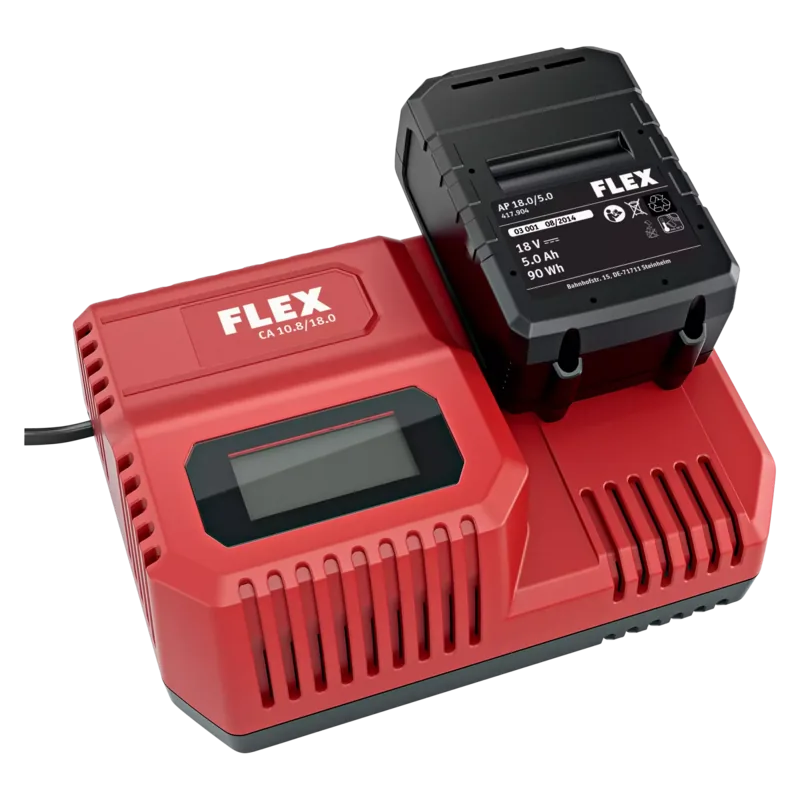
This charger operates from a 220-240 V, 50-60 Hz mains supply and delivers a 12.6 V charging voltage. Its dedicated battery slot, integrated contacts, ventilation openings, and attached power cord create a straightforward setup. Insert a compatible original battery fully into the charging bay, monitor the indicator lights, and remove the battery when charging is complete.
Charging times vary by battery capacity and its remaining charge. A 2.5 Ah battery takes approximately 40 minutes, a 4.0 Ah battery takes around 55 minutes, and a 6.0 Ah battery takes about 85 minutes. These timings make the CA 10.8 a practical choice for managing battery rotation during workshop, installation, repair, and maintenance tasks.
Clear LED Charging Information
The CA 10.8 uses a green LED for charge status and a red LED for fault messages. A flashing green light indicates active charging, while a steady green light confirms the battery is fully charged and maintenance charging is active. This simple visual feedback lets users check battery status at a glance.
The red fault LED also supports safer operation. A steady red light can mean the battery is outside the permitted charging temperature range. Charging begins automatically once the battery reaches a temperature between 0 C and 40 C. A flashing red light, or no LED display, may indicate dirty contacts, a faulty battery, or a charger fault that should be inspected by an authorized service center.
Safe Everyday Charging
The charger is rated for indoor use and should be kept dry, clean, and uncovered while operating. Do not charge batteries below 0 C or above 40 C, and avoid humid or excessively hot surroundings. Before use, inspect the charger, cable, and plug for damage. Cleaning should be done only after unplugging the unit, using a dry cloth or brush rather than water or liquid cleaners.
Notes
- Use original compatible FLEX batteries only.
- Battery and charger warmth during charging is normal.
- Do not place objects on the charger or use it on soft surfaces.
- Recycle used chargers and batteries through appropriate collection systems.
Search for 67,732 Manuals online


Type-in Brand or Model