
Feiyu Tech Vimble 2 Manual
PDF manual · 10 Pages
English



Quick check
Incorrect answer, please try again.
Chat with your Feiyu Tech Vimble 2 manual using AI
Get instant AI answers from your Feiyu Tech Vimble 2 manual
Ask anything about the Feiyu Tech Vimble 2. Answers come from this manual, with the pages they are based on.
Ask a Question
Do you recommend Vimble 2?
Yes NoFrequently Asked Questions
Its main benefit is stable handheld smartphone filming. The 3-axis design helps reduce shake across pan, tilt, and roll, so videos look smoother and more professional with less effort.
Is this answer helpful?
It supports smartphones with a width range of about 57–84 mm. Phones in the recommended weight range will balance more easily and perform better during filming.
Is this answer helpful?
It supports pan mode, follow mode, lock mode, and motion control mode. These modes help you switch between natural movement, fixed framing, and controlled camera motion.
Is this answer helpful?
Basic shooting works without the app, but Vicool is important for advanced functions like motion speed settings, firmware updates, and some lens or field-of-view controls.
Is this answer helpful?
A low battery is shown by a red status light blinking three times every five seconds. When charging, the indicator is red and turns green when the battery is full.
Is this answer helpful?
Motion control mode creates smooth, constant-speed camera movement between two saved positions. It is useful for timelapse shots, product videos, and controlled cinematic motion.
Is this answer helpful?
Advantages and Disadvantages
Advantages

- 3-axis stabilization helps keep smartphone footage smooth and more cinematic.
- Telescoping handle adds reach for low angles, overhead shots, and creative framing.
- Multiple modes like pan, follow, lock, and motion control improve shooting flexibility.
- Bluetooth shutter, joystick, and trigger make core controls quick to access.
- Phone charging support and a built-in battery are useful for longer recording sessions.
Disadvantages

- Works best with phones that fit the 57–84 mm width range and stay within the supported weight.
- Balancing the smartphone before use is important and can take time for beginners.
- Some advanced features rely on the Vicool app, which adds another setup step.
- Firmware changes may make instructions differ slightly from the unit or app version.
- Motion control and initialization require careful setup for the best results.
Product Specification
Compatibility
Smartphone (2.24-3.31 in clamp width)
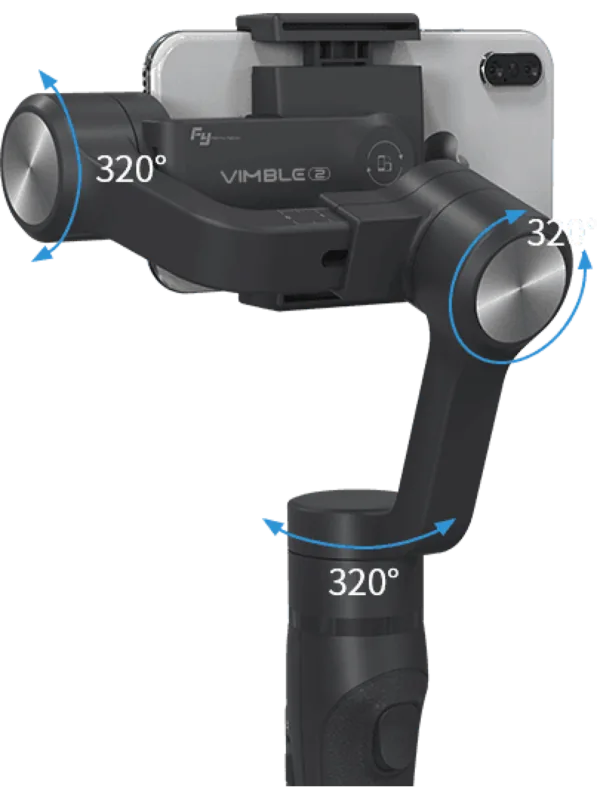
Pan axis
320°
Roll axis
320°
Tilt axis
320°
Max. payload
0.44 lb
Display
no
Connection
Bluetooth
Power supply
Battery
Operating time
5 hr
App control
yes
Handling
one-handed
Special features
Charging function for external devices (USB Micro-B), Accessory port (1x 1/4"), Tripod (removable), Telescopic pole
Dimensions
4.35x4.65x12.72 in
Weight
0.94 lb
Product Description
Feiyu Tech Vimble 2 Gray Manual
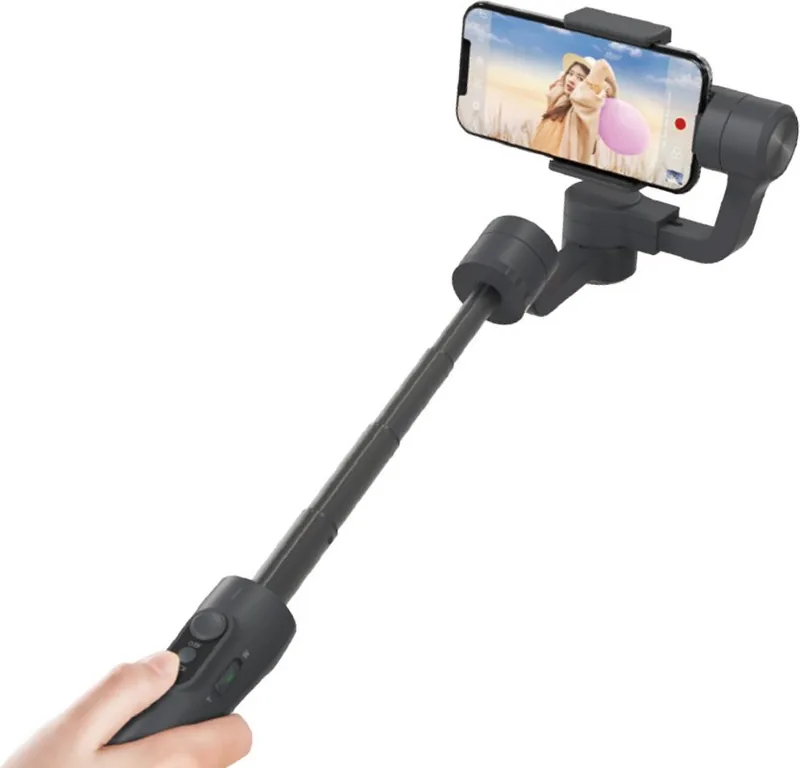
The Feiyu Tech Vimble 2 Gray is a smart choice for smartphone creators who want smoother motion without overcomplicating their setup. Built around a 3-axis stabilization system, it helps reduce shake across pan, tilt, and roll, making everyday clips, travel videos, and social content look more polished.
One of its most practical touches is the telescoping handle, which extends for better framing and creative angles. Whether you are filming at arm’s length, reaching over a crowd, or capturing a low perspective, the design gives you more freedom than a standard grip. The gray finish also keeps the look minimal and professional.
Controls are straightforward and useful. A joystick, function button, trigger button, and Bluetooth shutter release provide quick access to shooting modes and camera actions. The gimbal supports pan mode, follow mode, lock mode, and motion control, so you can adapt it to handheld walking shots, steady locked framing, or smoother timelapse-style movement. With the Vicool app, users can also adjust motion speed, update firmware, and fine-tune features for a more personalized workflow.
The Vimble 2 Gray is made for convenience as well as stability. It includes a built-in battery, USB charging, and even a phone charging option through the gimbal, which is especially helpful during longer sessions. A smartphone can be mounted in a width range of 57–84 mm, and the design works best when the phone is balanced before power-on. For best performance, lighter devices within the recommended weight range are ideal.
Another advantage is how much control it gives during actual shooting. You can switch between photo and video capture from the shutter button, use the trigger for temporary lock, or recenter the camera quickly when your framing drifts. The result is a mobile filming tool that feels responsive, compact, and flexible enough for casual creators and more serious vloggers alike.
Setup is not only about attaching the phone; the gimbal also includes useful feedback through status lights and vibration cues. A blinking red indicator warns of low power, while the blue light patterns show mode changes and initialization status. If the device has not been used for a long time or the phone is no longer level, a fresh initialization on a flat surface helps restore accurate movement. The included tripod, wrist strap, and cable round out the kit, giving it a practical feel for content creators who want to start filming with minimal extras.
For creators interested in controlled camera paths, motion control mode can move from one set position to another at a chosen speed, making it useful for product shots and timelapse scenes.
Notes
- Balance the phone before turning the gimbal on.
- Remove bulky cases if the fit feels tight.
- Use the Vicool app for advanced motion and firmware features.
- Let the battery charge fully before first use.
Search for 67,706 Manuals online


Type-in Brand or Model
Sarah Keller
9 months ago
How reliable is the Vimble 2 app connection (Bluetooth) and what if the app crashes or fails to switch portrait mode? Does the gimbal still work properly without using the app?
Manual.ly
9 months ago
The Vimble 2 gimbal can still be used with its onboard controls even if the app is unstable. The app is mainly for advanced features and settings (for example certain modes, panoramas, and time-lapse). If you see Bluetooth dropouts or frequent app crashes, please try these steps: fully charge the gimbal, reinstall the app using the QR code from the packaging, update your phone OS, enable Bluetooth and camera permissions for the app, and pair again from scratch. Also ensure the smartphone is balanced (level) before powering on, as improper balance can cause instability in app-controlled modes like vertical/portrait. If portrait stabilization still fails after balancing and re-pairing, contact support with your phone model and app version.