
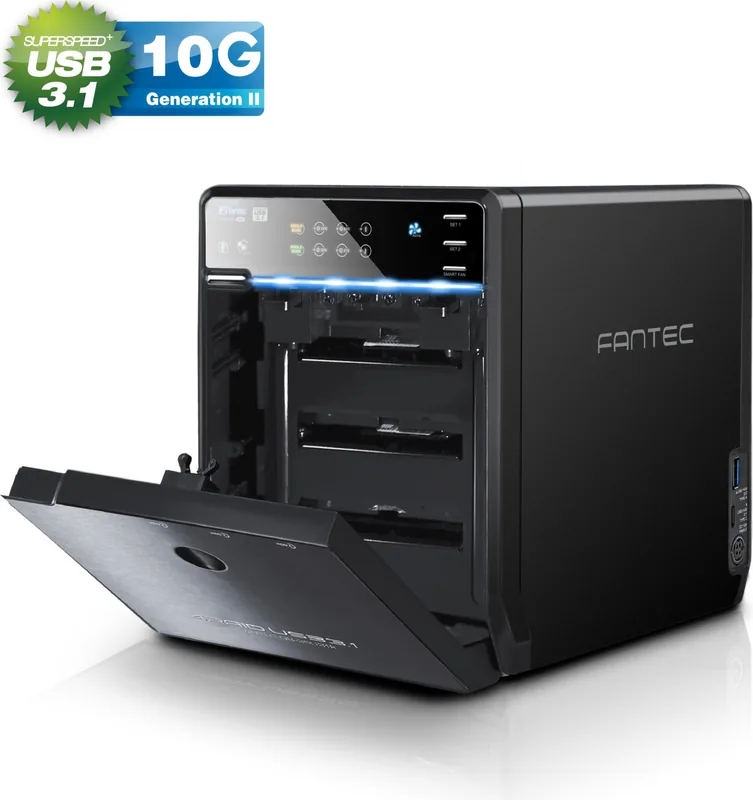
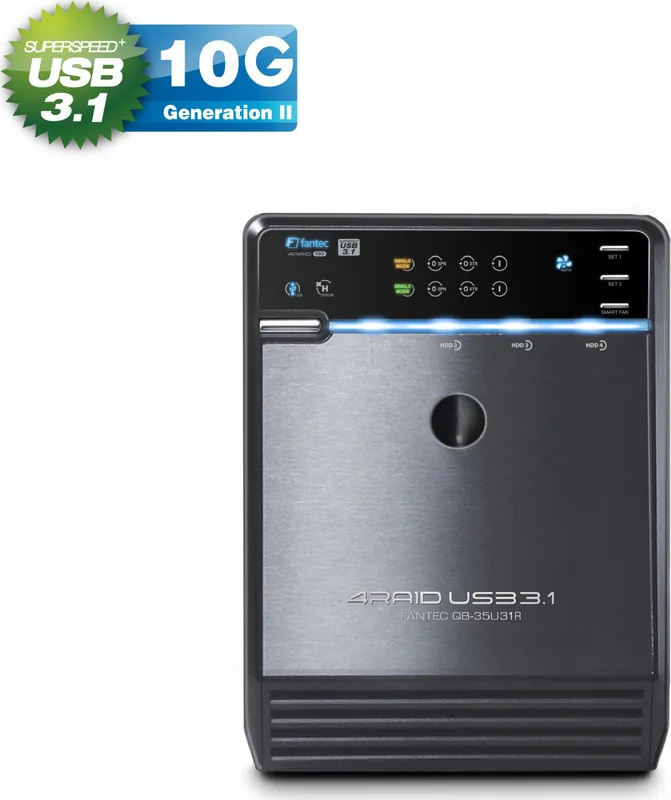
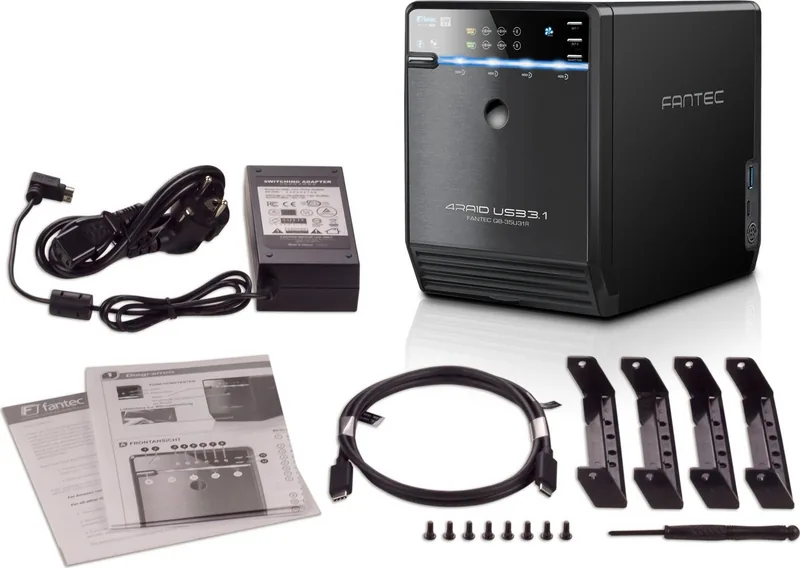
Fantec QB-35U31R Manual
PDF manual · 22 Pages
English



Quick check
Incorrect answer, please try again.
Chat with your Fantec QB-35U31R manual using AI
Get instant AI answers from your Fantec QB-35U31R manual
Ask anything about the Fantec QB-35U31R. Answers come from this manual, with the pages they are based on.
Ask a Question
Do you recommend QB-35U31R?
Yes No
Noemie Dach
4 months ago
Why do the drives disconnect and reconnect during file transfers or video playback on Windows 10?

Manual.ly
4 months ago
Repeated drive disconnects can be caused by USB cable, port, power, or driver issues. Use a direct USB connection, avoid hubs, try another high-quality cable and USB port, update Windows and USB/chipset drivers, and disable USB selective suspend. If the issue persists with different drives and cables, please contact the manufacturer for diagnostics or warranty support.

Muhammad Zieme
4 months ago
Why do the drives disconnect and reconnect during file transfers or video playback on Windows 10?
Manual.ly
4 months ago
Repeated disconnects can be caused by the USB connection, power delivery, driver settings, or drive compatibility. Use the supplied USB-C to USB-C cable or a high-quality USB-C adapter/cable, connect directly to a USB 3.x port, update chipset and USB drivers, and disable USB selective suspend. Check that all installed drives meet the enclosure's supported capacity and power requirements. If the issue continues with another cable and computer, please contact Fantec support for diagnostics or warranty assistance.
et60
6 months ago
Why do the drives disconnect and reconnect during file transfers or video playback on Windows 10?
Manual.ly
6 months ago
Repeated drive disconnects can be caused by an unstable USB connection, insufficient power delivery, USB controller compatibility, or power-saving settings. Please use the supplied USB-C to USB-C cable or a high-quality USB-C adapter/cable, connect directly to a rear motherboard port, and disable USB selective suspend and device power saving in Windows. Ensure the enclosure power adapter is securely connected. If the issue persists with different ports or a different computer, contact the manufacturer support for diagnostics or replacement options.
Lukas Weber
6 months ago
Why do the drives disconnect and reconnect during file transfers or video playback on Windows 10?
Manual.ly
6 months ago
Repeated disconnects can be caused by the USB cable or port, power delivery, drive compatibility, or USB controller settings. Try a different high-quality USB-C cable, another direct USB port, and avoid hubs. Update Windows, USB controller drivers, and the enclosure firmware if available. Also verify that the power supply is firmly connected and test the drives individually. If the issue continues with multiple drives and ports, please contact the manufacturer support for diagnostics or a replacement.
Ray Jones
3 months ago
Why do the drives disconnect and reconnect during file transfers or video playback on Windows 10?
Manual.ly
3 months ago
Repeated disconnects can be caused by USB cable, port, power, driver, or disk compatibility issues. Use the supplied USB-C to USB-C cable or a high-quality data-rated adapter/cable, connect directly to a USB 3.x port, update Windows and USB/chipset drivers, and disable USB selective suspend. Check that all installed drives are healthy and within the enclosure's supported specifications. If the issue continues, please contact Fantec support with the drive models and system details for troubleshooting or warranty assistance.
Lena Hoffman
3 months ago
Why do the drives disconnect and reconnect during file transfers or video playback on Windows 10?
Manual.ly
3 months ago
Unexpected disconnects can be caused by the USB connection, power delivery, drive installation, or host-controller compatibility. Please use a direct USB connection, avoid hubs, try another USB port and cable, and ensure the enclosure power adapter is firmly connected. Disable USB selective suspend and hard-disk power saving in Windows, then check whether the issue persists with fewer drives installed. If it continues, contact the manufacturer support with the drive models, capacity, and Windows version for compatibility troubleshooting.
Tomas Zulauf
5 months ago
Why do the drives disconnect and reconnect during file transfers or video playback on Windows 10?
Manual.ly
4 months ago
Unexpected disconnects can be caused by USB cable quality, an unstable USB port or hub, power delivery, drive compatibility, or USB power-management settings. Connect the enclosure directly to a rear motherboard USB port, use the supplied USB-C cable or a certified data-capable adapter, update USB/chipset drivers, and disable USB selective suspend. If the issue persists with different drives and ports, please contact the manufacturer support for diagnostics or a replacement.
excepturi69
3 months ago
Does the enclosure disconnect drives during large file transfers or video playback on Windows 10?
Manual.ly
3 months ago
Some users reported intermittent drive disconnects and reconnections during heavy use. Ensure the enclosure has stable power, use a short high-quality USB cable connected directly to the PC, disable USB power saving, and update relevant USB/chipset drivers. If the issue persists, please contact Fantec support for troubleshooting or a warranty assessment.
Zachary Murphy
5 months ago
Why do the drives disconnect and reconnect during file transfers or video playback on Windows 10?
Manual.ly
5 months ago
Unexpected disconnects can be caused by USB cable or port issues, insufficient power, outdated USB/chipset drivers, or Windows power management. Please use the supplied USB-C to USB-C cable or a high-quality USB-C adapter/cable, connect directly to a powered USB 3.x port, update system drivers, and disable USB selective suspend. If the issue continues with another cable and computer, contact the manufacturer for diagnostics or warranty support.
Ray Brown
3 months ago
Why do the drives disconnect and reconnect during file transfers or video playback on Windows 10?
Manual.ly
3 months ago
Repeated drive dropouts can be caused by the USB connection, power delivery, driver settings, or a compatibility issue. Please try a different high-quality USB cable, connect directly to a rear motherboard USB port, update Windows and USB/chipset drivers, and disable USB selective suspend. Also ensure the enclosure power supply is firmly connected. If the issue continues with multiple drives, contact Fantec support for diagnostics or a possible replacement.
jstevens20
3 months ago
Why do the drives disconnect and reconnect during file transfers or video playback on Windows 10?
Manual.ly
2 months ago
Repeated drive dropouts are not expected. Please check that the enclosure uses its supplied power adapter and a direct USB connection, then try another USB port and cable. Disable USB selective suspend and USB root hub power-saving options in Windows, and update USB/chipset drivers. If the issue continues with different drives and cable, contact the retailer or Fantec support for troubleshooting or a warranty replacement.
Lucas Campbell
5 months ago
Why do the drives disconnect and reconnect during file transfers or video playback on Windows 10?
Manual.ly
5 months ago
Repeated disconnects can be caused by USB cable or port issues, insufficient power delivery, driver or chipset problems, or enclosure/drive compatibility. Use the supplied USB-C to USB-C cable or a high-quality certified cable, connect directly to a USB 3.x port, update Windows and USB chipset drivers, and test the enclosure with fewer drives. Disable USB selective suspend and hard-disk power saving. If the issue continues, please contact Fantec support for diagnostics or warranty service.
ExVelit46
3 months ago
Why do my hard drives keep disconnecting and reconnecting every few seconds during heavy use like file transfers or video playback?
Manual.ly
3 months ago
This issue often stems from power delivery instability or USB port limitations when running multiple high-capacity drives. We recommend using the included USB-C to C cable with a powered USB hub or a dedicated external power adapter if available. Ensure your computer's BIOS settings have USB power management disabled for all ports. If the problem persists, please contact our support team at [email protected] for further diagnostics.
Klaus Meier
5 months ago
Does this enclosure come with a USB Type-A to Type-C cable since most PCs only have Type-A ports?
DataUser99
5 months ago
Does this enclosure support connecting four different hard drives simultaneously, and are there any known issues with drive disconnection during heavy use?
Manual.ly
5 months ago
Yes, the Fantec RAID enclosure is designed to support up to four hard drives independently or in RAID configurations. However, some users have reported intermittent disconnections of drives during operation, particularly when transferring large files or playing videos on Windows 10 systems. This issue may be related to power management settings or USB cable compatibility. We recommend ensuring all firmware is updated, using high-quality USB cables (note that a Type-C to Type-A adapter is not included), and disabling USB selective suspend settings in your operating system. If problems persist, please contact our support team for further assistance.
Jasmine Mitchell
5 months ago
Is it necessary to purchase a separate USB Type-C to Type-A adapter since only a Type-C to Type-C cable is included?
William Ellis
5 months ago
Does this RAID enclosure come with a USB Type-C to Type-A cable for connecting to older PCs?
Manual.ly
4 months ago
Thank you for your inquiry. The package includes only a USB Type-C to Type-C cable. A USB Type-C to Type-A adapter or cable is not included and must be purchased separately if your computer does not have a native Type-C port.
Zackary Batz
4 months ago
Why do my hard drives keep disconnecting and reconnecting randomly during file transfers on Windows 10?
laboriosam_veniam
5 months ago
I am experiencing frequent disconnects where my hard drives disappear and reappear during file transfers or video playback. Is this a known issue with power management?
Manual.ly
5 months ago
Thank you for contacting us. The intermittent disconnection of drives, even with USB power-saving settings disabled, often indicates insufficient power delivery to the connected drives. We recommend ensuring your USB cable is directly plugged into a powered port on your computer or using an external powered USB hub. Additionally, please verify that all drive bays are securely seated and that the enclosure's power supply meets the combined wattage requirements of your specific hard drive models. If the issue persists after these checks, our support team can assist with further troubleshooting steps.
sed_sit
3 months ago
Does the package include a USB Type-C to Type-A adapter cable since many older computers do not have native Type-C ports?
David Miller
3 months ago
Does this enclosure work reliably with Windows 10 when using large capacity drives for video playback and file transfers?
Manual.ly
3 months ago
Thank you for your inquiry. While the Fantec support team has assisted many users successfully, some reports indicate that drives may disconnect during heavy use on certain systems. We recommend ensuring all drivers are up to date and checking power settings. If issues persist, please contact our support directly at [email protected] for further assistance.
Darren Bailey
4 months ago
Is a USB Type-C to Type-A cable included in the box or do I need to buy one separately?
Samara Stanton
3 months ago
Does this case work reliably with Windows 10, or do drives disconnect frequently during large file transfers?
Manual.ly
3 months ago
We have received reports of some users experiencing intermittent drive disconnections on Windows 10 systems. Please ensure your USB power settings are configured to prevent the port from sleeping and that you are using a high-quality powered USB hub if needed. If issues persist, please contact our support team for further troubleshooting assistance.
Jennyfer Reichel
5 months ago
What cables are included in the box? I need to know if I can connect this to my older laptop without buying adapters.
Frequently Asked Questions
The enclosure supports Single mode, RAID 0 Spanning, RAID 0 Striping, and RAID 1 Mirroring. These modes can be configured for two independent sets of two drives each.
Is this answer helpful?
Yes, but only in Single mode or RAID 0 Spanning. For RAID 0 Striping and RAID 1, it is highly recommended to use identical drives in terms of capacity, brand, and model for best results.
Is this answer helpful?
You change the mode using the SET1 and SET2 buttons on the front panel to select the desired mode until the LED blinks, then confirm by pressing the confirmation button on the back while the device is powered off.
Is this answer helpful?
Yes, the device includes an integrated USB hub with one USB 3.0 Type-A port and one USB 3.1 Type-C port available on the side for connecting other devices.
Is this answer helpful?
No, the fan is smart-controlled based on internal temperature. It runs at three different speeds depending on heat levels and can be turned off manually if needed.
Is this answer helpful?
The system continues to operate normally using the remaining drive. You can replace the failed drive while the system is running, triggering a rebuild process to restore the mirror.
Is this answer helpful?
Advantages and Disadvantages
Advantages

- Supports two independent RAID sets with flexible configurations including Single, RAID 0, and RAID 1
- High-speed USB 3.1 Gen 2 interface with UASP support for transfers up to 10 Gbit/s
- Built-in USB hub with Type-A and Type-C ports for expanded connectivity
- Automatic thermal management with a smart fan controlled by an internal temperature sensor
- Hardware-based RAID setup requires no special software drivers or utilities
Disadvantages

- RAID 0 configurations result in total data loss if any single drive in the set fails
- RAID 1 reduces usable storage capacity by half since data is mirrored
- Requires identical drives for optimal RAID 0 and RAID 1 performance and stability
- No automatic hot-swap support; drives must be removed via manual procedure
- SMART monitoring is limited to only the first drive in each RAID pair
Product Specification
Form Factor
3.5"
Internal Connection
4x SATA 6Gb/s 3.5" (Hot-Swap)
External Connection
1x USB-C 3.1 (10Gb/s)
RAID Level
0/1/JBOD
Fan
1x 80mm
Dimensions
8.46x6.54x4.96 inches
Weight
3.97 lbs
Color
Black
Features
Aluminum enclosure, external power supply
Manufacturer Warranty
2 years
USB Spelling
Link
Product Description
Fantec QB-35U31R: Ultimate Four-Bay USB-C Storage Solution
The Fantec QB-35U31R is a high-performance four-bay hard drive enclosure designed for users who demand flexibility, speed, and data redundancy. This device supports up to four 3.5-inch SATA drives, allowing you to configure them into two independent RAID sets of two drives each. Whether you need maximum speed with RAID 0 or enhanced security with RAID 1, this enclosure adapts to your specific workflow needs.
Equipped with a robust USB 3.1 Gen 2 interface, the QB-35U31R delivers blazing-fast data transfer rates of up to 10 Gbit/s. The inclusion of UASP (USB Attached SCSI Protocol) further optimizes performance, ensuring that large file transfers are completed in record time. Beyond storage capacity, the unit features an integrated USB hub with both Type-A and Type-C ports, providing additional connectivity options for peripherals without cluttering your computer's ports.
Thermal management is handled by an intelligent internal fan system. A built-in temperature sensor automatically adjusts the fan speed across three levels, keeping your hard drives cool during intensive operations while maintaining low noise levels when activity is light. The front panel offers clear LED indicators for power status, drive activity, and RAID configuration, giving you immediate visual feedback on the health of your system.
Setup is straightforward using dedicated hardware buttons located on the front and rear of the unit. You can easily switch between Single mode, RAID 0 Spanning, RAID 0 Striping, and RAID 1 Mirroring without needing complex software tools. In Single mode, each drive operates independently, offering maximum compatibility for mixed drive sizes or brands. For those prioritizing data safety, RAID 1 provides real-time mirroring, ensuring your data remains accessible even if one drive fails.
Important Notes
Always back up important data before configuring RAID modes. While RAID 1 offers protection against single drive failure, it does not protect against catastrophic events like fire, theft, or simultaneous drive failures. Ensure all drives are securely seated to prevent connection errors during operation.
Search for 67,706 Manuals online


Type-in Brand or Model
Zaria Auer
6 months ago
Why do the drives disconnect and reconnect during file transfers or video playback on Windows 10?
Manual.ly
6 months ago
Unexpected disconnections can be caused by the USB connection, power delivery, cable quality, or host-controller compatibility. Please use the supplied USB-C to USB-C cable where possible, connect directly to a powered USB port, disable USB selective suspend, update USB/chipset drivers, and test each drive individually. If the issue continues under load, contact the manufacturer support for diagnostics or a warranty replacement.