
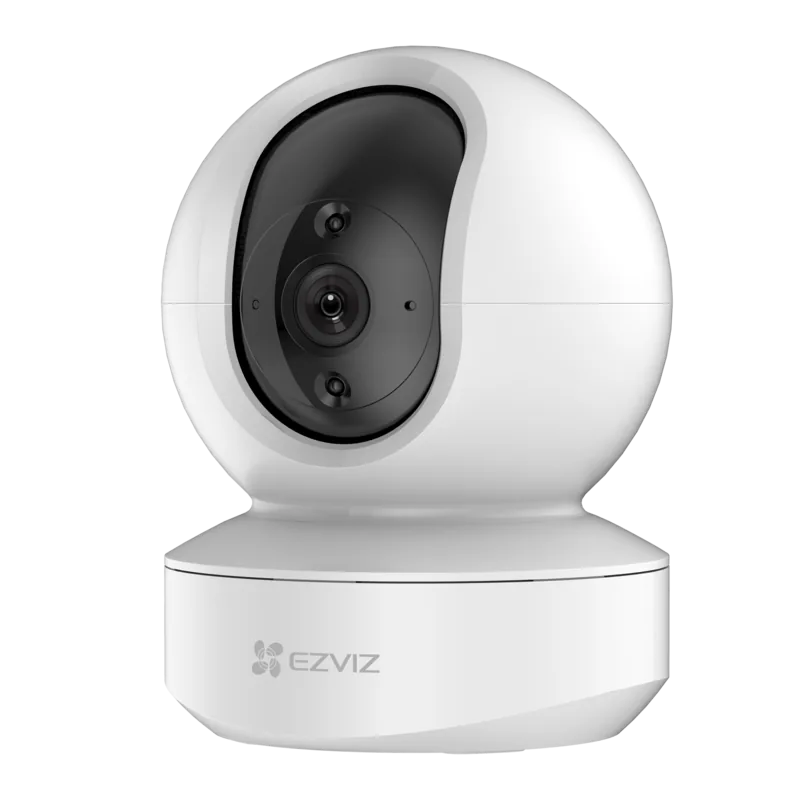
Ezviz TY1 Manual
PDF manual · 9 Pages
English



Quick check
Incorrect answer, please try again.
Chat with your Ezviz TY1 manual using AI
Get instant AI answers from your Ezviz TY1 manual
Ask anything about the Ezviz TY1. Answers come from this manual, with the pages they are based on.
Ask a Question
Do you recommend TY1?
Yes No
Oscar Wilkinson
5 months ago
Does this camera support automatic tracking of people and pets, and does it have a microphone for two-way audio?

Manual.ly
5 months ago
Yes, the camera features advanced automatic tracking that works well for both people and pets. It also includes built-in two-way audio, allowing you to speak with individuals in the room through the app. The device is designed for easy setup and offers high-quality video performance at an affordable price point.

Georgia Saunders
5 months ago
What type of storage card does this camera use and what is the maximum capacity supported?
Frequently Asked Questions
No, the Ezviz TY1 PTZ Wireless Cam only supports 2.4GHz Wi-Fi networks. If you have a dual-band router, ensure your phone connects to the 2.4GHz band during setup.
Is this answer helpful?
To reset the camera, locate the reset button on the device and hold it down for five seconds. This will restart the camera and restore all settings to factory defaults.
Is this answer helpful?
Yes, the camera supports microSD cards for local storage. You must insert a compatible card and format it via the EZVIZ app to enable video recording.
Is this answer helpful?
The provided text does not explicitly state outdoor ratings. It mentions indoor installation options like ceiling and wall mounts, but weatherproofing details are not covered in the manual excerpt.
Is this answer helpful?
If the Wi-Fi connection fails, the red LED light will blink slowly. The camera cannot record live feeds until the network connection is restored.
Is this answer helpful?
Advantages and Disadvantages
Advantages

- Seamless 2.4GHz Wi-Fi connectivity with easy app setup
- Pan-tilt-zoom functionality provides extensive coverage area
- Built-in two-way audio allows real-time communication
- Supports local microSD card storage for flexible recording
Disadvantages

- Requires stable 2.4GHz network which may be crowded
- Ceiling installation requires strong structural support
- Initial setup depends on having a compatible smartphone
Product Specification
Type
PTZ
Image Sensor
1/3 CMOS 2.0 MP
Resolution
1920x1080 Pixels (15fps)
Lens
4.0mm (F2.4)
Sensitivity
0 Lux (IR)
Viewing Angle
75 degrees (horizontal), 45 degrees (vertical), 85 degrees (diagonal)
Pan
340 degrees (motorized)
Tilt
55 degrees (motorized)
Compression/Codecs
H.264
Connections
1x RJ-45 100Mb LAN
Wireless
Wi-Fi 4 (WLAN 802.11b/g/n)
Data Storage
1x microSD Slot (max. 256GB)
Microphone
Integrated
Speaker
Integrated
Lighting
IR Lighting (33ft)
System Control & Operation
Mobile App (Android, iOS)
Zone & Analysis Functions
Motion Detection, IR Filter
Product Description
Ezviz TY1 PTZ Wireless Cam: Advanced Home Security Solution
The Ezviz TY1 PTZ Wireless Cam represents a significant leap in home security technology, offering users a comprehensive way to monitor their property with ease. This versatile device combines high-definition video capabilities with intelligent pan-tilt-zoom functionality, ensuring that no corner of your home remains unseen. Designed for seamless integration into modern smart homes, the camera connects effortlessly via 2.4GHz Wi-Fi, allowing you to keep an eye on your loved ones from anywhere using the intuitive EZVIZ mobile application.
Setting up the Ezviz TY1 is a straightforward process that requires minimal technical expertise. Once powered on, the camera guides you through a simple configuration within the app, where you can scan a QR code to link the device to your network. The unit features a built-in microphone and speaker, facilitating two-way audio communication so you can speak directly to family members or deter intruders remotely. For those seeking local storage options, the device includes a slot for microSD cards, enabling continuous recording without relying solely on cloud services.
Installation flexibility is another standout feature of this model. Whether you prefer wall mounting or ceiling installation, the included bracket and template make the process secure and precise. The camera supports rotation and tilting, providing a wide field of view that covers large areas effectively. The LED indicator offers clear visual feedback regarding the device status, from startup sequences to connection states, ensuring you always know if your system is operational. With robust build quality and reliable performance, the Ezviz TY1 stands as a top choice for homeowners seeking peace of mind and advanced surveillance capabilities.
Search for 67,732 Manuals online


Type-in Brand or Model
Mila Schuster
10 months ago
Which memory card does this security camera support, and does the automatic person tracking always work?
Manual.ly
10 months ago
The camera uses a microSD slot for local storage (supports microSD cards up to 256GB). You can also get push notifications on your phone when motion or small sounds are detected. Automatic tracking is designed to follow people in the room, but results can vary. For best performance, make sure the camera has a clear view of the area and adequate lighting, and that the person stays within the camera's field of view.