
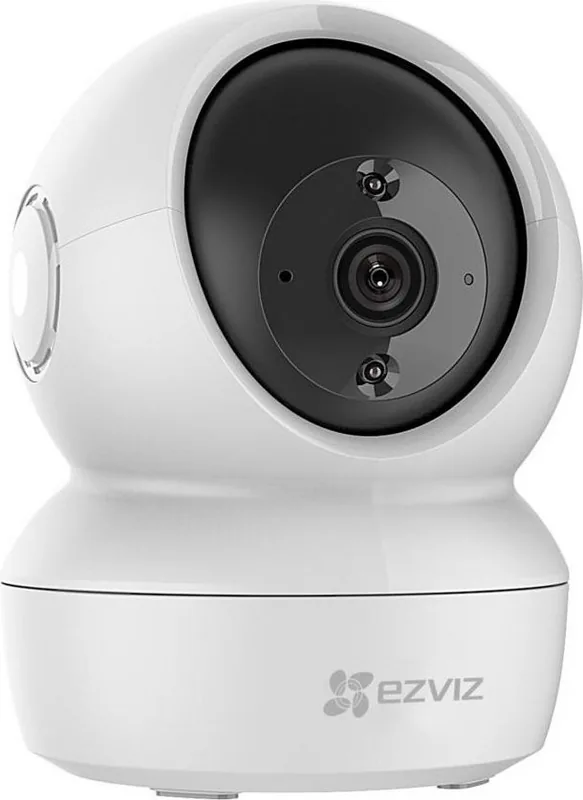
Ezviz C6N Manual
PDF manual · 121 Pages
English



Quick check
Incorrect answer, please try again.
Chat with your Ezviz C6N manual using AI
Get instant AI answers from your Ezviz C6N manual
Ask anything about the Ezviz C6N. Answers come from this manual, with the pages they are based on.
Ask a Question
Do you recommend C6N?
Yes NoFrequently Asked Questions
Connect your mobile phone to a 2.4GHz Wi-Fi network. Download the EZVIZ app and create an account. Scan the QR code on the camera to add the device. Follow the app wizard to finish the configuration.
Is this answer helpful?
No, the Micro SD card is sold separately. You must insert it into the slot and initialize it using the storage status option in the application before it can record video or images.
Is this answer helpful?
The product is warranted for a period of two years from the date of purchase against defects in materials and workmanship for the original purchaser.
Is this answer helpful?
Solid red means starting up. Slow flashing red is Wi-Fi failure. Fast flashing red is camera exception. Fast flashing blue is ready for connection. Slow flashing blue means running properly.
Is this answer helpful?
Hold the reset button for five seconds. This will restart the camera and set all parameters to default values immediately.
Is this answer helpful?
Yes, provided the structure is strong enough. Ensure the ceiling can support three times the weight of the camera to prevent accidents during installation.
Is this answer helpful?
You can contact customer service via telephone or email for technical inquiries related to your product and account management.
Is this answer helpful?
Advantages and Disadvantages
Advantages

- Two year warranty for original purchasers providing peace of mind against defects.
- App integration allows remote monitoring and control via smartphones worldwide.
- Local storage option supports Micro SD cards for continuous recording locally.
- Two-way audio communication through built-in microphone and speaker system.
- PTZ functionality enables remote adjustment of viewing angles for better coverage.
Disadvantages

- Device requires connection to a 2.4GHz Wi-Fi network only for operation.
- Micro SD card is sold separately and must be initialized before use.
- Ceiling installation requires mounting surface to hold three times the camera weight.
- External power adapter is necessary as there is no internal battery backup.
- Drill template used for mounting is only suitable for cement walls specifically.
Product Specification
Type
PTZ
Image Sensor
1/4" CMOS 2.0 MP
Resolution
1920x1080 Pixels (15fps)
Lens
0.16 inches (F2.4)
Light Sensitivity
0 Lux (IR)
Field of View
75 deg (horizontal), 45 deg (vertical), 85 deg (diagonal)
Pan
340 deg (motorized)
Tilt
55 deg (motorized)
Compression/Codecs
H.264
Ports
1x RJ-45 100Mbps LAN
Wireless
Wi-Fi 4 (WLAN 802.11b/g/n)
Data Storage
1x microSD Slot (max. 256GB)
Microphone
Integrated
Speaker
Integrated
Lighting
IR Lighting (32.81 ft)
System Control & Operation
Mobile App (Android, iOS)
Zone & Analysis Functions
Motion Detection, IR Filter
Product Description
Introduction to Advanced Home Security
Home security systems have evolved significantly to meet modern safety needs across the globe. The Ezviz C6N PTZ Wireless Cam provides robust monitoring capabilities for residential properties and small businesses alike. Installation requires careful planning to ensure stability and proper viewing angles for maximum coverage. Users are encouraged to read the Ezviz C6N PTZ Wireless Cam Manual thoroughly before connecting hardware components or power sources. Detailed steps guide the process from unpacking to final configuration without confusion. This guidance prevents common setup errors that might cause connectivity issues later.
Features and Capabilities
This device offers versatile movement control allowing users to adjust the viewing angle remotely via mobile apps. Audio features include a built-in microphone and speaker for clear two-way communication during events. Video feeds can be stored on a local Micro SD card which expands storage capacity significantly depending on size. Application integration enables easy management through iPhones or Androids worldwide in real time. Status lights indicate connection health and power states clearly using color codes. Night vision capabilities ensure visibility in low light conditions effectively. The included drill template aids precise mounting on cement walls only. Software wizards streamline the registration process for new accounts automatically.
Setup and Installation
Network configuration relies on a 2.4GHz Wi-Fi connection for optimal data transfer speeds and stability. Scanning the QR code simplifies the adding process within the dedicated software environment quickly. Ceiling mounting must support three times the device weight to prevent accidents or falls down. Power adapters must be plugged into stable outlets to avoid voltage fluctuations affecting operation. Reset buttons allow restoring default settings if connection errors persist or network changes occur.
Warranty and Support
Customers receive a two-year warranty covering manufacturing defects and material failures from the purchase date. Original purchasers retain rights to repair or replacement services under specific legal conditions defined locally. Technical support is available for troubleshooting connectivity or account management issues efficiently. Firmware updates may be required periodically to maintain security standards against cyber threats. Customer care channels provide assistance via telephone or email for registered users globally.
Safety and Compliance
Safety regulations are strictly followed during manufacturing to meet FCC and CE standards. The use of the product follows local laws regarding surveillance and data protection requirements everywhere. Environmental guidelines suggest proper disposal of electronic components to reduce landfill waste responsibly. Temperature tolerance ensures reliable operation during seasonal changes without overheating risks inside the unit. Regular maintenance keeps the lens clean to avoid obstructed footage over extended periods.
Conclusion
Proper usage ensures long-lasting performance and reliable surveillance coverage every single day. Adhering to regulatory guidelines guarantees legal compliance in various jurisdictions around the world. Responsible disposal of electronic waste follows recommended environmental practices worldwide to protect nature. Experience peace of mind knowing your property is under constant digital protection and monitoring.
Search for 67,706 Manuals online


Type-in Brand or Model