

Ezviz C6CN Manual
PDF manual · 118 Pages
English



Quick check
Incorrect answer, please try again.
Chat with your Ezviz C6CN manual using AI
Get instant AI answers from your Ezviz C6CN manual
Ask anything about the Ezviz C6CN. Answers come from this manual, with the pages they are based on.
Ask a Question
Do you recommend C6CN?
Yes NoFrequently Asked Questions
If the camera fails to connect to Wi-Fi or you need to switch networks, press and hold the Reset button for 5 seconds. The device will reboot, and you can then repeat the setup process in the EZVIZ app.
Is this answer helpful?
The Ezviz C6CN supports microSD cards up to a maximum capacity of 128GB. It is recommended to use Class 10 cards for optimal performance and reliable video recording.
Is this answer helpful?
This manual describes indoor mounting procedures. While the camera can be mounted on walls or ceilings, it is primarily designed for indoor use. Ensure the environment is within the specified temperature range for operation.
Is this answer helpful?
A fast-flashing red light indicates a device exception, such as a MicroSD card error or a critical system fault. Check your card insertion or try resetting the device to resolve the issue.
Is this answer helpful?
No, the Ezviz C6CN PTZ Wireless Cam only supports 2.4GHz Wi-Fi networks. If your router broadcasts both bands, you may need to disable the 5GHz band temporarily during setup.
Is this answer helpful?
Open the EZVIZ app, go to Camera Settings, tap Change Password, then Edit. Enter the verification code found on the camera label, and create a new password between 6 and 12 characters long.
Is this answer helpful?
Advantages and Disadvantages
Advantages

- 360-degree horizontal panning and wide vertical tilt range for full coverage
- Easy setup process via the EZVIZ mobile app with QR code scanning
- Supports local storage with microSD cards up to 128GB for offline recording
- Image encryption feature available to protect video privacy during transmission
- Includes complete mounting kit with drill template and screws for flexible installation
Disadvantages

- MicroSD card is not included in the box contents
- Camera only supports 2.4GHz Wi-Fi networks and cannot connect to 5GHz
- Requires a strong wall or ceiling capable of holding three times the camera weight
- LED indicators may be confusing initially until familiarized with the manual
- Setup requires a stable internet connection and active smartphone during configuration
Product Specification
Type
PTZ
Image sensor
1/2.9" CMOS 2.0 MP
Resolution
1920x1080 pixels (30fps)
Lens
4.0mm (F2.2)
Low light sensitivity
0 Lux (IR)
Pan
340° (motorized)
Tilt
120° (motorized)
Compression/Codecs
H.264
Connections
1x RJ-45 100Mb LAN
Wireless
Wi-Fi 4 (WLAN 802.11b/g/n)
Data storage
1x microSD slot (max. 256GB)
Microphone
integrated
Speaker
integrated
Lighting
IR lighting (32.8ft)
System control & operation
Mobile app (Android, iOS)
Zone & analysis functions
Motion detection, IR filter
Product Description
Ezviz C6CN PTZ Wireless Cam Manual: Your Ultimate Guide to Smart Security
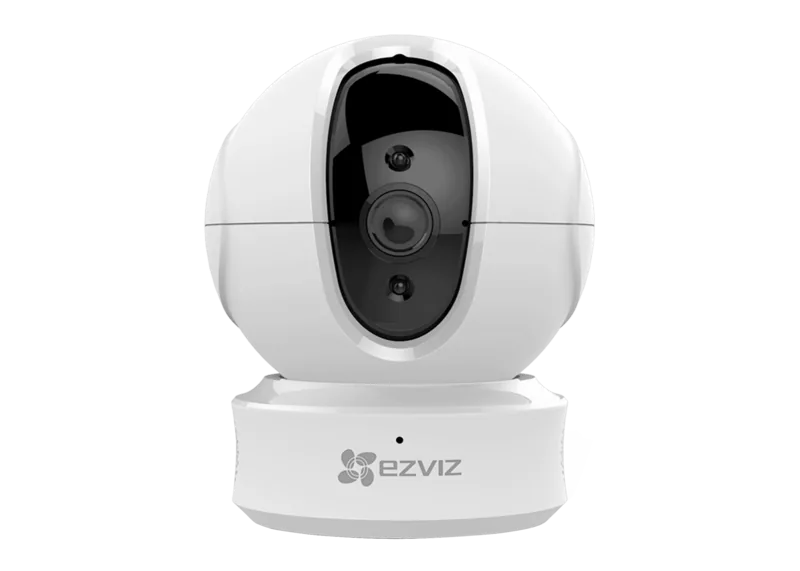
The Ezviz C6CN PTZ Wireless Cam is a versatile security solution designed to keep your home or office safe with advanced motion tracking and crystal-clear video. This device offers seamless integration with the EZVIZ app, allowing users to monitor their property from anywhere in the world via smartphone or tablet. The camera features a 360-degree horizontal pan and a vertical tilt range that ensures comprehensive coverage of any room without blind spots.
Setting up the Ezviz C6CN is straightforward for tech enthusiasts and beginners alike. After powering on the unit, users simply download the EZVIZ application, create an account, and scan the QR code located on the camera. The process guides you through connecting the device to your 2.4GHz Wi-Fi network. Once connected, the LED indicators provide clear visual feedback on the status of your connection, ranging from solid red during startup to flashing blue when ready for setup.
One of the standout features of this manual is its focus on user customization. You can adjust the viewing angle precisely using the app to capture the perfect shot. For those concerned about privacy and data security, the camera supports image encryption during transmission, ensuring your footage remains private. Additionally, the device includes a microSD card slot for local storage, supporting cards up to 128GB, which allows for continuous recording even if internet access is temporarily lost.
Installation options are flexible, with mounting kits included for both wall and ceiling installations. The package contains all necessary hardware, including screws, a drill template, and a power adapter. It is important to ensure the mounting surface is sturdy enough to support the weight of the camera and bracket. Users should also avoid placing the camera near reflective surfaces like mirrors to prevent glare issues.
This guide covers everything from initial power-on steps to managing SD card storage and resetting the device if connectivity issues arise. By following these instructions, you can maximize the performance and longevity of your Ezviz C6CN PTZ Wireless Cam.
Search for 67,732 Manuals online


Type-in Brand or Model