
Ezviz BM1 Manual
PDF manual · 15 Pages
English



Quick check
Incorrect answer, please try again.
Chat with your Ezviz BM1 manual using AI
Get instant AI answers from your Ezviz BM1 manual
Ask anything about the Ezviz BM1. Answers come from this manual, with the pages they are based on.
Ask a Question
Do you recommend BM1?
Yes NoFrequently Asked Questions
If the camera is powered on but disconnects from the Internet, local recording will continue but cloud recording will stop. If the camera is powered off, both video recordings will stop immediately.
Is this answer helpful?
Try to set the alarm sensitivity lower. Please notice that vehicle and animals are also trigger sources that might activate the alarm unintentionally.
Is this answer helpful?
Try to set the alarm sensitivity higher. Make sure that there is someone in the detection area, and the PIR detection distance is 7 meters when the detection sensitivity is set to 100.
Is this answer helpful?
Check whether the camera has run out of battery by pressing the power button. If so, charge the camera immediately. If the indicator still cannot turn on, check the settings page to ensure it is not disabled.
Is this answer helpful?
No, the device is not waterproof and should be installed indoors. Installing it outside may damage the unit and void any protections associated with exposure to elements.
Is this answer helpful?
Link your EZVIZ devices in the Alexa app under Skills and Games. Enable the EZVIZ skill, sign in, and allow Alexa to access your account to discover devices.
Is this answer helpful?
No, the battery of this device is non-removable which is risky to remove internally. It requires charging via the power port on the back of the camera unit.
Is this answer helpful?
Advantages and Disadvantages
Advantages

- Intelligent PIR detection for motion alerts
- Seamless integration with Alexa and Google Assistant
- Flexible Micro SD card and cloud storage options
- Easy setup process via EZVIZ mobile application
- Long-lasting rechargeable battery for portability
Disadvantages

- Indoor use only, device is not waterproof
- Micro SD card not included in the package
- Installation height limited to avoid injury risks
- Requires app for initial configuration and management
- Video encryption settings must be adjusted for smart voice commands
Product Specification
Operation Mode
Battery (2.0 Ah)
Transmission
digital, WiFi
Frequency Band
2400-2483.5 MHz
Display
via App Control
Features
Alarm Function, Sound Sensor, Motion Sensor, Infrared Night Vision, Card Reader (microSD), Voice Control (Amazon Alexa)
Package Contents
Power Adapter
Product Description
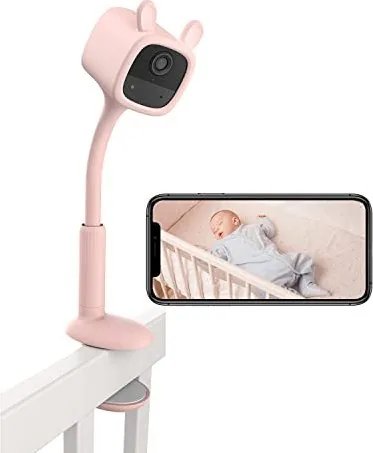
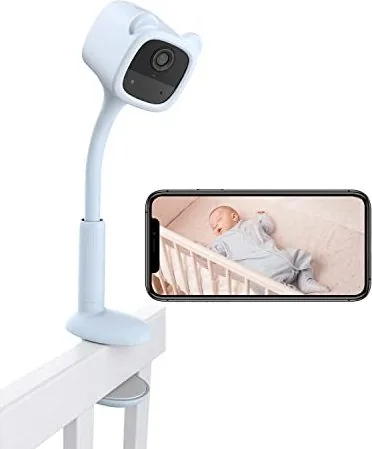
Discover Peace of Mind with the Ezviz BM1 Baby Camera
Keeping watch over your little one has never been easier or more secure. The Ezviz BM1 Baby Camera offers cutting-edge monitoring solutions designed specifically for modern parents who prioritize safety and connectivity. Whether you are at work or just in another room, this device ensures you stay connected to your child with crystal clear visibility and reliable alerts. Parents appreciate the simplicity of the interface combined with robust features that protect their family. Setting up your new monitoring system is straightforward. The camera integrates seamlessly with the EZVIZ app, allowing you to manage everything from a single device. You can check battery levels, adjust video settings, and review recordings instantly.
Key Features That Stand Out
One of the standout aspects of this system is its intelligent detection capabilities. The camera utilizes PIR technology to detect movement and notify you through the app. You can customize sensitivity levels to avoid false alarms caused by shadows or minor movements. Additionally, the device supports local storage via Micro SD cards or cloud storage subscriptions, giving you flexibility in how you preserve precious memories. The battery life is significant, ensuring you do not have to constantly hunt for a power outlet during outings. Smart home integration is another major benefit. You can link your device to Amazon Alexa or Google Assistant for hands-free control. This means you can request a live view using voice commands, fitting smoothly into your daily routine. The audio feature allows you to talk and listen, providing comfort to your baby even when you are not physically present. Video quality can be adjusted to Ultra HD or Standard depending on your bandwidth needs.
Important Setup Notes
For the best experience, ensure the camera is fully charged before the initial setup. The LED indicator guides you through the process, flashing blue when ready for Wi-Fi configuration. When connecting to the network, make sure video encryption is managed carefully if you plan to use voice assistants as some features require audio to be enabled. Regular firmware updates will keep your security features current and improve performance over time. Always place the device in areas where privacy expectations are met to comply with local regulations. Handling the silicone shell requires care to avoid unnecessary strain on the device body during cleaning or installation. Security and privacy are paramount with any digital device. The Ezviz BM1 Baby Camera Manual highlights the importance of setting strong passwords and keeping software updated. Users are encouraged to use unique network environments to prevent unauthorized access. This ensures that only family members with the correct credentials can view the video feed. The device is designed for indoor use, providing protection from the elements while keeping the camera safe. Installation steps should be followed strictly to maintain warranty validity and ensure stable operation. Proper power supply usage is essential for longevity. Additional maintenance tips include checking the lens regularly for dust accumulation. Keep the device away from direct sunlight to prevent overheating. Temperature sensitivity is crucial, so do not charge the camera when the ambient temperature exceeds 45 degrees or drops below 0. These precautions protect the internal battery health and ensure consistent video quality throughout the day. If issues arise, the support team offers technical assistance for network configuration. Remember to initialize any new storage media within the application settings to avoid data loss. This comprehensive guide helps you understand the full potential of your monitoring device.
Search for 67,732 Manuals online


Type-in Brand or Model