
EVGA Z20 Manual
PDF manual · 14 Pages
English



Quick check
Incorrect answer, please try again.
Chat with your EVGA Z20 manual using AI
Get instant AI answers from your EVGA Z20 manual
Ask anything about the EVGA Z20. Answers come from this manual, with the pages they are based on.
Ask a Question
Do you recommend Z20?
Yes No
vero85
7 months ago
Does the included font style look professional, or is it too flashy for general use?
Frequently Asked Questions
Press FN and ALT simultaneously to start recording. Wait for the CAPS LOCK light to turn on, type your sequence, then press FN and ALT again to stop. Finally, assign the macro to one of the E-keys.
Is this answer helpful?
The EVGA Z20 uses LK Light Strike DARK GREY Linear switches. These provide a smooth keystroke without a bump, designed for rapid actuation and reduced finger fatigue during extended gaming.
Is this answer helpful?
Yes, basic typing and media functions work out of the box. However, features like RGB customization, macro programming, and profile switching require the EVGA Unleash RGB software.
Is this answer helpful?
Yes, the Z20 features a Magnetic Approach Palm Rest that snaps securely onto the keyboard for comfort but can be removed quickly when storage or transport is needed.
Is this answer helpful?
Absolutely. The keyboard includes both a USB 2.0 passthrough port and a USB passthrough connector, allowing you to connect devices like mice or headsets directly to the keyboard.
Is this answer helpful?
This is an EVGA proprietary technology that measures the time it takes for a signal to travel, resulting in faster input latency and more accurate detection of key presses compared to traditional methods.
Is this answer helpful?
Advantages and Disadvantages
Advantages

- Magnetic approach palm rest offers superior ergonomics and easy removal
- Time-of-Flight sensing system ensures ultra-fast key registration
- Dedicated media controls and volume wheel provide convenient access
- USB 2.0 passthrough ports simplify peripheral connectivity
- EVGA Unleash software allows extensive RGB lighting customization
Disadvantages

- Requires software installation for full functionality and macro setup
- Linear switches may lack tactile feedback preferred by some typists
- Palm rest is sold as an included accessory but adds bulk to the box
- No wireless capability limits placement flexibility near the PC
- Cable management could be improved with detachable connectors
Product Specification
Layout
DE
Type
mechanical-optical
Switch Name
A4Tech Bloody LK Light Strike DARK GREY Linear
Lighting
RGB, each key individually
Keycap Level
raised, frameless
Keycap Format
regular
Keycap Dome
concave
Numpad
Standard
Cursor Block
Standard
Control Keys
Standard
Enter Key
Standard
Delete Key
Standard
Status Indicator
Capslock (Lock Key), Num (Num Lock Key), Scroll (Scroll Key), Game Mode
Wrist Rest
modular (padded, magnetic)
Case
Plastic
Case Color
solid, black
Keycap Finish
ABS, solid, black (9 additional Double-Shot keycaps)
Key Legend
solid, white (translucent)
Connection
wired (6.56ft), USB-A 2.0
Power Supply
USB
Dimensions (WxDxH)
18.58x1.50x5.94in
Weight
2.49lbs
Features
9 Multimedia keys (5 programmable), 1 Volume Roller (Scroll wheel, top right), Anti-Ghosting (N-Key Rollover), 9 additional keycaps included, USB Hub (1x USB-A 2.0), FN Key, 1x 3.5mm Jack, Proximity Sensor (ToF)
Switch Manufacturer
A4Tech Bloody
Switch Module
Light Strike
Switch Model
DARK GREY Linear
Actuation Characteristic
linear
Contact Feedback
none
Damping
none
Actuation Force
45.00cN ~ 45.89gf
Key Travel
3.00mm
Pre-Travel Point Force
N/A
Pre-Travel Distance
1.50mm
Lifespan
100 million
Note
additional keycaps: "4D Bump" Double-Shot
Product Description
Experience Precision with the EVGA Z20 Elite Gaming Keyboard
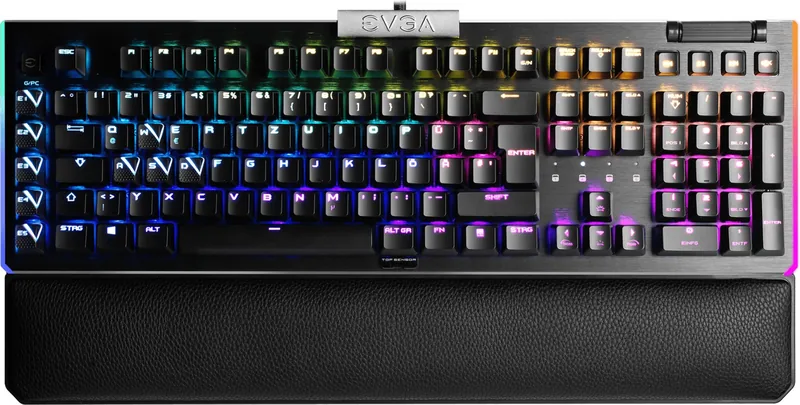
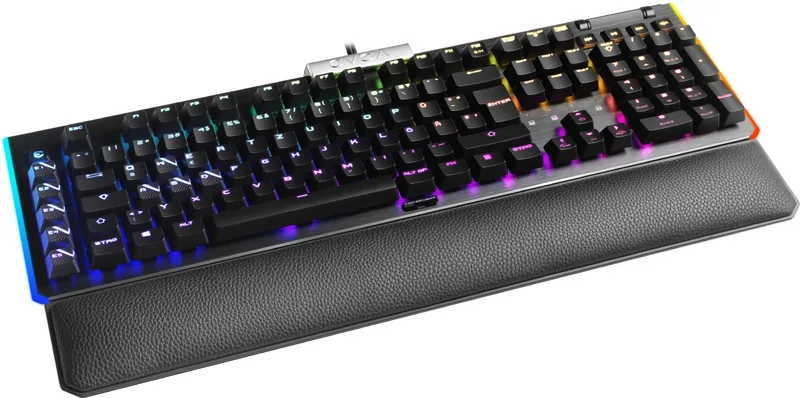
The EVGA Z20 Elite Gaming Keyboard redefines mechanical performance for serious gamers. Featuring a sleek black design, this keyboard integrates advanced RGB LED lighting systems that allow users to customize every aspect of their setup. The standout feature is the LK Light Strike DARK GREY Linear switch technology, which offers smooth keystrokes and rapid response times essential for competitive play.
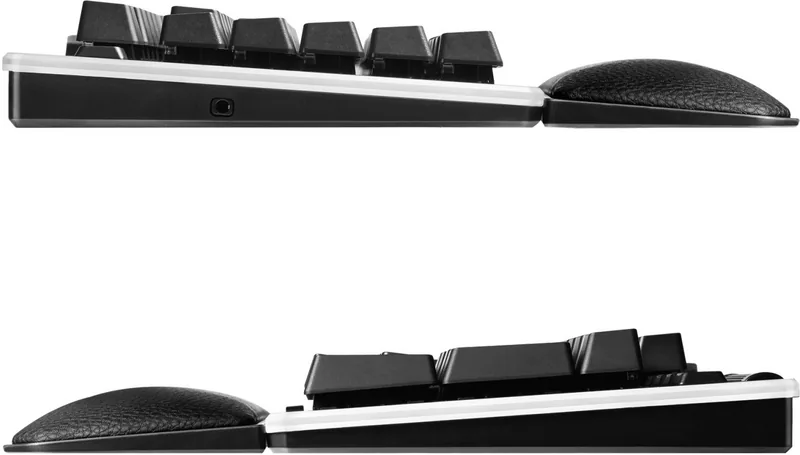
One of the most innovative aspects of the Z20 is the Magnetic Approach Palm Rest. This accessory attaches effortlessly via strong magnets, providing ergonomic comfort during long gaming sessions while remaining easily removable when not needed. The keyboard also utilizes EVGA's proprietary Time-of-Flight Sensing System, ensuring that key presses are registered instantly without delay or ghosting issues.
Connectivity is seamless with the built-in USB passthrough ports, allowing you to connect additional peripherals directly through the keyboard. A dedicated 3.5mm audio jack simplifies headset connections, keeping your desk organized. The EVGA Unleash RGB Software provides deep customization options for the light bar and individual keys, letting you create unique profiles for different games or applications.
Setting up the Z20 is straightforward. Simply connect the USB cable to your PC and install the software. Once active, you can utilize programmable macro keys by pressing FN plus ALT to start recording. The CAPS LOCK indicator confirms when recording begins and ends. You can save these macros to specific keys ranging from E1 to E5 for quick access during intense gameplay.
The keyboard includes dedicated media buttons and volume controls, giving you instant command over your audio experience without leaving your game. With N-Key Roll Over support, every key press is accurately captured even when multiple keys are pressed simultaneously. Whether you are streaming, coding, or competing in tournaments, the EVGA Z20 delivers reliability and style.
Key Features
- Magnetic palm rest for comfort
- Fast linear switches for speed
- Advanced RGB customization
- Integrated audio and USB hubs
Important Notes
Always check local regulations for electronic waste disposal. Ensure your PC drivers are updated for optimal software performance.
Search for 67,706 Manuals online


Type-in Brand or Model
Selina Heathcote
6 months ago
Is this keyboard quiet enough for office use, and how does the linear switch feel compared to clicky ones?
Manual.ly
6 months ago
Thank you for your inquiry. The Bloody Z20 features fast linear switches that are not silent; they produce a moderate noise level typical of gaming keyboards. While excellent for responsive gaming, they may be too loud for a quiet office environment. Additionally, the actuation point is very short (1mm), which feels extremely fast but can lead to accidental key presses if you rest your fingers on the keys. For users preferring tactile feedback or quieter operation, a clicky or tactile switch model might be more suitable.