
EVGA SuperNOVA P3 Series Manual
PDF manual · 28 Pages
English



Quick check
Incorrect answer, please try again.
Chat with your EVGA SuperNOVA P3 Series manual using AI
Get instant AI answers from your EVGA SuperNOVA P3 Series manual
Ask anything about the EVGA SuperNOVA P3 Series. Answers come from this manual, with the pages they are based on.
Ask a Question
Do you recommend SuperNOVA P3 Series?
Yes NoFrequently Asked Questions
The ECO Thermal Control System allows the fan to stop spinning during low to moderate loads, reducing noise and extending fan life. It automatically restarts the fan when the power draw increases, ensuring proper cooling only when needed.
Is this answer helpful?
Most motherboards only require one 4+4 or 8-pin EPS connection. However, if you have a dual-CPU motherboard or plan for extreme overclocking, you should connect the second cable as recommended by your motherboard manufacturer.
Is this answer helpful?
The extra holes are for compatibility with various case designs. You only need four screws to securely mount the power supply to your case chassis.
Is this answer helpful?
EVGA strongly recommends using direct connections from the power supply to all components. Adapters can introduce resistance and potential points of failure, so they should only be used if absolutely necessary.
Is this answer helpful?
Always check the labels on the cables. The ends connecting to the PSU are distinct and often have different pin configurations (like 8-pin vs 4+4) compared to the component side. Connect the labeled PSU side directly to the unit.
Is this answer helpful?
It includes Over Voltage Protection (OVP), Under Voltage Protection (UVP), Over Power Protection (OPP), Short Circuit Protection (SCP), Over Current Protection (OCP), and Over Temperature Protection (OTP) to safeguard your entire system.
Is this answer helpful?
Advantages and Disadvantages
Advantages

- 80 PLUS Platinum certification for up to 94% efficiency
- 100% Japanese capacitors rated at 105°C for maximum reliability
- ECO Thermal Control System enables silent operation with No Fan Spin mode
- Comprehensive protection suite including OVP, UVP, SCP, OPP, OCP, and OTP
- Industry-leading 10-year warranty coverage
Disadvantages

- Modular design may require purchasing additional cables for specific setups not included in the box
- Firmware updates or BIOS adjustments may be needed for optimal compatibility with some motherboards
- Higher price point compared to standard Bronze or Silver certified units
Product Specification
Fan
135mm, semi-passive
Cable management
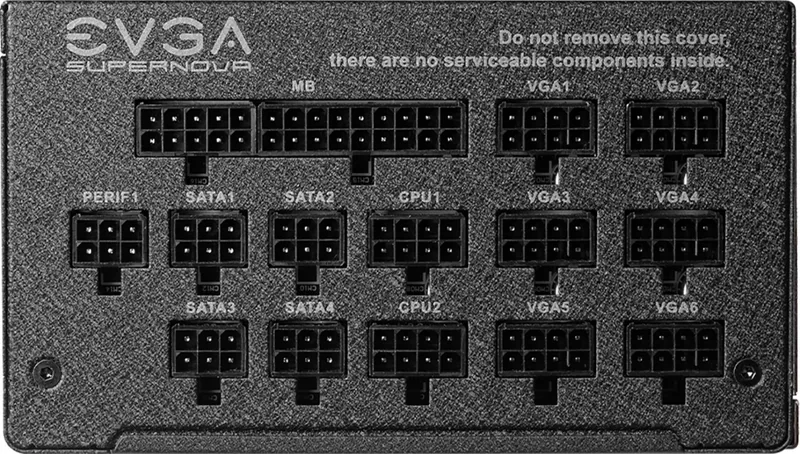
fully modular
Average efficiency
92% (per manufacturer, 115V), 94% (per manufacturer, 230V)
Certificates per manufacturer
80 PLUS Platinum (per manufacturer, 115V)
Dimensions (WxDxH)
5.91x3.39x7.09 inches
Manufacturer warranty
10 years (INFO)
+3.3V
25A
+5V
25A
-12V
0.5A
+5Vsb
3A
Number of 12V rails
1
PFC
active
Form factor
ATX PS/2
Specification
ATX
Features
ErP Lot 6, switchable semi-passive mode
Color
black
Product Description
EVGA SuperNOVA P3 ATX: Premium Power for High-Performance Systems
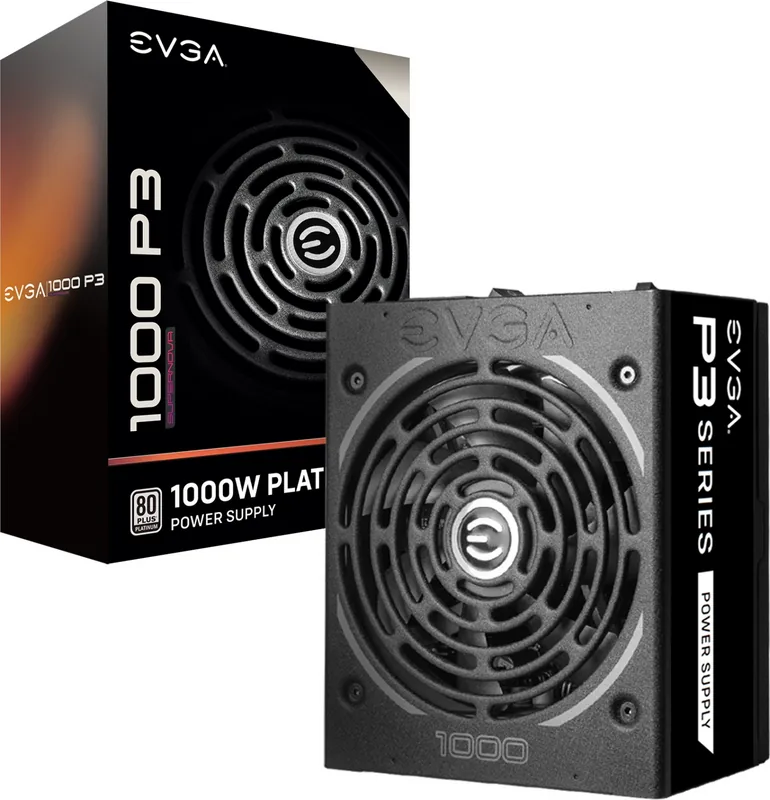
The EVGA SuperNOVA P3 series represents the pinnacle of power supply engineering, designed specifically for enthusiasts and professionals who demand absolute reliability. Featuring 80 PLUS Platinum certification, these units deliver exceptional efficiency with up to 94% power conversion rates at 230V input. This high level of efficiency not only reduces electricity costs but also minimizes heat generation, ensuring a cooler and quieter system environment.
Built with top-tier components, every unit in the P3 series utilizes 100% Japanese capacitors rated for 105 degrees Celsius, guaranteeing long-term stability even under extreme loads. The internal layout has been optimized to improve airflow, while the Variable Resistor module ensures ultra-stable voltage output, which is crucial for achieving safe overclocks on your CPU and GPU. The modular design allows users to connect only the cables they need, significantly reducing clutter inside the case and improving overall air circulation.
Noise reduction is a key focus of the P3 design. It features an ultra-quiet 135mm Fluid Dynamic Bearing fan that operates silently during low-load scenarios thanks to the ECO Intelligent Thermal Control System. This feature includes a "No Fan Spin" mode that completely stops the fan when power demands are low, eliminating noise entirely until cooling becomes necessary. When the load increases, the fan ramps up automatically to maintain optimal temperatures without audible disruption.
Safety is paramount with the SuperNOVA P3. It comes equipped with a comprehensive suite of protections including Over Voltage Protection (OVP), Under Voltage Protection (UVP), Short Circuit Protection (SCP), Over Current Protection (OCP), and Over Temperature Protection (OTP). These safeguards protect your expensive hardware from power surges and electrical faults. Furthermore, EVGA backs this product with an industry-leading 10-year warranty, demonstrating their confidence in the build quality and longevity of the unit.
Whether you are building a high-end gaming rig or a workstation for intensive rendering tasks, the EVGA SuperNOVA P3 provides the stable, clean, and efficient power foundation required for peak performance. Its robust construction and advanced thermal management make it a standout choice for modern PC builds.
Key Installation Notes
- Install the PSU with the fan facing down if possible for better intake.
- If the case bottom lacks ventilation holes, install the fan facing up.
- Always use direct cables from the PSU; avoid adapters for critical components like GPUs.
- Ensure all modular connectors are fully seated to prevent connection issues.
Search for 67,706 Manuals online


Type-in Brand or Model