
Eurochron EFWU Jumbo 102 Manual
PDF manual · 12 Pages
English



Quick check
Incorrect answer, please try again.
Chat with your Eurochron EFWU Jumbo 102 manual using AI
Get instant AI answers from your Eurochron EFWU Jumbo 102 manual
Ask anything about the Eurochron EFWU Jumbo 102. Answers come from this manual, with the pages they are based on.
EFWU Jumbo 102 Maintenance Schedule
Always remove the batteries from the product before starting any cleaning process.
Replace base station batteries when display contrast fades or sensor batteries when a battery symbol appears.
Ask a Question
Do you recommend EFWU Jumbo 102?
Yes NoFrequently Asked Questions
The device captures the DCF radio signal transmitted from atomic clocks. Once received, the clock automatically sets the correct time and date. This happens nightly at 3 am. The process takes about five minutes and requires the device to remain stationary.
Is this answer helpful?
The base station typically lasts about two years using four AA batteries. The outdoor sensor uses two AAA batteries and may require replacement annually depending on usage conditions. Using alkaline batteries ensures maximum longevity.
Is this answer helpful?
Yes, the sensor is designed for outdoor use but must be placed in a protected area. Avoid direct sunlight or rain which can cause inaccurate readings. Never submerge the sensor in water as it will cause damage.
Is this answer helpful?
Try relocating the clock near a window away from electronic interference. Wait overnight for better atmospheric conditions. You can also manually restart the reception by pressing and holding specific buttons as per the manual.
Is this answer helpful?
Yes, the device allows you to set upper and lower temperature thresholds. If the outdoor temperature exceeds these limits, an audible alarm sounds. You can switch the alarm on or off using the alert button.
Is this answer helpful?
Yes, both units are supported. You can toggle between Celsius and Fahrenheit on the base station display using the mode button to change the setting based on your preference.
Is this answer helpful?
Place the base station indoors where signal reception is strong. Keep the outdoor sensor away from heat sources like radiators. Mounting near a window often improves the chance of receiving the time signal successfully.
Is this answer helpful?
Advantages and Disadvantages
Advantages

- Automatically synchronizes with atomic clock time via DCF signal
- Displays both indoor and outdoor temperatures simultaneously
- Adjustable alarm function with snooze and temperature alerts
- Easy wall mounting with built-in suspension eyes and stand
- No manual time setting required for Daylight Saving Time changes
Disadvantages

- Battery operated with no alternative power supply option
- Outdoor sensor must be protected from moisture and direct sun
- Signal reception may be affected by large metal surfaces
- Not suitable for installation inside or near medical equipment
- Requires specific battery types for optimal performance
Product Specification
Display
digital
Case Diameter
14.57 in
Color
silver
Features
Date, Day, Month, Thermometer
Special Features
Radio
Product Description
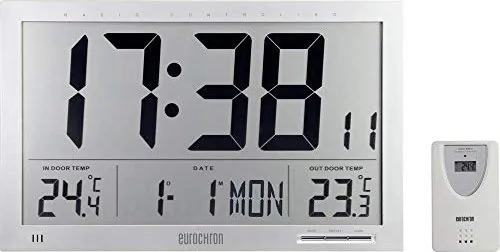
Advanced Timekeeping with the Eurochron EFWU Jumbo 102
The Eurochron EFWU Jumbo 102 represents a premium solution for accurate timekeeping in modern environments. Consult the Eurochron EFWU Jumbo 102 Manual for detailed setup instructions to maximize performance. This radio controlled wall clock utilizes DCF signals from atomic clocks in Braunschweig to synchronize automatically. There is no need for manual adjustments regarding time zones or daylight saving time transitions. The system features a robust base unit alongside a dedicated wireless outdoor temperature sensor. This combination allows for comprehensive monitoring of environmental conditions.
Display Capabilities and Alerts
The large digital display offers clear visibility of hours, minutes, seconds, and the current date alongside temperature data. Two temperature readings are available simultaneously for indoor and outdoor environments. Users can toggle between Celsius and Fahrenheit units easily through designated buttons on the interface. The built-in alarm system includes configurable snooze functionality for waking schedules or naps. Temperature alerts notify users when outside conditions exceed set safety limits or thresholds. This ensures comfort and safety monitoring throughout the day and night cycles. Reception range can reach two thousand kilometers under ideal conditions.
Power Management and Installation
Battery operation is strict for safety and regulatory compliance for all models. The base station requires four AA cells while the sensor utilizes two AAA cells specifically. Users must observe polarity markings during insertion to prevent damage from incorrect orientation. The outdoor sensor requires careful placement away from direct sunlight to avoid measurement errors in readings. Protection from moisture is essential as water contact can destroy the internal electronics permanently. Ensure batteries are fresh for optimal signal processing during initial operation phases. Wall mounting utilizes suspension eyes for convenience on brick, drywall, or wood surfaces securely.
Troubleshooting and Safety
Interference from electronics like computers can affect signal reception in some rooms. Relocating the unit near a window often improves synchronization success rates during installation phases significantly. If the display shows blank characters, a reset function restores normal operation immediately. Do not use the device in medical facilities due to potential radio signal interference with life support equipment nearby. Proper disposal of batteries is required by environmental regulations for safety. Avoid exposing the device to extreme temperatures or physical impact during shipping or handling.
Conclusion
Investing in this unit guarantees precise time without tedious manual input or constant checks. The durable construction supports long term reliability for years of use. Always refer to documentation for warranty compliance and safety guidelines regarding use. This product delivers peace of mind through automatic synchronization and temperature monitoring. It remains an excellent choice for households seeking hassle free time management solutions today. The user experience is enhanced by the clear layout of the display elements for quick viewing. This ensures satisfaction across different user preferences and needs within the home.
Search for 67,706 Manuals online


Type-in Brand or Model
earum_voluptates
5 months ago
I am concerned about the display quality and sensor range. Is the outdoor sensor rated for -50C and does the time font size meet standard sizing requirements?
Manual.ly
5 months ago
Thank you for your inquiry. The outdoor sensor is rated from -50 to 60 degrees Celsius. Time digit height follows the standard specification for this model size. Display clarity depends on viewing angle and lighting. Please check the included manual for detailed dimensions.