Manual.ly Logo

Enermax Platimax D.F. Manual

0.0 · 0 Ratings

PDF manual · 2 Pages

English

M: QW-35-FL
page

/ 2

Loading...
ee3efa494101795ce6188d1a6aa84350d80a page 1
Jan,2016
KOMPATIBILITÄT
ENERMAX Platimax D.F. PSU Serie ist kompatibel mit:
Intel ATX12V Power Supply Design Guide v2.4 Spezifikation und abwärtskompatibel
mit v2.0, v2.01, v2.2
ATX System Design Guide v2.2, v2.1
BTX / EEB / CEB / EPS12V
Dieses Netzteil unterstützt keine MB`s mit ISA Erweiterungsslots, welche -5V benötigen
könnten. -5V wurde ab Intel ATX12V v1.3 Spezifikation abgeschafft.
Um solche Ausfälle zu vermeiden und um die Lebensdauer Ihres PC’s zu verlängern,
empfehlen wir Ihnen sicherzustellen, dass:
Ihr PC nicht neben einer Heizung oder einer anderen Wärmequelle steht
Ihr PC nicht neben einer magnetischen Quelle steht
Ihr PC nicht in einer feuchten und/oder staubigen und/oder vibrierenden Umgebung
steht
Ihr PC nicht dem direkten Sonnenlicht ausgesetzt ist
Ihr PC ausreichend durch Lüfter gekühlt wird
.
COMPATIBILITY
ENERMAX Platimax D.F. series is compliant with:
Intel ATX12V Power Supply Design Guide v2.4 specification and downward compatible
with v2.0, v2.01 and v2.2
ATX System Design Guide v2.2, v2.1
BTX/ EEB/ CEB/EPS12V
This PSU does not support MB with ISA expansion slot, which might require –5V power. –5V
has been cancelled from Intel ATX12V v1.3 specification onwards.
To avoid failures and to increase lifetime of your entire PC, we suggest you to make sure that:
Your PC is NOT located near a radiator or any other heat producing device
Your PC is NOT located near a magnetic device
Your PC is NOT located in a moist and/or dusty and/or vibrating environment
Your PC is NOT exposed to direct sunshine
Your PC is sufficiently cooled by additional fans
.
2016
2016
2016
2016
2016
COMPATIBILITE
La série ENERMAX Platimax D.F. est compatible avec:
Les spécifications Intel ATX12V Power Supply Design Guide v2.4 et les versions
antérieures v2.0, v2.01 et v2.2
ATX System Design Guide v2.2, v2.1
BTX/ EEB/ CEB/EPS12V
Cette alimentation ne supporte pas les cartes mères avec un slot ISA, qui pourrait demander
une source d’alimentation -5V. Cette dernière a été retirée des spécifications Intel ATX12V
v1.3.
Pour éviter tous problèmes et augmenter la durée de vie de votre PC, nous vous suggérons
de:
Ne pas placer votre PC près d’un radiateur ou de toutes autres sources de chaleur
Ne pas placer votre PC près d’une source magnétique
Ne pas placer votre PC dans une pièce humide, et/ou salle, et/ou un environnement
soumis à des vibrations
Ne pas exposer votre PC à la lumière directe du soleil
Suffisamment refroidir votre PC par l’ajout de ventilateurs supplémentaires si nécessaire
.
COMPATIBILITÀ
La serie ENERMAX Platimax D.F. è conforme con:
Specifiche della Guida alla progettazione di alimentatori Intel ATX12V v2.4 e la con le
precedenti. versioni v2.0, v2.01 e v2.2
Guida alla progettazione del sistema ATX v2.2, v2.1
BTX/ EEB/ CEB/EPS12V
Questo alimentatore non supporta schede madri con slot di espansione ISA, le quali
potrebbero richiedere un’alimentazione da –5V, parametro che è stato cancellato dalle
specifiche Intel ATX12V v1.3 e versioni successive.
Per prolungare la durata del PC le suggeriamo di prestare attenzione a quanto segue:
Il PC NON deve essere posizionato nelle vicinanze di radiatori o a qualsiasi altra fonte di
calore
Il PC NON deve essere posizionato nelle vicinanze di dispositivi magnetici
Il PC NON deve essere posizionato in ambienti polverosi e/o umidi e/o soggetti a vibrazioni
Il PC NON deve essere esposto alla luce diretta del sole
Il PC deve essere raffreddato a sufficienza
.
COMPATIBILIDAD
La serie ENERMAX Platimax D.F. fuente es compatible con:
Intel ATX12V Power Supply Design Guide especificación v2.4 y también con las
versiones v2.2, v2.01 e v2.2
ATX System Design Guide v2.2, v2.1
BTX / EEB / CEB / EPS12V
Si su Mother Board (MB) usa un bus “ISA“, es posible que esta fuente no sea compatible,
porque no tiene una transmisión de -5V, la cual es requerida por algunos equipos de ISA.
La transmisión de -5V fue descontinua para Intel ATX12V v1.3.
Para evitar dichos fallos y maximizar la duración de su sistema, le recomendamos
asegurar, que:
Su Ordenador no esté al lado de una calefacción ni otro objeto irradiando calor
Su Ordenador no esté al lado de un objeto magnético
Su Ordenador no esté en un entorno húmedo ni polvoriento ni vibrando
Su Ordenador no reciba radiación solar directa
Su Ordenador sea refrigerado lo suficiente por parte de los ventiladores
.
Dear customer,
Thank you for choosing this ENERMAX Platimax D.F. power supply unit (PSU)! Please
read this manual carefully and follow its instructions, before installing the PSU.
Sehr geehrte Kundin, sehr geehrter Kunde,
vielen Dank, dass Sie sich für dieses ENERMAX Platimax D.F.-Netzteil (PSU)
entschieden haben! Bitte lesen Sie sich dieses Handbuch sorgfältig durch und folgen Sie
bitte seinen Anweisungen bevor Sie das Netzteil installieren!
Chers clients,
Merci d’avoir choisi l’alimentation ENERMAX Platimax D.F. ! Veuillez lire avec attention
ce manuel avant de procéder à l’installation de l’alimentation.
Estimado cliente:
Muchas gracias por comprar nuestra fuente ENERMAX Platimax D.F.. Le recomendamos,
se familiarice bien con este manu al del usuario.
Gentile cliente,
La ringraziamo per aver acquistato l’unità di alimentazione (PSU) ENERMAX Platimax D.F..
Prima di installare la PSU legga con attenzione questo manuale e segua le istruzioni.
If you plan to put in 2 or more high end, power demanding GPU cards, please choose the motherboard that comes
with extra 4P Molex/ 4P FDD / 6P PCI-E power socket(s) on board and connect them with your power supply. This
will prevent the motherboard from overloading and possibly causing damage to your system including your power
supply. The damage to the motherboard and the power supply caused by failing to do the above instruction will not
be covered under Enermax manufacturer’s warranty. Please refer to your motherboard’s user manual to configure
your system properly to prevent damage to your system and your power supply.
Wenn Sie zwei oder mehr Hochleistungsgrafikkarten in Ihrem System installieren möchten, wählen Sie bitte ein
Mainboard mit zusätzlichen 4-Pin-Molex, 4-Pin-FDD, oder 6-Pin-PCI-Express-Sockeln und verbinden sie diese mit
dem Netzteil. Auf diese Weise verhindern Sie, dass das Mainboard überlastetet wird und andere
Systemkomponenten einschließlich des Netzteils Schaden nehmen. Ein Schaden, der durch Missachtung des
obigen Hinweises am Mainboard oder Netzteil entsteht, wird nicht von der Enermax-Herstellergarantie gedeckt.
Bitte lesen Sie sich auch die die Betriebsanleitung Ihres Mainboards gründlich durch, um das System fachgerecht
einzurichten und Schäden am Netzteil und den anderen Komponenten zu verhindern.
Si vous envisagez de mettre 2 cartes graphiques haut de gamme ou plus, veuillez choisir une carte mère pourvue
de connecteurs supplémentaires 4P Molex / 4P FDD / 6P PCI-E et les brancher aux connecteurs correspondants de
votre alimentation. Cela permettra d'éviter de surcharger la carte mère et éventuellement causer des dommages à
votre système, y compris l'alimentation. Si l’instruction ci-dessus n’est pas respectée, les dommages causés à
l'alimentation ne seront pas couverts dans le cadre de la garantie Enermax. Veuillez vous référer au manuel
d'utilisation de votre carte mère pour configurer correctement votre système et éviter de l'endommager ainsi que
votre alimentation.
Si van a utilizar dos o más tarjetas vídeo de gama alta, escojan una placa base que tenga conectores 4P Molex /
FDD 4P / 6P PCI-E extra y conéctenlos con su fuente de alimentación. Esto evitará que la placa base se
sobrecargue y que por lo tanto cause daños a su sistema y a su fuente de alimentación. Los daños a la placa base
y a la fuente provocados por no haber seguido las instrucciones indicadas no serán cubiertos por la garantía del
fabricante Enermax. Por favor controle con cuidado el manual de usuario de la placa base para configurar
correctamente el sistema y para evitar cualquier daño al sistema y a la fuente de alimentación.
Se avete intenzione di usare due o più schede video di alta gamma, utilizzate una scheda madre che abbia dei
socket 4P Molex/ 4P FDD / 6P PCI-E extra e collegateli con il vostro alimentatore. Ciò eviterà che la scheda madre
si sovraccarichi e provochi di conseguenza dei danni al vostro sistema e al vostro alimentatore. Il danno alla scheda
madre e all’alimentatore causato dalla mancata applicazione delle istruzioni sopra indicate, non sarà coperto dalla
garanzia del fabbricante Enermax. Si prega di controllare attentamente il manuale utente della scheda madre per
configurare in modo corretto il sistema ed evitare ogni danno al sistema e all’alimentatore.
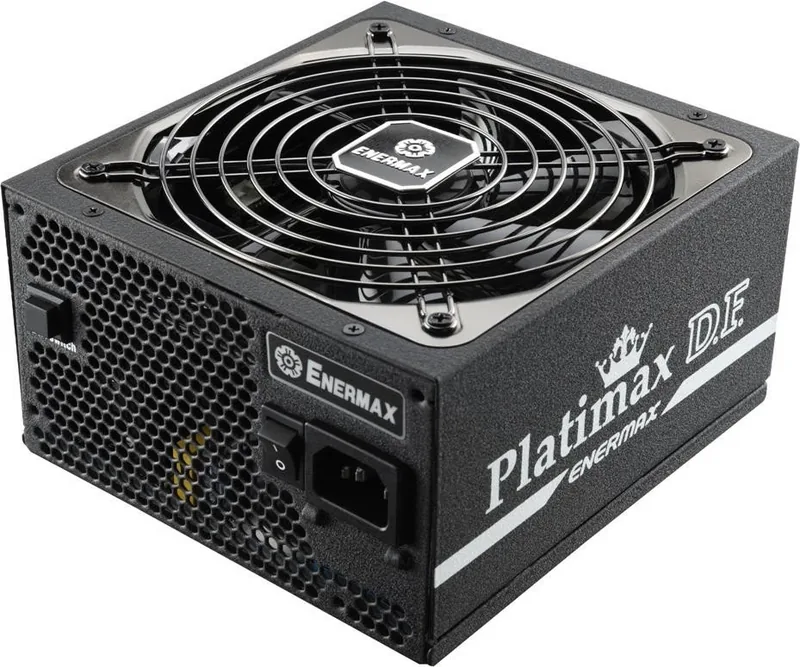
Name of Parts
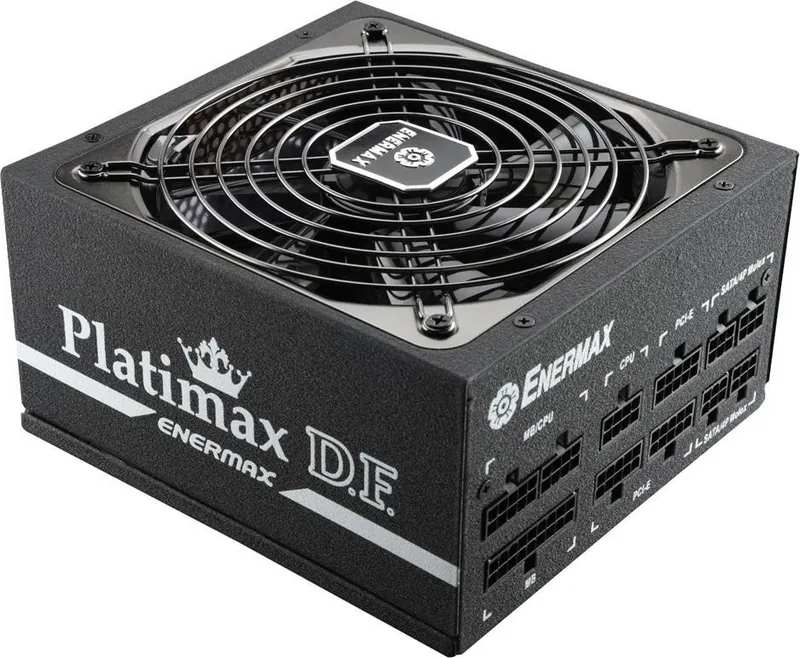
1. Output cable: Please check “Cables &
Connectors” section
2. 13.9cm fan
3. AC inlet*
4. I/O switch*: individual PSU on/off
switch (I= ON, O=OFF)
*When assemble or maintain the system, please
remove AC cord from AC inlet, or turn I/O switch
into “O” position
.
NOMBRES DE PARTES
1. Cable del corriente: Por favor, examine el
párrafo „CABLES Y ENCHUFES“
2. Ventilador de 13.9cm
3. Enchufe de corriente*
4. I/O interruptor*: separado interruptor de la
fuente por En/Paro (I=En, O=Paro)
*Desenchufe siempre el cable de la corriente de la
fuente y apague el interruptor I/O a “O”
manteniendo el sistema.
ELEMENTS PRATIQUES
1. Câble de sortie: Veuillez vérifier les Câbles &
Connecteurs
2. Ventilateur 13.9cm
3. Connecteur AC*
4. Bouton I/O* ( I= ON, O=OFF)
*Lorsque vous assemblez ou réparez votre
système, veuillez débrancher le câble
d’alimentation.
НАИМЕНОВАНИЕ ДЕТАЛЕЙ
1. Выходной кабель. См. раздел «Кабели и
разъемы»
2. 13.9-см вентилятор
3. Гнездо входа переменного тока*
4. Выключатель*: отдельный выключатель БП
(I=Вкл., O=Выкл.)
*При сборке и обслуживании системы
отсоединяйте кабель переменного тока от
гнезда переменного тока или переводите
выключатель в положение «O».
NAZWA CZĘŚCI
1. Kabel wyjścia: Sprawdź część “Kable i połączenia”.
2. Wentylator 13.9 cm.
3. Wejście prądu zmiennego*
4. Przełącznik Włączenie/Wyłączenie*: (I=Włączenie,
O=Wyłączenie).
*Podczas montażu lub konserwacji systemu należy
odłączyć przewód prądu zmiennego od gniazda prądu
zmiennego lub przełączyć włącznik ON/OFF
(Włączenie/Wyłączenie) do pozycji “OFF (Wyłączenie)”.
NOME DELLE PARTI
1. Cavo di uscita: Controllare la sezione
“Cavi e connettori”
2. Ventola da 13.9cm
3. Ingresso CA*
4. Interruttore I/O*: interruttore di
accensione/spegnimento PSU (I=ON,O=OFF)
*Quando si monta o viene eseguita la
manutenzione del sistema, rimuovere il cavo CA
dall’ingresso CA, o portare l’interruttore I/O sulla
posizione “O”.
ชื่อของชิ้นส่วนต่างๆ
1.สายจ่ายไฟ: โปรดตรวจสอบในส่วนของ “สายไฟและขั้วต่อ”
2. ¾Ñ´ÅÁ 13.9cm
3. ช่องรับไฟกระแสสลับ *
4. สวิตช์เปิด/ปิด: (I=เปิด, O=ปิด)
* àÁ×èÍ·‡Ò¹µˆÍ§¡ÒûÃСͺËÃ×͵ÃǨÊͺÃкº ¡ÃسҶʹÊÒ AC
cord ÍÍ¡ ¨Ò¡ AC inlet ËÃ×Í»ÃѺ switch ãˈÍÂه㹵Óá˹‡§ "O"
¡‡Í¹´Óà¹Ô¹¡Ò÷ء¤ÃÑé§
部品名
1. 出力ケーブル:「ケーブルとコネクタ」の項を
参照してください
2. 13.9cmファン
3. AC インレット*
4. I/Oスイッチ*:電源I/O(オン/オフ)スイッチ
(I=ON, O=OFF)
*システムアセンブリまたはメンテナンスを行う場合、ACコー
ドをAC インレットから取り外すまたはI/Oスイッチを“O”位
置(オフ)にする。
外觀結構
1. 輸出線材: 請參閱“線材及連接頭”說明
2. 13.9厘米風扇
3. AC交流電插座*
4. I/O 開關*: 電源供應器獨立開關(I=開, O=關)
*當您要組裝或維護系統時,請將AC電源線從插座中
拔出,或是將I/O開關切換到 “O”檔位置。
*按照
说
明
书进
行安
装
后,
仅
耦合器一面可触及,
其余面均在机箱
内
。
각 부위별 명칭 및 설명
1. 출력 케이블 : ‘케이블 및 커넥터’ 항목
참조
2. 139mm 팬
3. AC 소켓*
4. I/O 스위치* : PSU On/Off 스위치
(I=ON, O=OFF)
* 시스템 조립/유지보수 시 AC 코드를 벽면
소켓에서 분리하거나 I/O스위치를 ‘O’로
설정하십시요.
外觀結構
1. 輸出線材: 請參閱“線材及連接頭"說明
2. 13.9公分風扇
3. AC交流電插座*
4. I/O 開關*: 電源供應器獨立開關
(I=開, O=關)
*當您要組裝或維護系統時,請將AC電源線移除,
或是將I/O開關切換到 “O" 位置。
DETAILBESCHREIBUNG
1. Ausgangskabel: Bitte lesen Sie den
Abschnitt „Anschlüsse“
2. 13.9cm Lüfter
3. Stromeingang *
4. I/O Schalter*: separater Netzteil
An/Aus-Schalter (I=AN, O=AUS)
*Entfernen Sie immer das Stromkabel vom
Netzteil und schalten Sie den I/O-Schalter auf
“O”während Sie am System arbeiten.
24P Mainboard
The serial number label or warranty seal is defaced, modified, or removed.
2016
ﯽﺳﺭﺎﻓ
ﺕﺎﻌﻄﻗ ﻢﺳﺍ
ﻄﻟ : ﻢﻴﻘﺘﺴﻣ ﻲﺟﻭﺮﺧ ﻞﺑﺎﻛ"ﺎﻔ ﺎﻫ ﻂﺑﺍﺭ ﻭ ﻞﺑﺎﻛ ﺶﺨﺑ ﻪﺑ ﻪﻌﺟﺍﺮﻣ ﺪﻴﻨﮐ
ﻦﻓ
.
ﺵﻮﻣﺎﺧ/ﻦﺷﻭﺭ ﺪﻴﻠﮐ
ﻕﺮﺑ یﺩﻭﺭﻭ
.
AC ﺪﻴﻠﻛ ﻭ ﻩﺩﺮﻛ ﺍﺪﺟI/O ﺖﻴﻌﻗﻮﻣ ﻱﻭﺭ ﺍﺭO
. ﺪﻳﺭﺍﺬﮕﺑ
ﻄﻟ ﻢﺘﺴﻴﺳ ﺲﻳﻭﺮﺳ ﻭ ﺮﻴﻤﻌﺗ ﺎﻳ ژﺎﺘﻧﻮﻣ ﻥﺎﻣﺯ ﺭﺩ ﻢﻴﺳ
ً
ﺎﻔAC ﻲﺟﻭﺮﺧ ﺯﺍ ﺍﺭ
*
СОВМЕСТИМОСТЬ
БП серии ENERMAX Platimax D.F. соответствует следующим стандартам:
спецификация «Рекомендации по проектированию блоков питания Intel ATX12V,
версия 2.4» с обратной совместимостью с версиями 2.0, 2.01 и 2.2
Рекомендации по проектированию систем ATX, версия 2.2, версия 2.1
BTX/ EEB/ CEB/EPS12V
Данный БП не поддерживает материнские платы с гнездом расширения ISA, для
которых может потребоваться напряжение -5 В. Напряжение –5 В не применяется,
начиная со спецификации Intel ATX12V, версии 1.3.
Для предотвращения сбоев и продления срока службы всего ПК рекомендуется
выполнить приведенные ниже условия:
ПК НЕ ДОЛЖЕН располагаться рядом с радиатором и иными источниками тепла
ПК НЕ ДОЛЖЕН располагаться с устройствами, генерирующими магнитное поле
ПК НЕ ДОЛЖЕН располагаться в местах с повышенной влажностью, пыльных местах
и в местах, подверженных вибрации
ПК НЕ ДОЛЖЕН подвергаться воздействию прямого солнечного света
ПК должен достаточно охлаждаться дополнительными вентиляторами
.
2016
Уважаемый клиент!
Благодарим вас за выбор данного блока питания ENERMAX Platimax D.F. (БП)!
Перед установкой БП внимательно прочтите настоящее руководство и выполняйте
все приведенные в нем инструкции.
Если Вы планируете использовать две или более высокопроизводительные видеокарты, пожалуйста,
выберите материнскую плату, которая имеет дополнительный 4P Molex / FDD 4P / 6P PCI-E разъем и
подключите его к блоку питания. Это позволит предотвратить перегрузку материнской платы и повреждение
комплектующих, включая блок питания. Гарантия Enermax не действительна в случае повреждения
материнской платы или блока питания из-за несоблюдения инструкции. Пожалуйста, прочитайте описание
материнской платы, чтобы предотвратить повреждение системы или блока питания.
EPF500AWT EPF600AWT
100-240VAC, Active PFC
47-63Hz
16A
15A
41A
0.3A
2.5A
16A
15A
50A
0.3A
2.5A
500W
-40
o
C to +55
o
C
0~40
20% to 85%
10% to 95%
> 0.96 at 230Vac input and full load
One 13.9cm Twister bearing fan, speed auto controlled
600W
10A 10A
103W
492W
3.6W
12.5W
103W
600W
3.6W
12.5W
500W/600W, 1.6 Kg(±50g)
150(W) x 86 (H) x 160 (D)
CE,FCC, BSMI, CCC, C-Tick
Safty & EMC
(Reference only)
160mm
150mm
86mm

Chat with your Enermax Platimax D.F. manual using AI

Get instant AI answers from your Enermax Platimax D.F. manual

Ask anything about the Enermax Platimax D.F.. Answers come from this manual, with the pages they are based on.

Ask a Question

0/1000

Do you recommend Platimax D.F.?

Yes No

Frequently Asked Questions

A

No, this power supply does not support motherboards with ISA expansion slots that require -5V power. The -5V rail was discontinued in the Intel ATX12V v1.3 specification.

Is this answer helpful?

A

Connecting multiple high-end GPUs without using extra 4-pin Molex or 6-pin PCI-E sockets can overload the motherboard. Damage resulting from this misuse is not covered under the Enermax warranty.

Is this answer helpful?

A

You can use the dedicated I/O switch on the unit to turn it off, or simply unplug the AC cord from the AC inlet. Always ensure the power is cut before working inside the system.

Is this answer helpful?

A

Place your PC away from radiators, heat sources, and magnetic devices. Avoid humid, dusty, or vibrating environments and never expose the unit to direct sunlight.

Is this answer helpful?

A

Yes, the unit comes with a 13.9cm Twister bearing fan that features auto-controlled speed to balance cooling performance with noise levels.

Is this answer helpful?

M: QW-35-FL

Advantages and Disadvantages

Advantages

  • Compliant with Intel ATX12V v2.4 and backward compatible with older versions
  • Includes a 13.9cm auto-controlled fan for efficient thermal management
  • Features a dedicated I/O switch for safe power disconnection during maintenance
VS

Disadvantages

  • Does not support legacy ISA expansion slots requiring -5V power rails
  • Warranty does not cover damage caused by improper GPU power distribution
  • Requires careful environmental placement to avoid heat and dust issues
M: QW-35-FL

Product Specification

Fan

140mm, semi-passive

Cable management

fully modular

80 PLUS certificates

80 PLUS Platinum (115V, per 80 PLUS certificate)

Dimensions (WxDxH)

5.91x3.39x6.30 inches

Manufacturer warranty

5 years

-12V

0.3A

PFC

active

Form factor

ATX PS/2

Specification

ATX 2.4

Features

ErP Lot 6, supports Haswell C6/C7 Low-Power States

Color

black

M: QW-35-FL

Product Description

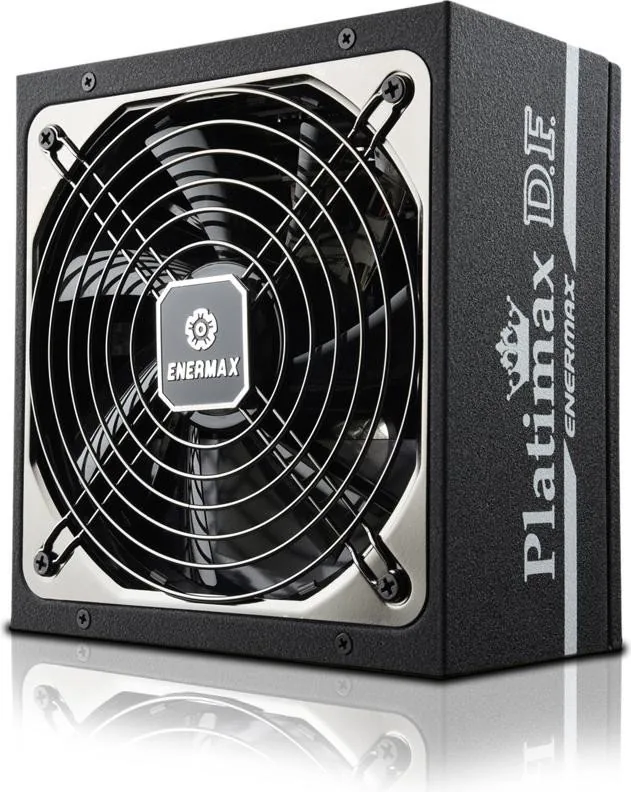
Enermax Platimax D.F. ATX 2.4 Power Supply Overview

The Enermax Platimax D.F. series represents a robust solution for modern PC builds, designed to meet the rigorous demands of high-performance systems. Compliant with the Intel ATX12V Power Supply Design Guide v2.4 specification, this unit ensures backward compatibility with versions 2.0, 2.01, and 2.2. It also supports various system design guides including ATX, BTX, EEB, CEB, and EPS12V standards. This versatility makes it an excellent choice for builders seeking reliability and efficiency in their power delivery.

One critical feature of the Platimax D.F. is its support for advanced configurations involving multiple graphics cards. Users planning to install two or more high-end GPUs are advised to select motherboards equipped with additional 4-pin Molex, 4-pin FDD, or 6-pin PCI-Express power sockets. Connecting these directly to the power supply prevents motherboard overload, which could otherwise lead to system damage. It is important to note that failure to follow these installation guidelines may void the manufacturer's warranty regarding damage to the motherboard or the power supply itself.

The unit includes a 13.9cm Twister bearing fan with auto-controlled speed, ensuring effective cooling while maintaining acoustic comfort. The chassis features a dedicated I/O switch for individual on/off control, enhancing safety during maintenance. When assembling or servicing the system, users must ensure the AC cord is removed from the inlet or the switch is set to the off position. Proper environmental placement is also vital; the PC should not be located near heat sources, magnetic devices, or in damp, dusty, or vibrating environments. Direct sunlight exposure must be avoided to maximize the lifespan of the entire system.

Important Notes

Ensure your motherboard has extra power connectors if using dual high-end GPUs. Always disconnect power before opening the case. Keep the unit away from heat and moisture.

M: QW-35-FL

© Copyright 2026 Manual.ly