Manual.ly Logo

Eltako FWWKW71L Manual

0.0 · 0 Ratings

PDF manual · 3 Pages

English

M: qwen/qwen3.5-flash-20260224
page

/ 3

Loading...
23e6e9710ebb3f650429609a38e7888e5522 page 1
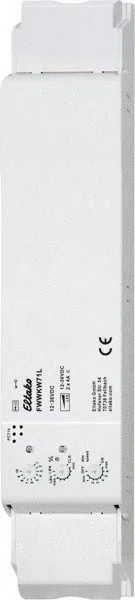
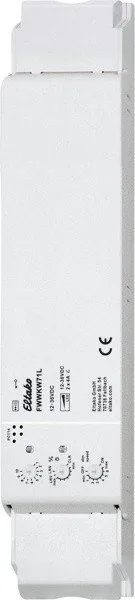
PWM dimmer switch with 2 channels
for LED 12-36V DC, each up to 4A.
Adjustable minimum brightness and
dimming speed. With snooze function
and light alarm circuit. Additionally with
light scene control via PC or with wire-
less pushbuttons. Activation for encryp-
ted wireless, bidirectional wireless and
repeater function. Standby loss only
0.3-0.5 watt.
Installation for example in suspended
ceilings and lamps. 252mm long,
46mm wide and 31mm high.
The set brightness level remains stored
when switched off (memory).
In case of a power failure, the switch
position and brightness level are saved
and switched on when the power supply
is restored.
Automatic electronic overload protection
and overtemperature shutdown.
Encrypted sensors can be taught-in.
Bidirectional wireless and/or a repeater
function can be switched on.
Every change in state and incoming
central control telegrams are then
confirmed by a wireless telegram. The
wireless telegram can be taught in
other actuators, in the FUA55 universal
displays and the GFVS software. In
addition the current dimming value is
displayed in % in the GFVS software.
GB
30 200 837 - 1
Wireless actuator
PWM dimmer switch for LED
FWWKW71L
Only skilled electricians may install
this electrical equipment otherwise
there is the risk of fire or electric
shock!
Temperature at mounting location:
-20°C up to +50°C.
Storage temperature: -25°C up to +70°C.
Relative humidity:
annual average value <75%.
Function rotary switches
The upper rotary switch is only required
for teach-in.
Use the middle %
rotary switch to set
the minimum brightness (fully dimmed).
Use the lower dimming speed rotary
switch to set the dimming speed.
The pushbuttons can either be taught in
as direction pushbuttons or universal
pushbuttons: as direction pushbutton,
one side is 'switch on and dim up'; the
other side is 'switch off and dim down'.
Double-click on the switch-on side to
trigger automatic dim up to full bright-
ness at dimming speed. Double-click on
the switch-off side to trigger the snooze
function. As universal pushbutton,
change the direction by briefly releasing
the pushbutton.
FHB wireless motion/brightness sensors
can be taught in as master or slave.
FAH wireless brightness sensors can be
taught in for switch-off dependent on
brightness or as a twilight switch.
Pushbutton 'central off' for 1 channel:
switches off.
Pushbutton 'Central ON' for channel 1:
switches on with the memory value.
Pushbutton 'central off' for all 2 channels:
saves the current lighting scene and
switches off.
Pushbutton 'central ON' for all 2 channels:
switches on with the light scene where
central was switched off most recently.
After a power failure, the memory values
are switched on.
Rotary switch: Press the middle of the
rotaryknobtoswitchonwiththememory
rent dimming value. Turn to the right
(clockwise) to dim up. The turning speed
determines the dim-up speed. If the dim-
ming actuator was turned to the right
when it was switched off, the dimmer
will switch on at minimum brightness
and then continue to dim up. If the rotary
knob is turned jerkily – and the actuator
was previously switched on or off – dim-
up is rapid to full brightness. Turn to the
left (anticlockwise) to dim-down to the
minimum brightness which is adjusted
on the dimming actuator. The turning
speed determines the dim-down speed.
If the rotary knob is turned to the left jer-
kily, dim-down is rapid to the minimum
brightness which is adjusted on the dim-
ming actuator.
Intensity rotary switch: (must be
taught-in in both channels) To switch
on, press or turn. To dim up turn right,
to dim down turn left. To switch off press.
White tone rotary switch: (must be
taught-in in both channels) Turn right or
left switches on and change the white
tone, to right warmer and to the left col-
der. Press to switch off and press again
to switch on.
White tone and intensity double rocker
pushbutton:
(must be taught-in in both
channels) rocker upper right switches
on and dim up, rocker bottom right swit-
ches off and dim down. Left rocker up
and down changes the white tone.
Switching for light alarm clocks:
An appropriately taught-in timer wireless
signal starts the wake-up function by
switching on the lighting at lowest
brightness and slowly dimming up to
maximum brightness over a period of
30 minutes (or light scene 5). The dim-
ming process is stopped by tapping
briefly, e.g. on the hand-held transmitter.
Snooze function (universal switch or
direction switch on the switch-off side):
With a double impulse the lighting is
dimmed down from the current dimming
position to the minimum brightness
level and switched off. The current dim-
ming position as well as the adjustable
minimumbrightnessleveldeterminethe
ming
position
as
well
as
the
adjustable
minimum brightness level determine the
dimming time (max. = 30 minutes)
which can be reduced as required. It
can be switched off at any time by
short-time control commands during the
lighting is dimmed down.
Light scenes on the PC are set and
retrieved using the Wireless Visualisation
and Control Software GFVS. One or
several FWWKW71L devices must be
taught in on the PC as dimming switches
with percentage brightness values or
high-definition brightness values.
FBH as Master: When an FBH wireless
motion detector and brightness sensor
is taught in, the switching threshold at
which the lighting is switched on at the
brightness values of light scene 6 is
defined during teach-in using the lower
rotary switch. The switching threshold is
dependent on the brightness in addition
to motion (from approx. 30 lux in position
OFF to approx. 300 lux in max position.
When the FBH in taught-in in the ON
position, it is only evaluated as a motion
detector.
A time delay of 1 minute is a fixed setting
in the FBH.
By switching-off or dimming with push-
button, the FBH is deactivated.
Central pushbutton, scene pusbhbutton
and 'dimming value' by PC also lead to
deactivation. A short press on the switch-
on side of the direction pushbutton, the
FBH is reactivated.
FBH as Slave: The FBH is only evaluated
as motion detector.
FAH as Master: When a wireless
bright-
ness sensor FAH is taught-in, the swit-
ching
threshold is defined by the lower
rotary switch during teach-in. The swit-
ching threshold switches the lighting off
depending on the brightness. Switch-on
is only possible by pressing the pushbutton.
FAH as twilight switch: When an FAH
wire less brightness sensor is taught in,
the switching threshold at which the
lighting is switched on at the brightness
values of light scene 6 is defined during
teach-in using the lower rotary switch.
The switching threshold is dependent on
the brightness (from approx. 0 lux in
positionOFFtoapprox 50luxinmax
Technical data
Standby loss
12V DC 0.3W
24V DC 0.4W
36V DC 0.5W
Teaching-in wireless sensors in
wire less actuators
All sensors must be taught-in in the
actuators so that they can detect and
execute commands.
Teaching-in actuator FWWKW71L
The teach-in memory is empty on delivery
from the factory. If you are unsure whether
the teach-in memory contains something
or not, you must first clear the memory
contents completely:
Set the middle rotary switch to CLR. The
LED flashes at a high rate. Within the
next 10 seconds, turn the upper rotary
switch three times to the right stop (turn
clockwise) and then turn back away
from the stop. The LED stops flashing
andgoesoutafter2seconds All
Rotary
switch:
Press
the
middle
of
the
rotary knob to switch on with the memory
value and to switch off and save the cur-
The red LED accompanies the teach-in
process and indicates control commands
in operation by flashing briefly.
The green LED flashes briefly when a
confirmation telegram is sent.
the
brightness
(from
approx
.
0
lux
in
position OFF to approx. 50 lux in max
position.
Switch-off takes place at a brightness of
> 200 lux.
Typical connection

Chat with your Eltako FWWKW71L manual using AI

Get instant AI answers from your Eltako FWWKW71L manual

Ask anything about the Eltako FWWKW71L. Answers come from this manual, with the pages they are based on.

Ask a Question

0/1000

Do you recommend FWWKW71L?

Yes No

Frequently Asked Questions

A

The Eltako FWWKW71L operates on direct current voltage ranging from 12 to 36 volts.

Is this answer helpful?

A

Yes, the memory function retains the previous brightness level and state when power is restored.

Is this answer helpful?

A

Yes, the system supports encryption for secure data transmission between transmitters and actuators.

Is this answer helpful?

A

Control can be managed centrally through the GFVS software on a PC.

Is this answer helpful?

A

Yes, sensors like FBH and FAH must be taught-in manually to the actuator.

Is this answer helpful?

A

Standby loss is extremely low, consuming only 0.3 to 0.5 watts depending on voltage.

Is this answer helpful?

M: qwen/qwen3.5-flash-20260224

Advantages and Disadvantages

Advantages

  • Bidirectional wireless communication enhances reliability
  • Memory function saves settings during power failure
  • Low standby loss consumes minimal energy
  • Adjustable dimming speed for flexibility
  • Overload protection ensures hardware safety
VS

Disadvantages

  • Requires skilled electrician for installation
  • Physical dimensions limit tight spaces
  • Teaching-in sensors takes time
  • Limited to DC voltage inputs only
  • Software required for full feature access
M: qwen/qwen3.5-flash-20260224

Product Specification

Type

Actuator

Standard

Wireless Bus (868MHz)

Function

Switching Actuator (on/off), Dimming Function

Topology

Bus

Dimensions

1.77x1.77x1.30in

Special Features

IP20

M: qwen/qwen3.5-flash-20260224

Product Description

Exploring the Eltako FWWKW71L

Welcome to our detailed look at the Eltako FWWKW71L.

This actuator offers a comprehensive solution for users. It operates on direct current voltage ranging from 12 to 36 volts, making it suitable for low voltage installations. Each of its two channels can handle up to 4 amperes of current, ensuring sufficient power delivery for most lighting requirements.

Key Features and Operational Benefits

Homeowners and technicians alike value the memory function included in this unit. When power is restored after an outage, the switch retains the previous brightness level and state. This prevents the need for manual resetting. Dimming speed is fully adjustable through rotary switches. Users can set the minimum brightness level to avoid abrupt light changes when dimming down to dark. A valuable snooze function allows for gradual dimming down to a set minimum. Light alarm circuits provide a gentle wake-up service by increasing brightness over thirty minutes.

Wireless Connectivity and System Integration

This device supports bidirectional wireless communication using the 868.3 MHz frequency. Sensors such as the FHB wireless motion detectors or FAH brightness sensors integrate seamlessly. The system supports encryption for secure data transmission between transmitters and actuators. Control can be managed locally via pushbuttons or centrally through the GFVS software. This software allows for the management of light scenes and dimming values displayed as percentages. Up to eight distinct light scenes can be saved.

Safety, Compliance, and Installation

Safety features are built deeply into the architecture. Automatic electronic overload protection and overtemperature shutdown mechanisms safeguard the hardware. Standby loss is extremely low, consuming only 0.3 to 0.5 watts depending on voltage. The unit is compliant with Directive 2014/53/EU regarding radio equipment. It operates within a temperature range of minus 20 to 50 degrees Celsius. Installation should strictly be performed by skilled electricians to mitigate fire or shock risks.

Final Recommendations

Integrating this actuator simplifies complex lighting control systems significantly. It offers flexibility without requiring extensive wiring changes. The ability to adjust color tones and intensities provides customization that generic switches cannot match. Whether for commercial office spaces or residential apartments, the control is intuitive and responsive. This product remains a top choice for PWM dimming applications requiring wireless freedom.

M: qwen/qwen3.5-flash-20260224

© Copyright 2026 Manual.ly