Manual.ly Logo

Eltako FUD71L/1200W-230V Manual

0.0 · 0 Ratings

PDF manual · 4 Pages

English

M: qwen/qwen3.5-flash-20260224
page

/ 4

Loading...
cef9e2f022bf73ca8b7acecbc533b25baf43 page 1
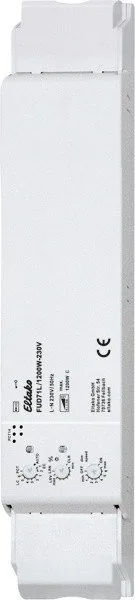
Wireless actuator
Universal dimmer switch
FUD71L/1200 W-230 V
30 100 846 - 3
Universal dimmer switch, power MOSFET up
to 1200 W. Automatic lamp detection. With
adjustable minimum brightness and dimming
speed. With switching operation for light
alarm clocks, children's rooms and snooze
function as well as constant light regulation
and master-slave mode. Also with light scene
control by PC or wireless pushbuttons. Enc-
rypted wireless, bidirectional wireless and
repeater function are switchable. Only 0.7
watt standby loss.
Mounting in the 230 V power supply cord, e.g.
in false ceilings and lamps. 252 mm long,
46 mm wide und 31 mm high.
Universal dimmer switch for lamps up to
1200 W, depending on ventilation conditions.
Dimmable energy saving lamps ESL and
dimmable 230 V LED lamps, additionally de-
pending on the lamps electronics.
Zero passage switching with soft ON and
soft OFF to protect lamps.
The brightness level is stored on switch-off
(memory).
In case of a power failure the switch position
and the brightness stage are stored and may be
switched on when the power supply is restored.
Automatic electronic overload protection
and overtemperature switch-off.
Encrypted sensors can be taught in.
You can switch on bidirectional wireless
and/or a repeater function.
GB
Temperature at mounting location:
-20°C up to +50°C.
Storage temperature: -25°C up to +70°C.
Relative humidity:
annual average value <75%.
Only skilled electricians may install this
electrical equipment otherwise there is
the risk of re or electric shock!
valid for devices from production week
50/16 (see bottom side of housing)
p
Every change in state and incoming central
command telegrams are conrmed by a wi-
reless telegram. This wireless tele gram can
be taught-in in other actuators, in universal
displays FUA55 and in the GFVS software.
The current dimming value is also displayed
in % in the GFVS-Software.
Function rotary switches
The upper rotary switch determines the
operation, whether automatic lamp detection
or special comfort positions should work:
AUTO allows the dimming of all lamp types.
EC1 is a comfort position for energy saving
lamps, which which by design must be tur-
ned on with an increased voltage so that
they switch on again in cold state when
dimmed down.
EC2 is a comfort position for energy saving
lamps, which by design won't switch on
again when dimmed down. Therefore Me-
mory is switched off in this position.
LC1 is a comfort position for dimmable 230 V
LED lamps, which by design won't be dimmed
down enough in the AUTO position (trailing
phase angle) and therefore has to be forced
to leading phase angle.
LC2 and LC3 are comfort positions for dim-
mable 230 V LED lamps like LC1 but with dif-
ferent dimming curves.
In positions EC1, EC2, LC1, LC2 and LC3 in-
ductive (wound) transformers may not be
used. In addition, the maximum number of
dimmable LED lamps may be lower by design
than in the AUTO position.
LC4, LC5 and LC6 are comfort positions for
LED lamps like AUTO but with different dim-
ming curves.
PCT is a position for special functions which
were set up using the PCT14 PC Tool. The
PCT14 link is hooked up using the data
transformer DAT71.
The minimum brightness (fully dimmed
down) is adjustable with the middle %
rotary switch.
The dimming speed is adjustable using the
lower dimming speed rotary switch.
The pushbuttons can be either taught-in
as direction pushbuttons or universal
pushbuttons: As direction pushbutton
'switch on and dim up' is on one side and
'switch off and dim down' on the other side.
A double-click on the switch on side triggers
the automatic dimming up to full brightness
with dim speed time. A double-click on the
switch off side triggers the snooze function.
The children's room function is triggered on
the switch on side. As a universal push-
button the direction change is made by
briey releasing the push button.
Switching for light alarm clocks: An ap-
propriately taught-in timer wireless signal
starts the wake-up function by switching on
the lighting at lowest brightness and slowly
dimming up to maximum brightness over a
period of 30 minutes. The dimming process
is stopped by tapping briey, e.g. on the
hand-held transmitter. In the settings EC no
switching for light alarm clocks is possible.
Switching operation for children's rooms
(universal switch or direction switch on the
switch-on side): If the light is switched on
by holding down the pushbutton, it starts at
the lowest brightness level after approx. 1
second and dims up slowly as long as the
pushbutton is held down without modifying
the last stored brightness level.
Snooze function (universal switch or
direction switch on the switch-off side):
With a double impulse the lighting is dim-
med down from the current dimming positi-
on to the minimum brightness level and
switched off. The current dimming position
as well as the adjustable minimum brightness
level determine the dimming time (max. = 60
minutes) which can be reduced as required.
It can be switched off at any time by short-
time control commands during the lighting is
dimmed down.
Light scenes on the PC are set and
retrieved using the Wireless Visualisation
and Control Software GFVS One or several
retrieved
using
the
Wireless
Visualisation
and Control Software GFVS. One or several
FUD71 devices must be taught in on the PC
as dimming switches with percentage
brightness values.
A resettable staircase time switch function
with RV = 2 minutes can be called by a push-
button taught-in as a staircase pushbutton.
Brightness level settings can be called during
teach-in with single light scene pushbuttons.
A twilight pushbutton can be implemented
using a taught-in FAH. Switch-on can be
performed dependent on motion and bright-
ness with up to 4 FBH devices.
Wireless pushbutton Central ON:
The impulse length is not important. The push-
button switches on with the memory value.
Wireless pushbutton Central OFF:
The impulse length is not important. The
pushbutton switches off.
Staircase light pushbutton:
The staircase light pushbutton switches on
with a memory value and starts an RV time
of 2 minutes at the end of which the device
switches off. Press the pushbutton again to
restart.
FTK as NO contact:
When the window is opened, the light is
switched on. When the window is closed,
the light is switched off.
FTK as NC contact:
When the window is opened, the light is
switched off. When the window is closed,
the light is switched on.
Either a FBH or a FHD60 can be taught-in
as master:
FBH as Master: (automatic brightness con-
trol) When a wireless motion/brightness
sensor FBH is taught-in, the switching
threshold is dened by the lower rotary
switch during teach-in.
The switching threshold switches on the
lighting with memory value depending on
the brightness (in addition to motion) (from
approx. 30 Lux in OFF position to approx.
300 Lux in ON position). When the FBH in
taught-in in the ON position, it is only evalu-
ated as a motion detector.
A return delay of 2 minutes is preset in the
FUD71.
By switching-off or dimming with pushbut-
ton, the FBH is deactivated. Central push-
button, scene pusbhbutton and 'dimming

Chat with your Eltako FUD71L/1200W-230V manual using AI

Get instant AI answers from your Eltako FUD71L/1200W-230V manual

Ask anything about the Eltako FUD71L/1200W-230V. Answers come from this manual, with the pages they are based on.

Ask a Question

0/1000

Do you recommend FUD71L/1200W-230V?

Yes No

Frequently Asked Questions

A

The actuator supports universal dimming up to 1200 Watts depending on ventilation conditions at the mounting location.

Is this answer helpful?

A

Yes, it supports dimmable 230V LED lamps and energy saving lamps. Specific comfort positions optimize performance.

Is this answer helpful?

A

Yes, encrypted wireless and bidirectional wireless can be switched on for secure sensor integration.

Is this answer helpful?

A

Yes, the switch position and brightness stage are stored and may switch on when power supply is restored.

Is this answer helpful?

A

In deenergised state turn middle rotary to CLR and lower to ON. Switch on power to activate the repeater.

Is this answer helpful?

A

Yes, you can use GFVS software or PCT14 PC tool for detailed configuration and light scenes.

Is this answer helpful?

A

The housing is 252 mm long, 46 mm wide and 31 mm high for mounting in power supply cords.

Is this answer helpful?

M: qwen/qwen3.5-flash-20260224

Advantages and Disadvantages

Advantages

  • Supports dimming of various lamp types including LEDs and halogens up to 1200W.
  • Bidirectional wireless confirmation ensures commands are received correctly.
  • Low standby loss of 0.7 watt maintains energy efficiency.
  • Memory function stores brightness after power failure for convenience.
  • Encrypted wireless signals provide secure communication within the home.
VS

Disadvantages

  • Installation requires skilled electricians to prevent safety risks.
  • Maximum power capacity depends heavily on ventilation conditions at mount.
  • Manual rotary switch operation is less intuitive than app settings.
  • No dedicated mobile app interface for configuration setup.
  • Comfort positions limit inductive transformer usage without specific settings.
M: qwen/qwen3.5-flash-20260224

Product Specification

Type

Actuator

Standard

EnOcean, Wireless Bus (868MHz)

Function

Switching Actuator (on/off), Dimming function

Topology

Bus

Dimensions

1.81x9.92x1.22 in

Features

IP20

M: qwen/qwen3.5-flash-20260224

Product Description

Transforming Your Home with Intelligent Dimming Technology

Modifying your lighting requires reliability ensuring safety and function. The Eltako FUD71L/1200W-230V Wireless Actuator Universal Dimmer Switch 230V, Switching Actuator with Dimmer Manual represents a sophisticated choice for modern projects. This device handles high power loads up to 1200 Watts safely. It uses MOSFET technology for longevity and smooth dimming curves.

Comprehensive Lamp Compatibility

This dimmer interfaces with incandescent lamps, halogen transformers, and LED modules effectively. The FUD71 adapts automatically including comfort positions like EC and LC for ballast types. This detection simplifies installation significantly. Configuration is simple. LED compatibility is key. Maximum load depends on ventilation conditions.

Wireless Integration and Security

Secure communication uses encrypted wireless protocols at 868.3 MHz for signals. The system supports bidirectional feedback for instant command confirmation. A repeater function extends signal range for larger areas. Control via PC software allows detailed programming of scenes. The memory function retains brightness levels even if mains power is disrupted. The green LED confirms telegrams. Encryption ensures security.

Specialized Functions for Comfort

Home automation goes beyond simple switches and control. This actuator includes light alarm clocks to wake occupants gently. The children room mode sets a soothing dimming curve for bedtime. A snooze function dims lights to minimum before shutting off completely. Constant light control adjusts output based on daylight using sensors like the FBH or FHD65. Sensors detect motion well.

Safety and Installation Guidelines

Proper installation is critical for safety and long term success. Qualified electricians should handle this electricity equipment to avoid fire or shock hazards. Thermal monitoring protects the unit from overheating and electronic overload protection prevents damage. The physical unit measures 252 mm in length and mounts within the 230V supply cord. Consider ventilation requirements when calculating load capacity. Temperature ranges matter.

Configuration and Master Slave Setup

Managing the device involves specific rotary switch operations for teach in procedures. Factory settings can be restored by turning switches to specific positions within the housing. Master slave mode allows synchronization for uniform lighting effects. You can teach in up to one hundred twenty sensors efficiently. Standby loss is minimal at only 0.7 Watts. PC tools allow fine-tuning. Efficiency is improved.

M: qwen/qwen3.5-flash-20260224

© Copyright 2026 Manual.ly