Manual.ly Logo

Eltako FUD61NPN-230V Manual

0.0 · 0 Ratings

PDF manual · 3 Pages

English

M: gpt-5.6-terra
page

/ 3

Loading...
c751995e4bbd7db88dd6e226afda1cff6663 page 1
Universal dimmer switch, 300 W power
MOSFET. Automatic lamp detection. Only
0.7 watt standby loss. With adjustable
minimum brightness or dimming speed.
With switching operation for light alarm
clocks, children‘s rooms and snooze
function. Additionally with light scene
control. Encrypted wireless, bidirectional
wireless and repeater function are
switchable.
For installation.
45 mm long, 45 mm wide, 33 mm deep.
Universal dimmer switch for lamps up to
300 W, dependent on ventilation conditions.
Dimmable energy saving lamps ESL and
dimmable 230 V-LED lamps, additionally
dependent on the lamps electronics.
Zero passage switching with soft ON and
soft OFF to protect lamps.
Supply voltage, switching voltage and con-
trol voltage local 230 V. No minimum load.
The brightness level is stored on switch-off
(memory).
In case of a power failure the switch posi-
tion and the brightness stage are stored
and may be switched on when the power
supply is restored.
Automatic electronic overload protection
and overtemperature switch-off.
Wireless actuator
Universal dimmer switch
FUD61NPN-230V
GB
Temperature at mounting location:
-20°C up to +50°C.
Storage temperature: -25°C up to +70°C.
Relative humidity:
annual average value <75%.
30 100 835 - 10
Only skilled electricians may install this
electrical equipment otherwise there is
the risk of re or electric shock!
valid for devices from production week
46/17 (see bottom side of housing)
You can teach in encrypted sensors. You
can switch on bidirectional wireless and/or
a repeater function.
Every change in state and incoming central
command telegrams are then conrmed by
a wireless telegram.
This wireless telegram can be taught-in into
other actuators and the GFVS-Software.
The current dimming value is also displayed
in % in the GFVS-Software.
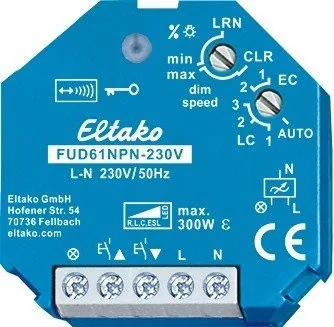
Function rotary switches
The minimum brightness (fully dimmed) or
the dimming speed is adjustable with the
upper %
/dimming speed rotary switch.
The lower rotary switch determines the
operation, whether the automatic lamp
detection or special comfort positions
should act:
AUTO allows the dimming of all light species.
EC1 is a comfort position for energy saving
lamps which must be switched on with in-
creased power dependent on the construc-
tion, so they will also switch on again safely
in cold condition when dimmed down.
EC2 is a comfort position for energy saving
lamps which will not be switched on again
when dimmed down dependent on the
construction. Memory is switched off in this
position.
LC1 is a comfort position for dimmable 230 V
LED lamps which are not being dimmed
down enough when set to AUTO (trailing
phase angle) dependent on the construction
and must therefore be forced to leading
phase angle.
LC2 and LC3 are comfort positions for
dimmable 230 V LED lamps like LC1, but with
different dimming curves.
In positions EC1, EC2, LC1, LC2 and LC3 no
inductive (wound) transformers should be
used. In addition, the maximum number of
dimmable LED lamps can be lower than in
the AUTO position dependent on the
construction.
In addition to the wireless control input via
an internal antenna, this universal dimmer
switch can also be controlled locally by a
conventional 230 V control switch if tted
previously. Either separate local control
inputs for dim brighter and dim darker as a
direction switch, or these two inputs can be
bridged and controlled with a single switch
as a universal switch. The dimming direc-
tion can then be changed by interrupting
the control. Short control commands switch
on/off.
The pushbuttons can be either taught-in
as direction pushbuttons or universal
pushbuttons:
As direction pushbutton 'switch on and dim
up' is on one side and 'switch off and dim
down' on the other side. A double-click on
the switch on side triggers the automatic
dimming up to full brightness with dim
speed time. A double-click on the switch off
side triggers the snooze function. The chil-
dren’s room function is triggered on the
switch on side.
As a universal pushbutton the direction
change is made by briey releasing the
pushbutton.
Switching for light alarm clocks: A
wireless signal of a time clock which was
taught-in accordingly starts the wake up
function by switching on the light at the
lowest brightness level and dims up slowly
until the maximum level is reached.
Dependent on the set dim speed the wake
up time is between 30 and 60 minutes.
The dimming process is stopped by tapping
briey, e.g. on the hand-held transmitter.
At setting ESL is no switching for light alarm
clocks possible.
Switching operation for children’s rooms
(universal switch or direction switch on the
switch-on side): If the light is switched on
by holding down the pushbutton, it starts at
the lowest brightness level after approx.
1 second and dims up slowly as long as the
pushbutton is held down without modifying
the last stored brightness level.
Snooze function (universal switch or direc-
tion switch on the switch-off side): With a
double impulse the lighting is dimmed down
from the current dimming position to the
minimum brightness level and switched off.
The current dimming position as well as the
adjustable minimum brightness level deter-
mine the dimming time (max. = 60 minutes)
which can be reduced as required. It can be
switched off at any time by short-time
control commands during the lighting is
dimmed down.
Light scenes on the PC are set and
retrieved using the Wireless Visualisation
and Control Software GFVS.
One or several FUD71 devices must be
taught in on the PC as dimming switches
with percentage brightness values.
Lights scenes with wireless switches
are taught in on the FUD61NPN device. Up to
four brightness values which can be taught-
in in light scene pushbuttons with double
rocker.
Semi-automatic motion detection with
taught-in FB65B wireless motion sensor
(factory setting): After switching on via
pushbutton, the 5 minutes delay time
starts, within this time the delay will
restart after each detected motion. 5 minu-
tes after the last detected motion it will
switch off. If a motion is detected 5 minutes
after switching off, it will automatically
switch on again. After this time only a push-
button can switch on. The pushbutton is
allowed to switch off at any time, then the
motions are no more evaluated.
Fully automatic motion detection with
FB65B taught-in wireless motion sensor:
If the actuator should switch on automati-
cally when motion is detected, e. g. in rooms
without daylight, replug the jumper to
'active' on the FB65B device. When motion
is no longer detected, thedevice switches
off automatically after the 5 minutes re-
lease delay time expires. Press the push-
button at any time to switch the device on
or off. When motion is detected, the device
switches on again automatically.
Either an FBH (Master) or an FHD60 can be
taught in.
If a wireless motion-brightness sensor
FBH (Master) is taught in, the switching
threshold at which the lighting with memory
value switches on (from approx. 30 lux in
the position AUTO to approx. 300 lux in the
position EC2) depending on the brightness
(in addition to the motion) is determined

Chat with your Eltako FUD61NPN-230V manual using AI

Get instant AI answers from your Eltako FUD61NPN-230V manual

Ask anything about the Eltako FUD61NPN-230V. Answers come from this manual, with the pages they are based on.

Ask a Question

0/1000

Do you recommend FUD61NPN-230V?

Yes No

Frequently Asked Questions

A

It can control incandescent and halogen lamps, compatible inductive and electronic transformers, dimmable energy-saving lamps, and dimmable 230 V LED lamps. Actual dimming performance depends on the electronics of the connected lamps and the selected operating mode.

Is this answer helpful?

A

The actuator supports loads up to 300 W under suitable conditions. The practical limit can be lower depending on ventilation, ambient temperature, transformer losses, lamp electronics, and the selected comfort mode. EC and LC comfort modes are limited to 100 W.

Is this answer helpful?

A

Yes. The memory function stores the selected brightness level when the light is switched off. The actuator also retains switch status and brightness through a power outage, then restores the saved state when supply voltage returns if appropriate.

Is this answer helpful?

A

Yes. It supports local 230 V control pushbuttons. These can be connected as directional pushbuttons for separate brightening and dimming commands, or as a universal pushbutton that changes dimming direction after a brief release.

Is this answer helpful?

A

It includes a nursery mode for gradual brightening from minimum output, a snooze function for timed dimming down before switch-off, and a wake-up light function that slowly brightens over approximately 30 to 60 minutes. It also supports stored light scenes.

Is this answer helpful?

A

Yes. Compatible wireless motion sensors can provide semi-automatic or fully automatic occupancy control. Compatible brightness-motion and dusk sensors can also switch or dim lighting based on ambient light thresholds and stored brightness settings.

Is this answer helpful?

M: gpt-5.6-terra

Advantages and Disadvantages

Advantages

  • Universal dimming support for incandescent, halogen, compatible transformers, dimmable ESL, and dimmable 230 V LED lamps.
  • Automatic lamp recognition plus EC and LC comfort modes help optimize difficult LED and energy-saving lamp behavior.
  • Stores switching state and brightness level, including after a power failure, for consistent lighting operation.
  • Supports wireless controls, encrypted sensors, optional bidirectional feedback, repeater mode, scenes, and sensor automation.
  • Soft switching, electronic overload protection, overtemperature shutdown, and 0.7 W standby consumption enhance everyday use.
VS

Disadvantages

  • The 300 W rating depends on ventilation, lamp technology, and installation conditions.
  • Some LED and ESL lamps may still have limited dimming ranges, switching issues, or reduced maximum lamp quantities.
  • Comfort modes limit maximum output to 100 W and do not permit inductive wound transformers.
  • Wireless pairing and rotary-switch configuration require careful setup to avoid learning unintended signals.
  • Installation involves 230 V wiring and must be performed by a qualified electrician.
M: gpt-5.6-terra

Product Specification

Type

Actuator

Standard

EnOcean, wireless bus (868 MHz)

Function

Switch actuator (on/off), dimming function

Topology

Bus

Dimensions

1.77 x 1.77 x 1.3 in

Special features

IP20

M: gpt-5.6-terra

Product Description

Eltako FUD61NPN-230V Wireless Actuator Universal Dimmer Switch, Switching Actuator with Dimming Function Manual

The Eltako FUD61NPN-230V Wireless Actuator Universal Dimmer Switch, Switching Actuator with Dimming Function Manual describes a compact flush-mounted lighting controller designed for flexible wireless dimming and switching. Built around a Power MOSFET output, this actuator supports lighting loads up to 300 W, subject to installation ventilation and the connected lamp type. Its 45 x 45 x 33 mm housing makes it suitable for installations where space is limited.

Flexible dimming for modern lighting

Automatic lamp recognition helps the actuator work with incandescent lamps, halogen lighting, dimmable electronic transformers, inductive transformers, dimmable energy-saving lamps, and dimmable 230 V LED lamps. Because LED and ESL electronics can vary, dedicated comfort settings are available. EC1 and EC2 modes address specific energy-saving lamp behavior, while LC1, LC2, and LC3 provide alternative dimming curves for LEDs that need improved low-end dimming or a different dimming method.

The upper rotary control lets installers set either the minimum brightness or dimming speed. Soft-on and soft-off switching at the zero crossing can reduce stress on lamps, while the memory function recalls the last selected brightness after switching off. Switch status and brightness are also retained after a power interruption, allowing the lighting to resume its stored condition when power returns.

Wireless control and automation options

The actuator operates on 868.3 MHz radio technology and can learn compatible wireless sensors, pushbuttons, timers, and selected brightness or motion sensors. Encrypted sensors can be paired for improved control security. Bidirectional radio communication and repeater functionality can be activated when required, enabling status feedback and broader integration in compatible installations.

Local operation is also supported through conventional 230 V control pushbuttons. These can be configured as directional controls for separate brighter and darker commands, or as a universal pushbutton with alternating dimming direction. Short presses switch the output on or off, while longer presses support smooth brightness adjustment.

Comfort functions for everyday spaces

Beyond standard dimming, the FUD61NPN-230V offers practical lighting functions. A nursery mode starts at minimum brightness and gradually raises light while a button is held. A snooze function slowly dims the current level down to the configured minimum before switching off. The wake-up light function can gradually increase illumination over roughly 30 to 60 minutes.

Up to four direct light scenes can be stored with a compatible scene pushbutton. Motion and brightness sensor support can also automate lighting based on occupancy and ambient light. Electronic overload protection and overtemperature shutdown add protection, while standby consumption is only 0.7 W.

Note: Installation on 230 V systems must be carried out by a qualified electrician. Load compatibility, transformer restrictions, ventilation, and the selected comfort mode should be checked before use.

M: gpt-5.6-terra

© Copyright 2026 Manual.ly