Manual.ly Logo

Eltako FUD61NP-230V Manual

0.0 · 0 Ratings

PDF manual · 2 Pages

English

M: qwen/qwen3.5-flash-20260224
page

/ 2

Loading...
6e49ad0767e5363a2f6f130c6545ad25e388 page 1
Without N connection, 300W power
MOSFET. Only 0.7 watt standby loss.
With adjustable minimum brightness
and dimming speed. With switching
operation for children's rooms and
snooze function. Light scenes can be
taught-in.
Encrypted wireless, bidirectional wireless
and repeater function are switchable.
For installation.
45mm long, 45mm wide, 33mm deep.
Universal dimmer switch for R, L and C
loads up to 300 watt, depending on
ventilation conditions. Automatic detection
of load R+L or R+C.
Without N connection, therefore it is
suitable for mounting directly behind
the pushbutton light switch, even if
there is no N wire.
Energy saving lamps and LED lamps
cannot be controlled by dimmers without
N-connection.
Supply voltage, switching voltage and
control voltage local 230V.
Minimum load only 40W.
Zero passage switching with soft ON
and soft OFF to protect lamps.
The brightness level is stored on switch-off
(memory).
In case of a power failure the switch
position is stored and may be switched
on when the power supply is restored.
Al ld
GB
Only skilled electricians may install
this electrical equipment otherwise
there is the risk of fire or electric
shock!
Temperature at mounting location:
-20°C up to +50°C.
Storage temperature: -25°C up to +70°C.
Relative humidity:
annual average value <75%.
Wireless actuator
Universal dimmer switch
without N, FUD61NP-230V
30 100 830 - 9
valid for devices from production week
46/17 (see bottom side of housing)
on
when
the
power
supply
is
restored.
Automatic electronic overload protection
and overtemperature switch-off.
You can teach in encrypted sensors.
You can switch on bidirectional wireless
and/or a repeater function.
Every change in state and incoming
central command telegrams are then
confirmed by a wireless telegram.
This wireless telegram can be taught-in
into other actuators, FUA55 universal
displays and the GFVS-Software. The
current dimming value is also displayed
in % in the GFVS-Software.
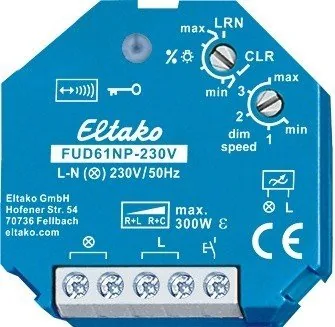
Function rotary switches
The minimum brightness (fully dimmed)
is adjustable with the % rotary switch.
In the setting LRN up to 35 wireless push -
buttons can be assigned therefrom one
or more central pushbuttons.
The dimming speed is adjustable using
the dimming speed rotary switch. At the
same time, the soft ON and soft OFF
periods are changed.
In addition to the wireless control input
via an internal antenna, this universal
dimmer switch can also be controlled
locally by a conventional 230V control
switch if fitted previously.
The wireless pushbuttons can be taught
in either as direction switches or universal
switches:
When installed as a direction switch, one
side is then 'switch on and dim up' and
the other side is 'switch off and dim
down'. A double-click on the switch-on
side activates automatic dim-up to full
brightness at dim speed. A double click
on the switch-off side activates the
snooze function. The children's room
function is implemented on the switch-
on side.
As a universal switch, change the
direction by briefly releasing the push-
button. Short-time control commands
switch on/off.
Switching operation for children's
rooms (universal switch or direction
switch on the switch-on side): If the
light is switched on by holding down
the pushbutton, it starts at the lowest
brightness level after approx. 1 second
and dims up slowly as long as the push -
button is held down without modifying
the last stored brightness level.
Snooze function (universal switch or
direction switch on the switch-off side):
With a double impulse the lighting is
dimmed down from the current dimming
position to the minimum brightness level
and switched off. The current dimming
position as well as the adjustable
minimum brightness level determine the
dimming time (max. = 60 minutes)
which can be reduced as required. It
can be switched off at any time by
short-time control commands during the
lighting is dimmed down.
Light scenes on the PC are set and
retrieved using the Wireless Visualisation
and Control Software GFVS. A description
of the GFVS is at 'eltako-wireless.com'.
One or several FUD61NP devices must be
taught in on the PC as dimming switches
with percentage brightness values.
Lights scenes with wireless switches are
taught in on the FUD61NP device. Up to
four brightness values which can be
taught-in in light scene pushbuttons with
double rocker.
Semi-automatic motion detection with
taught-in FB65B wireless motion sensor
(factory setting): After switching on via
pushbutton, the 5 minutes delay time
starts, within this time the delay will
restart after each detected motion. 5 mi-
nutes after the last detected motion it will
switch off. If a motion is detected 5 mi-
nutes after switching off, it will automati-
cally switch on again. After this time only
a pushbutton can switch on. The push-
button is allowed to switch off at any
time, then the motions are no more
evaluated.
evaluated.
Fully automatic motion detection with
FB65B taught-in wireless motion sensor:
If the actuator should switch on automa-
tically when motion is detected, e.g. in
rooms without daylight, replug the jumper
to 'active' on the FB65B device. When
motion is no longer detected, the device
switches off automatically after the 5 mi-
nutes release delay time expires. Press
the pushbutton at any time to switch the
device on or off. When motion is detected,
the device switches on again automati-
cally.
Either an FBH (Master) or an FAH can be
taught in.
If a wireless motion-brightness sensor
FBH (Master) is taught in, the switching
threshold at which the lighting with me-
mory value switches on (from approx.
30lux in the position 'min' to approx.
300lux in the position '3') depending on
the brightness (in addition to the mo-
tion) is de termined with the lower rotary
switch during teach-in. If the FBH is
taught in in position 'max', it is only
evaluated as a motion sensor (Slave). A
dropout delay of 1 minute is fixed in the
FBH.
If a wireless brightness sensor FAH is
taught in, the threshold at which the
lighting switches on or off (from approx.
0lux in the position 'min' to approx.
50lux in the position 'max') depending
on the brightness is determined with the
lower rotary switch. If the brightness
threshold is undershot, the memory
parameter is used to switch the device
on. Switching off takes place at a bright-
ness of > 200lux.
The LED performs during the teach-in
process as mentioned in this instruction
manual below. It shows wireless control
commands by short flickering during
operation.
Typical connection
Technical data
Incandescent lamp and up to 300W
2)
halogen lamp load
1)
230V
Local control current 1mA
at 230V control input
Max. parallel capacitance 0.06μF
(approx. length) of local (200m)
control lead at 230V AC
Standby loss (active power) 0.7W
1)
Applies to lamps of max. 150W.
2)
Also max. 2 induction transformers of the same
type (L load) and electronic transformers (C load).
Teaching-in wireless sensors in wire-
less actuators
All sensors must be taught-in in the
actuators so that they can detect and
execute commands.
Teaching-in actuator FUD
61NP-230V
The teach-in memory is empty on
delivery from the factory. To ensure that
a device was not previously taught-in,
clear the memory completely:
Turn the upper rotary switch to CLR.
The LED flashes at a high rate. Within
10 seconds, turn the lower rotary switch
three times to right stop (turn clockwise)
and back again. The LED stops flashing
and goes out after 2 seconds. All taught-
in sensors are cleared; the repeater and
the confirmation telegrams are switched
off.
Clear single taught-in sensors:
Turn the upper rotary switch to CLR. The
LED flashes at a high rate. Operate the
sensor. The LED goes out.

Chat with your Eltako FUD61NP-230V manual using AI

Get instant AI answers from your Eltako FUD61NP-230V manual

Ask anything about the Eltako FUD61NP-230V. Answers come from this manual, with the pages they are based on.

Ask a Question

0/1000

Do you recommend FUD61NP-230V?

Yes No

Frequently Asked Questions

A

The device handles resistive loads up to 300W. Inductive and capacitive loads are also supported depending on ventilation conditions. Specific transformer types may apply under certain wattage limits.

Is this answer helpful?

A

No, the FUD61NP-230V is designed to work without a neutral wire connection. This makes it suitable for mounting directly behind the existing light switch in many older installations.

Is this answer helpful?

A

It operates with a standby loss of 0.7 watt. It also features automatic electronic overload protection and a soft ON and OFF switch to protect lamps and save energy.

Is this answer helpful?

A

Yes, it supports the FB65B wireless motion sensor for semi-automatic or fully automatic motion detection. It can switch on after motion is detected and off after a delay.

Is this answer helpful?

A

Encryption is available to ensure security. You can teach in encrypted sensors to ensure data security using rolling codes to prevent unauthorized access.

Is this answer helpful?

A

The device integrates with the GFVS-Software for wireless visualization and control. It allows for light scene setting and brightness value retrieval via PC.

Is this answer helpful?

M: qwen/qwen3.5-flash-20260224

Advantages and Disadvantages

Advantages

  • No neutral wire required for standard installation
  • Supports up to 300W load capacity
  • Bidirectional wireless communication included
  • Memory function retains brightness state after power loss
  • Adjustable dimming speed and minimum brightness
VS

Disadvantages

  • Minimum load of 40W required for operation
  • Encrypted sensor setup requires specific steps
  • Energy saving lamps cannot be dimmed without N connection
  • Requires skilled electrician for installation safety
  • Standard standby loss of 0.7 watts present
M: qwen/qwen3.5-flash-20260224

Product Specification

Type

Actuator

Standard

EnOcean, Radio Bus (868 MHz)

Function

Switching Actuator (on/off), Dimming Function

Topology

Bus

Dimensions

1.77x1.77x1.30in

Special Features

IP20

M: qwen/qwen3.5-flash-20260224

Product Description

Eltako FUD61NP-230V Wireless Actuator Universal Dimmer Switch

The Eltako FUD61NP-230V offers a robust solution for modern lighting control without the need for a neutral wire. This universal dimmer switch integrates seamlessly into existing installations. It features a 300W power MOSFET that handles various load types including resistive, inductive, and capacitive loads. The device is designed for local 230V supply and ensures energy efficiency with a standby loss of just 0.7 watts. This actuator represents a significant step forward for wireless lighting automation in residential and commercial settings.

Installation and Connectivity

One of the primary advantages is its ability to function without a neutral connection. This allows for mounting directly behind the pushbutton light switch, significantly simplifying retrofit projects. Automatic detection of load types ensures compatibility with different lamp technologies. However, minimum load requirements apply, necessitating at least 40W for proper operation. The physical dimensions of 45mm by 45mm fit standard mounting boxes efficiently. It supports operation within a temperature range of -20 degrees Celsius up to 50 degrees Celsius at the mounting location.

Wireless Control and Customization

Encrypted wireless communication ensures security and privacy within your smart home network. Bidirectional wireless functionality and switchable repeater functions enhance signal reliability throughout the building. Users can adjust minimum brightness and dimming speed using rotary switches on the device. The memory feature stores the brightness level upon switch-off, retaining the last state even during power failures. This feature ensures convenience when power is restored. The wireless frequency operates at 868.3 MHz with a transmit power of 10mW.

Special Functions and Safety

Designed with families in mind, this actuator includes specific modes for children's rooms and a snooze function. You can teach in light scenes and retrieve them via PC software or dedicated pushbuttons. The device offers automatic electronic overload protection and overtemperature switch-off to safeguard connected equipment. Whether using direction switches or universal switches, the control logic adapts to your needs. Double-clicking on the switch-on side activates automatic dim-up to full brightness.

Integration and Maintenance

The Eltako FUD61NP-230V supports integration with GFVS software for central control. You can teach in encrypted sensors to ensure data security using rolling codes. Temperature storage requirements are flexible up to 70 degrees Celsius. Installation must be performed by qualified personnel to mitigate risks of fire or electric shock. The device confirms state changes via wireless telegrams which can be taught into other actuators. This comprehensive ecosystem allows for advanced automation scenarios involving motion and brightness detection.

M: qwen/qwen3.5-flash-20260224

© Copyright 2026 Manual.ly