Manual.ly Logo

Eltako FUD14 Manual

5.0 · 1 Ratings

PDF manual · 3 Pages

English

M: qwen/qwen3.5-flash-20260224
page

/ 3

Loading...
66147d85bda84c1a3ed8fccbe08a96309be6 page 1
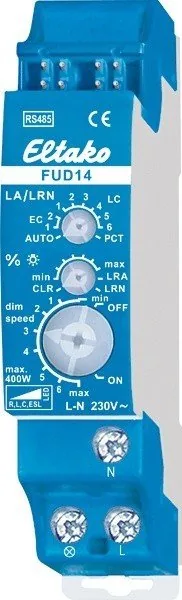
Universal dimmer switch, Power MOSFET
up to 400 W. Automatic lamp detection.
Bidirectional. Only 0.3 watt standby loss.
With adjustable minimum brightness and
dimming speed. With switching operation
for light alarm clocks, children‘s rooms
and snooze function. Also with light scene
control and constant light regulation.
Modular device for DIN-EN 60715 TH35
rail mounting. 1 module = 18 mm wide,
58 mm deep.
The delivery includes a spacer DS14,
1 short jumper 1 module (up to 200 W load)
and 1 long jumper 1,5 modules (from 200 W
load with DS14 on the left side).
Universal dimmer switch for lamps up to
400 W, depending on ventilation conditions,
dimmable energy saving lamps (ESL) and dim-
mable 230 V LED lamps are also dependent on
the lamp electronics
and the dimming tech-
nology.
Zero passage switching with soft ON and
soft OFF to protect lamps.
Switching voltage 230 V. No minimum load.
The brightness level is stored on switch-off
(memory).
In case of a power failure the switch position
and the brightness stage are stored and may be
switched on when the power supply is restored.
RS485 bus actuator
Universal dimmer switch
FUD14
GB
Temperature at mounting location:
-20°C up to +50°C.
Storage temperature: -25°C up to +70°C.
Relative humidity:
annual average value <75%.
30 014 005 - 3
Only skilled electricians may install this
electrical equipment otherwise there is
the risk of re or electric shock!
valid for devices from production week
51/16 (see bottom side of housing)
Automatic electronic overload protection
and overtemperature switch-off.
Connection to the Eltako-RS485 bus. Bus
cross wiring and power supply with jumper.
Function rotary switches
The upper rotary switch LA/LRN is rst
required for teach-in and denes in opera-
tion whether automatic lamp detection
should be activated or special comfort
positions:
AUTO allows all lamp types to be dimmed.
EC1 is a comfort position for energy saving
lamps which must be switched on at high
voltage due to their design so that they can
be dimmed down and switched back on
safely when cold.
EC2 is a comfort position for energy saving
lamps which cannot be switched back on in
dimmed-down position due to their design.
Therefore the memory is switched off in
this position.
LC1 is a comfort position for dimmable 230 V
LED lamps which are not being dimmed
down enough when set to AUTO (trailing
phase angle) dependent on the construction
and must therefore be forced to leading
phase angle.
LC2 and LC3 are comfort positions for
dimmable 230 V LED lamps like LC1, but with
different dimming curves.
In positions EC1, EC2, LC1, LC2 and LC3, no
inductive (wound) transformers may be
used. In addition the maximum number of
dimmable LED lamps may be lower than in
AUTO position due to their design.
LC4, LC5 and LC6 are comfort positions for
LED lamps such as AUTO but with different
dimming curves.
PCT is a position for special functions which
are set up using the PC tool PCT14.
The minimum brightness (fully dimmed down)
is adjustable with the middle %
- rotary
switch.
The dimming speed is adjustable using the
bottom dimming speed rotary switch.
The pushbuttons can be taught-in either as
direction switches or universal switches:
When installed as a direction switch, one
side is then 'switch on and dim up' and the
other side is 'switch off and dim down'.
A double-click on the switch-on side acti-
vates automatic dim-up to full brightness at
dim speed. A double click on the switch-off
side activates the snooze function. The
children’s room function is implemented on
the switch-on side.
As a universal switch, change the direction
by briey releasing the pushbutton.
Switching for light alarm clocks: A wire-
less signal of a time clock which was
taught-in accordingly starts the wake up
function by switching on the light at the
lowest brightness level and dims up slowly
until the maximum level is reached. The
dimming process is stopped by tapping
briey, e.g. on the hand-held transmitter.
Switching operation for children’s rooms
(universal switch or direction switch on the
switch-on side): If the light is switched on
by holding down the pushbutton, it starts
at the lowest brightness level after approx.
1 second and dims up slowly as long as the
pushbutton is held down. The last saved
brightness level is not modied.
Snooze function (universal switch or direc-
tion switch on the switch-off side): With a
double impulse the lighting is dimmed down
from the current dimming position to the
minimum brightness level and switched off.
The current dimming position as well as the
adjustable minimum brightness level deter-
mine the dimming time (30 minutes) which
can be reduced as required. It can be
switched off at any time by short-time
control commands during the lighting is
dimmed down.
Light scenes on the PC are set and retrieved
using the Wireless Building Visualisation and
Control Software GFVS. A description of the
GFVS is in Chapter V at “eltako-wireless.com”.
One or several FUD14 devices must be taught
in on the PC as dimming switches with per-
centage bright ness values.
Staircase light switch:
The staircase light switch switches on with
a memory value and starts an RV time at the
end of which the device switches off. Press
the switch again to restart.
Clock:
Set the upper rotary switch to PCT. The
clock is started by the universal button,
direction button (switch-on side) and the
'Central ON' button.
FTK as NO contact:
When the window is opened, the light is
switched on. When the window is closed,
the light is switched off.
FTK as NC contact:
When the window is opened, the light is
switched off. When the window is closed,
the light is switched on.
Either a FBH or a FHD60 can be taught-in
as master:
FBH as Master: (automatic brightness
control) When a wireless motion-brightness
sensor FBH is taught-in, the switching
threshold is dened by the lower rotary
switch during teach-in. The switching
threshold switches on the lighting with
memory value depending on the brightness
(in addition to motion) (from approx. 30 lux
in OFF position to approx. 300 lux in ON
position). When the FBH in taught-in in the
ON position, it is only evaluated as a motion
detector. A return delay of 2 minutes is
preset in the FUD14.
By switching-off or dimming with pushbut-
ton, the FBH is deactivated. Central push-
button, scene pusbhbutton and 'dimming
value' by PC also lead to deactivation. A
short press on the switch-on side of the
direction pushbutton, the FBH is reactivated.
FBH as Slave:
The FBH is only evaluated as motion
detector.
Semi-automatic motion detection with
taught-in FB65B wireless motion sensor
(factory setting): After switching on via
pushbutton, the 5 minutes delay time
starts, within this time the delay will
restart after each detected motion. 5 min-
utes after the last detected motion it will
switch off. If a motion is detected 5 minutes
after switching off, it will automatically
switch on again. After this time only a push-
button can switch on.

Chat with your Eltako FUD14 manual using AI

Get instant AI answers from your Eltako FUD14 manual

Ask anything about the Eltako FUD14. Answers come from this manual, with the pages they are based on.

Ask a Question

0/1000

Do you recommend FUD14?

Yes No
0
User Pic

Klaus Weber

8 months ago

Does the product meet quality expectations consistently?

0
User Pic

Manual.ly

8 months ago

Yes, based on customer feedback, the product performs as described with reliable functionality. Many users confirm that everything meets standards without issues.

M: qwen/qwen3.5-flash-20260224

Frequently Asked Questions

A

The device supports loads up to 400 W depending on ventilation conditions. Careful calculation is required for higher loads.

Is this answer helpful?

A

Yes, the brightness level and switch position are stored and may be switched on when power supply is restored.

Is this answer helpful?

A

Yes, it supports teaching in sensors like FBH and FHD60 for motion detection and automatic brightness control.

Is this answer helpful?

A

Yes, only skilled electricians may install this electrical equipment to avoid risks of fire or electric shock.

Is this answer helpful?

A

It operates at minus 20°C up to +50°C at the mounting location. Storage temperature is minus 25°C up to +70°C.

Is this answer helpful?

A

Dimming speed is adjustable using the bottom dimming speed rotary switch on the device.

Is this answer helpful?

M: qwen/qwen3.5-flash-20260224

Advantages and Disadvantages

Advantages

  • Ultra-low 0.3 watt standby loss for significant energy savings.
  • Robust 400 W load capacity with flexible automatic lamp detection.
  • Memory retention ensures state preservation after power failure.
  • Bidirectional RS485 bus allows seamless network integration.
  • Adjustable dimming speed and minimum brightness settings.
VS

Disadvantages

  • Installation strictly requires skilled electrician for safety and compliance.
  • Ventilation clearance needed when load exceeds 200 W to prevent overheating.
  • Inductive transformers require specific configuration to prevent damage.
  • Teach-in process complexity for advanced sensor integration.
  • Limited dimming range possible depending on lamp electronics.
M: qwen/qwen3.5-flash-20260224

Product Specification

Type

Actuator

Standard

EnOcean, RS485

Function

Switching actuator (on/off), Dimming function

Topology

Bus

Special Features

IP20

M: qwen/qwen3.5-flash-20260224

Product Description

The Eltako FUD14 RS485-Bus-Universal-Dimming Switch Review

The Eltako FUD14 RS485-Bus-Universal-Dimming Switch, 1TE REG, Switch Actuator with Dimmer Manual serves as a comprehensive guide for lighting control. This device stands as a premier choice for sophisticated lighting automation projects. The Eltako FUD14 RS485-Bus-Universal-Dimming Switch delivers unparalleled flexibility, accommodating a wide range of lamp technologies including 230 V LED lamps and energy saving lamps. Its core Power MOSFET technology supports loads up to 400 W, providing robust performance for demanding environments. A key benefit is the ultra-low standby loss of 0.3 watt, which significantly reduces energy consumption even when the device is idle. The bidirectional communication capability ensures reliable data exchange over the RS485 bus network, facilitating complex control scenarios.

Users appreciate the automatic lamp detection feature, which optimizes dimming curves for connected loads. The switch includes specific comfort positions for LED and energy saving lamps, ensuring smooth transitions without flickering or buzzing. Adjustable parameters such as minimum brightness and dimming speed allow users to tailor the lighting atmosphere precisely. The memory function is crucial, as it stores the brightness level and switch position during power failures, automatically restoring previous settings once power returns. This continuity is essential for maintaining comfort and security in buildings.

Installation is straightforward with the DIN-EN 60715 TH35 rail mounting system, occupying just 18 mm of space. The package includes spacers and jumpers to support loads up to 200 W or higher, provided ventilation clearance is maintained for larger loads. Advanced functionality includes light scenes controlled via PC tools and wireless visualization software. Staircase light switching and clock operations enable automated schedules. Integration with wireless sensors like FBH or FHD60 allows for motion-based lighting and daylight harvesting. The rotary switches simplify the teach-in process for sensors and configurations.

Safety features protect against electrical hazards during use. Skilled electricians must handle installation to ensure safety and compliance. The device works reliably within a temperature range of minus 20 to 50 degrees Celsius at the mounting location. Humidity must remain below 75 percent for longevity. Zero passage switching protects filaments during soft start cycles. Pushbuttons enable direction switches for snooze modes and light alarms. Central buttons allow centralized control in larger networks. Constant light regulation maintains target brightness automatically. The LED confirms status visually. Configuration clears to factory settings easily. This dimmer serves modern smart buildings.

M: qwen/qwen3.5-flash-20260224

© Copyright 2026 Manual.ly