


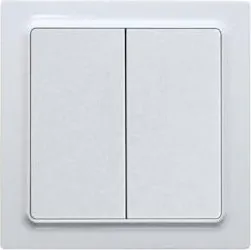
Eltako FT55 Manual
PDF manual · 1 Pages
English


Quick check
Incorrect answer, please try again.
Chat with your Eltako FT55 manual using AI
Get instant AI answers from your Eltako FT55 manual
Ask anything about the Eltako FT55. Answers come from this manual, with the pages they are based on.
Ask a Question
Do you recommend FT55?
Yes NoFrequently Asked Questions
No, the FT55 does not require batteries. It uses energy harvesting technology to generate the necessary power when the switch is pressed, ensuring long-term maintenance-free operation.
Is this answer helpful?
You can install it by screwing the holding plate onto a flat surface or by using the included adhesive foil to stick it to walls, glass, or furniture. Ensure the surface is clean before applying the adhesive.
Is this answer helpful?
The FT55 is specifically designed as a Friends of Hue product. While it uses Zigbee, it is optimized for the Philips Hue ecosystem and may not function fully with other non-Hue Zigbee hubs.
Is this answer helpful?
If the connected Hue lamps lose power, the FT55 cannot control them even though the switch itself works. The lamps must remain powered for the Hue system to respond to commands from the switch.
Is this answer helpful?
No, the products are strictly designed for indoor mounting only. They are not weatherproof and should not be exposed to outdoor elements like rain or direct sunlight.
Is this answer helpful?
The double rocker design allows the FT55 to send four distinct evaluable signals. Each side of the rocker has an upper and lower section that can trigger different actions.
Is this answer helpful?
Advantages and Disadvantages
Advantages

- Completely battery-free operation using energy harvesting technology
- Seamless integration with Philips Hue ecosystem via Zigbee
- Versatile installation options including screw-mounting or adhesive
- Sends four distinct signals from a single double rocker switch
- Compact design fits standard 55mm switch systems or stands alone
Disadvantages

- Requires existing Hue lamps to have continuous power supply
- Limited to indoor environments only due to weather resistance ratings
- Setup requires smartphone app and compatible Hue bridge
- Does not work independently without the Hue system infrastructure
- Adhesive mounting may not hold securely on rough textured surfaces
Product Specification
Type
Sensor
Standard
ZigBee
Function
Push button
Topology
Star
Dimensions
3.15x3.15x0.59 in
Product Description
Eltako FT55: The Ultimate Wireless Control Solution
The Eltako FT55 represents a significant leap in smart home automation, designed specifically to integrate seamlessly with the Philips Hue ecosystem. This Friends of Hue push button offers a wireless control experience that eliminates the need for batteries or hardwired power connections. By utilizing advanced energy harvesting technology, the device generates its own electricity every time you press the switch, ensuring a maintenance-free operation that lasts for years.
Designed for versatile installation, the FT55 can be mounted directly onto flat surfaces using the included adhesive foil or screwed into place with the provided mounting frame. It fits perfectly into standard 55mm switch systems or as a standalone unit measuring 80x80x15 mm. The sleek double rocker design allows users to send four distinct signals, enabling complex lighting scenes or individual lamp controls with simple taps. Whether placed on a wall, glass surface, or piece of furniture, this sensor adapts to your environment without compromising aesthetics.
Operating on the reliable Zigbee protocol at 2.4 GHz, the FT55 ensures stable communication between your physical actions and digital lighting responses. The setup process is intuitive, guided by the official Hue app available for iOS and Android devices. Users simply add the accessory, select Friends of Hue, and follow the on-screen prompts to pair the device. For optimal performance, it is recommended to ensure that connected Hue lamps remain powered on at all times, as the system requires continuous power to function correctly.
Built to withstand various indoor conditions, the FT55 functions within a temperature range of -20°C to +50°C during operation and can be stored between -25°C and +70°C. It handles relative humidity levels up to 75% annually, making it suitable for most living spaces. The package includes everything needed for immediate use: the frame, double rocker, mounting bracket, holding plate, radio module, and adhesive film. This comprehensive kit makes the Eltako FT55 an accessible entry point for anyone looking to enhance their smart home capabilities with reliable, battery-free switching technology.
Search for 67,706 Manuals online


Type-in Brand or Model