Manual.ly Logo

Eltako FR62-230V Manual

0.0 · 0 Ratings

PDF manual · 1 Pages

English

M: qwen/qwen3.5-flash-20260224
page

/ 1

Loading...
aa2c6eaea641f971d67178b1a7c2117d2373 page 1
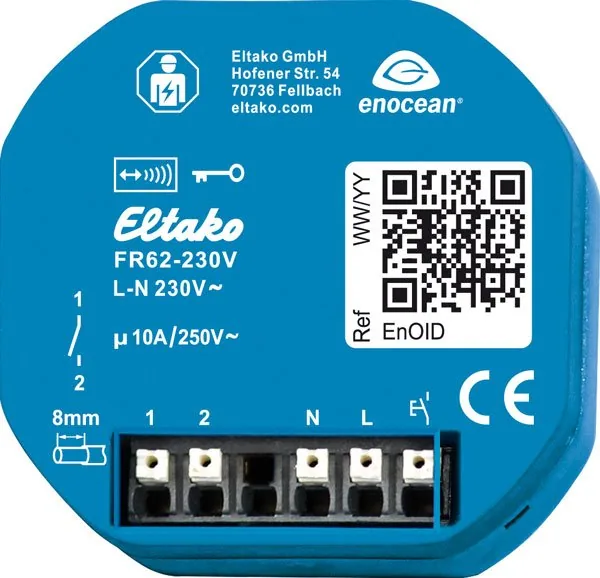
Wireless relay actuator
FR62-230V
GB
Temperature at mounting location:
-20°C up to +50°C.
Storage temperature: -25°C up to +70°C.
Relative humidity:
annual average value <75%.
30 100 540 - 2
Only skilled electricians may install this
electrical equipment otherwise there is
the risk of re or electric shock!
Wireless relay actuator 10 A/250 V AC.
1 NO contact or NC contact, potential free.
Standby loss only 0.4 watt.
For installation. 49x51 mm, 20 mm deep.
The terminals are plug-in terminals for
con-
ductor cross-sections of 0.2 mm
2
to 2.5 mm
2
.
Up to 32 wireless pushbuttons and wireless
window contacts can be taught in using
easy tap technology.
Bidirectional wireless switchable.
Distance between control terminals/
contact 6 mm.
Supply voltage, switching voltage and
control voltage local 230 V.
If supply voltage fails, the device is switched
off in dened mode. When the supply voltage
is restored, the device is switched off in a
dened process. After installation, wait
until the short automatic synchronisation
takes place before the switched user is
connected to the network.
In addition to the wireless control input via
an internal antenna, this wireless actuator
can also be controlled locally by a conven-
tional 230 V control switch if tted previously.
Glow lamp current is not permitted.
valid for devices from production week
18/21 (see bottom side of housing)
Typical connection
During teach-in, the function of the contact
in quiescent position is dened as NO or NC.
Closes the contact with at least one open
window; it can then activate extraction
hoods etc. or generate an alarm.
Opens the contact with at least one open
window: it can then switch off heaters or
air conditioners.
Several wireless window contacts are
linked together. The function is determined
by the last wireless window contact
which is taught in.
Start-up:
After you switch on the power supply, the
teach-in mode is automatically active for
2 minutes provided the memory content
is empty (as-delivered state) and/or the
teach-in mode is not blocked.
Readiness for teach-in is indicated by
briey switching the load on/off.
If no action takes place for 2 minutes,
teach-in mode ends automatically.
This is signalled by switching the load on
and off briey.
Teaching-in sensors:
Wireless pushbutton as NO contact:
tap briey 3 times;
Wireless pushbutton as NC contact:
tap briey 4 times;
Wireless window contact FTK, FTKB:
(EEP D5-00-01) as well as FTKE (EEP
F6-10-00) as NO
contact: Briey close
and open the window
3 times (close ->
open -> close -> open -> close -> open
window);
Wireless window contact FTK, FTKB:
(EEP D5-00-01) as well as FTKE (EEP
F6-10-00) as NC
contact: Briey close
andopenthe indo
4time (clo e
Wireless window handle sensor
FFG7B as NO contact: (EEP A5-14-09)
Wireless window/door contact FTKB-hg,
mTronic as NO contact: (EEP A5-14-0A)
Wireless window/door contact FFGB-hg
as NO contact: (EEP A5-14-01, -03, -0A)
Wireless window/door contact eTronic
as NO contact: (EEP A5-14-01)
GFVS: (EEP A5-38-08);
During the teaching-in of the GFVS, con-
rmation telegrams are switched on and
sent automatically.
Teaching-in a sensor, is conrmed by briey
switching the load on/off. The teach-in
mode is then active for a further 2 minutes.
To prevent unintentional teach-in, the
teach-in mode is automatically blocked
2 minutes after the last teach-in. This
is indicated by the load switched on/
off briey twice.
Unencrypted and encrypted sensors can
be taught in.
Teach in encrypted sensors:
1. Activate teach-in mode if necessary.
2. Activate sensor encryption within
2 minutes.
3. Then teach in the encrypted sensor as
described under 'Teach in sensors'.
With encrypted sensors, use the 'rolling
code', i.e. the code changes in each tele-
gram, both in the transmitter and in the
receiver.
If a sensor sends more than 50 telegrams
when the actuator is not active, the sensor
is no longer recognised by the active
actuator and must be taught in again as
'encrypted sensor'. It is not necessary to
teach in the function again.
Block teach-in mode immediately:
Tap 3 times briey and once long
(>2 seconds) on a wireless pushbutton
that is already taught in or the wireless
window contact.
With a wireless window contact, tapping
briey 3 times and once long = close ->
open -> close -> open -> close -> open ->
close long (>2 seconds)-> open window.
A block is indicated by switching the load
/fft i bi
A
block
is
indicated
by
switching
the
load
on/off twice briey.
Unblock teach-in mode:
Tap 4 times briey and once long
(>2 seconds) on a wireless pushbutton
that is already taught in, the local push-
button or the wireless window contact.
Briey close and open the window
4 times briey and 1 once long (close ->
open -> close -> open -> close -> open ->
close -> open -> long close (>2 seconds)
-> open window).
Readiness for teach-in is indicated by
briey switching the load on/off.
Teach in conrmation telegrams from
other actuators:
Unlock simplied learning mode:
1. Tap an already taught-in wireless push-
button (not central control pushbutton)
or the local wired button 4 times briey
plus 2 times long (> 2 seconds). The
readiness for teching-in is signaled by
briey switching the load on and off,
this mode is active for 30 seconds.
2. Switch the actuator, which its conr-
mation telegram has to be taught in, on
or off with its wired button. The auto-
matic locking is signaled immediately
after teaching-in by briey switching
the load on and off twice.
Conrmation telegram 'ON' (0x70 and
0x30) is taught-in as 'Central ON'.
Conrmation telegram 'OFF' (0x50 and
0x10) is taught-in as 'Central OFF'.
Clear memory content completely
(restore as-delivered state):
1. Switch power supply off/on.
2. Tap 8 times briey and once long
(>2 seconds) on a wireless pushbutton
that is already taught in, the local
pushbutton or the wireless window
contact.
Clear is indicated by switching the
load on/off briey.
3. Apply on 'Teach in wireless push button'.
Switch on/off conrmation telegrams:
1. Switch power supply off/on.
2. Tap 7 times briey and once long
(>2 seconds) on a wireless push button
that is already taught in, the local push-
button or the wireless window contact.
Frequency 868.3 MHz
Transmit power max. 10 mW
Hereby, Eltako GmbH declares that the radio
equipment type FR62-230V is in com-
pliance with Directive 2014/53/EU.
The full text of the EU declaration of
conformity is available at the following
internet address: eltako.com
Must be kept for later use!
Eltako GmbH
D-70736 Fellbach
Technical Support English:
+49 711 94350025
technical-support@eltako.de
eltako.com
14/2021 Subject to change without notice.
OFF is indicated by switching the load on/
off briey once.
F6 10 00)
as
NC
contact:
Briey
close
and open the window
4 times (close ->
open -> close -> open -> close -> open ->
close -> open window);
ON is indicated by switching the load on/
off briey twice.

Chat with your Eltako FR62-230V manual using AI

Get instant AI answers from your Eltako FR62-230V manual

Ask anything about the Eltako FR62-230V. Answers come from this manual, with the pages they are based on.

Ask a Question

0/1000

Do you recommend FR62-230V?

Yes No

Frequently Asked Questions

A

The device operates at a local 230 V supply voltage and switching voltage.

Is this answer helpful?

A

No, only skilled electricians may install this equipment to avoid risks of fire or shock.

Is this answer helpful?

A

Up to 32 wireless pushbuttons and wireless window contacts can be taught in easily.

Is this answer helpful?

A

The standby loss is minimal at only 0.4 watt for efficient power usage.

Is this answer helpful?

A

Yes, it supports encrypted sensors using rolling codes for security during transmission.

Is this answer helpful?

A

The operating frequency is 868.3 MHz for wireless transmission.

Is this answer helpful?

A

Temperature at mounting location is -20 to 50 C for operation range.

Is this answer helpful?

M: qwen/qwen3.5-flash-20260224

Advantages and Disadvantages

Advantages

  • Low standby power consumption of 0.4 watt for energy efficiency
  • Bidirectional wireless communication with up to 32 teachable sensors
  • Compact dimensions fitting standard back boxes easily
  • Flexible contact configuration for NO or NC applications
VS

Disadvantages

  • Installation is restricted to skilled electricians only
  • Specific wireless sensors required for full functionality
  • Glow lamp current usage is not permitted on terminals
M: qwen/qwen3.5-flash-20260224

Product Specification

Type

Actuator

Standard

EnOcean, Wireless Bus (868MHz)

Function

Switch Actuator (on/off)

Topology

Star/Mesh

Dimensions

1.93x2.01x0.79in

Features

IP20

M: qwen/qwen3.5-flash-20260224

Product Description

Eltako FR62-230V Wireless Relay Actuator Overview

The Eltako FR62-230V Wireless Relay Actuator stands out as a robust solution for modern home automation systems. Designed for seamless integration, this device allows users to control electrical loads remotely using wireless signals. It operates on a standard 230 V supply voltage, making it compatible with most household electrical infrastructures. The unit features a compact design measuring 49x51 mm with a depth of 20 mm. This small footprint ensures it fits easily into standard back boxes without taking up too much space.

Technical Specifications and Wireless Capabilities

One of the standout features of this actuator is its wireless bidirectional communication. It uses the 868.3 MHz frequency with a maximum transmit power of 10 mW. Users can teach up to 32 wireless pushbuttons and window contacts using the easy tap technology. This flexibility allows for a comprehensive control network. The standby loss is remarkably low at only 0.4 watt, contributing to energy efficiency. The device handles switching voltages of 10 A/250 V AC. It supports both Normally Open and Normally Closed contacts, providing flexibility for different applications such as alarms or heating control.

Installation and Safety Guidelines

Installation requires strict adherence to safety protocols. Only skilled electricians should install this equipment to prevent fire or electric shock risks. The terminals are designed for conductor cross-sections between 0.2 mm and 2.5 mm. Proper wiring ensures stable performance. The device includes a defined mode for supply voltage failure and restoration. After installation, a short automatic synchronisation period is required before connecting the switched user to the network.

Configuration and Usability

Configuring the unit involves a teach-in mode activated for two minutes upon power-up. The readiness for teach-in is indicated by briefly switching the load on or off. Users can define functions for window contacts to activate extraction hoods or switch off heaters. Block and unblock modes are available through specific tap sequences on already taught sensors. This ensures security against unintentional reconfiguration. Encrypted sensors support rolling codes to change codes in each telegram for added security protection during transmission. It also supports standard unencrypted sensors for legacy compatibility.

Important Notes

Glow lamp current is not permitted with this device. Devices produced from week 18/21 onwards comply with Directive 2014/53/EU. Regular maintenance checks are recommended to ensure continued safety and performance in varying temperatures ranging from -20 to 50 degrees C. The device automatically blocks teach-in mode two minutes after the last action to prevent accidental changes. Always verify contact status before final network connection.

M: qwen/qwen3.5-flash-20260224

© Copyright 2026 Manual.ly