

Eltako FJ62NP-230V Manual
PDF manual · 2 Pages
English



Quick check
Incorrect answer, please try again.
Chat with your Eltako FJ62NP-230V manual using AI
Get instant AI answers from your Eltako FJ62NP-230V manual
Ask anything about the Eltako FJ62NP-230V. Answers come from this manual, with the pages they are based on.
Ask a Question
Do you recommend FJ62NP-230V?
Yes NoFrequently Asked Questions
It operates on local 230 V AC supply voltage for switching and control.
Is this answer helpful?
The device allows teaching in up to 32 wireless universal pushbuttons.
Is this answer helpful?
No, only skilled electricians should install this equipment to avoid shock risk.
Is this answer helpful?
It automatically saves travel time to adjust shading element position accurately.
Is this answer helpful?
Yes, it works with GFVS software for position tracking and control.
Is this answer helpful?
Yes, a lockout protection disables down commands if a window sensor is triggered.
Is this answer helpful?
Power cycle and tap an existing button 8 times briefly then once long.
Is this answer helpful?
Advantages and Disadvantages
Advantages

- Supports up to 32 wireless pushbuttons for flexible control layouts.
- Low standby power consumption of 0.6 watt for energy savings.
- Includes tap reverse function to automatically adjust travel times accurately.
- Wire local control inputs compatible with universal or direction pushbuttons.
- Built-in safety lockout prevents commands when windows are open.
Disadvantages

- Installation must be performed by a skilled electrician for safety.
- Teach-in mode requires specific button sequences that may confuse users.
- Encrypted sensor setup adds complexity to initial configuration steps.
- Limited to 230 V AC supply voltage for regional compatibility issues.
- Cannot process incandescent lamp currents without additional components.
Product Specification
Type
Actuator
Standard
EnOcean, Wireless Bus (868 MHz)
Function
Switch Actuator (on/off), Blind Control
Topology
Bus
Dimensions
1.93x2.01x0.79 in
Features
IP20
Product Description
Transform Your Smart Home
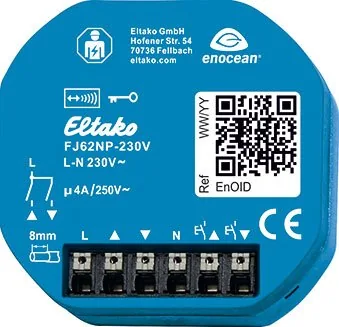
The Eltako FJ62NP-230V Wireless Blind/Roller Shutter Actuator represents a significant leap in modern home automation technology. Designed for seamless integration with existing electrical systems, this device allows homeowners to manage shading elements efficiently. With a compact form factor measuring only 49x51 mm, it fits easily into standard junction boxes without taking up excessive space. The system operates on 230 V AC, ensuring compatibility.
Wireless Connectivity and Flexibility
One of the standout features is the robust wireless technology integrated directly into the housing. Users can easily teach-in up to 32 wireless universal pushbuttons, direction pushbuttons, and central control pushbuttons. This flexibility means you can control your blinds from multiple locations. The device supports bidirectional wireless switching, allowing real-time feedback on the current shutter position so the system always knows the status. It switches off safely if voltage fails.
Installation and Safety Protocols
Installation strictly requires a skilled electrician due to the high risk of fire or electric shock if handled incorrectly. The terminals are plug-in types accommodating conductor cross-sections from 0.2 mm2 to 2.5 mm2. A notable safety feature is the tap reverse function, which adjusts travel time settings automatically. This ensures that the shading element stops exactly where needed. Additionally, a lockout protection feature disables central down commands if a window is open, preventing mechanical damage.
Technical Specifications and Performance
The actuator boasts an impressive standby loss of only 0.6 watt, contributing significantly to overall energy efficiency. It utilizes zero passage switching to minimize electrical noise. The internal antenna facilitates wireless communication at 868.3 MHz with a transmit power of max 10 mW for reliable signal strength. Control can be managed via local switches or through software like GFVS for precise travel time information. When paired with wireless window contacts, the system enhances security by preventing down commands during open states to protect the interior.
Practical User Notes
The device includes an automatic teach-in mode upon startup if memory is empty, signaling readiness. Users can lock or unlock teach-in modes using specific touch sequences on pushbuttons to prevent accidental reprogramming. Encrypted sensors are supported via rolling codes to ensure increased security against interception. Always keep the housing information for later reference. This equipment is compliant with EU Directive 2014/53/EU standards for radio equipment.
Search for 67,706 Manuals online


Type-in Brand or Model