

Eltako FHK61U-230V Manual
PDF manual · 2 Pages
English



Quick check
Incorrect answer, please try again.
Chat with your Eltako FHK61U-230V manual using AI
Get instant AI answers from your Eltako FHK61U-230V manual
Ask anything about the Eltako FHK61U-230V. Answers come from this manual, with the pages they are based on.
Ask a Question
Do you recommend FHK61U-230V?
Yes NoFrequently Asked Questions
It is a wireless relay actuator for controlling heating or cooling equipment from compatible radio temperature controllers and sensors. It can switch loads up to 10 A at 250 V AC and supports room-based climate automation.
Is this answer helpful?
The actuator offers heating PWM modes with 4-minute and 15-minute cycles, heating two-point control, cooling PWM with a 15-minute cycle, and cooling two-point control. The selected mode should match the response behavior of the connected valves or equipment.
Is this answer helpful?
In heating operation, frost protection is always active. When the measured temperature drops below 8 C, the actuator regulates toward 8 C even if the output has otherwise been switched off or an open-window condition is present.
Is this answer helpful?
Yes. When compatible window or door contacts, or supported window handles, are learned into the actuator, the output remains off while one or more windows are open. Frost protection remains active in heating mode.
Is this answer helpful?
Yes. Units from production week 11/14 onward can learn encrypted sensors using a rolling-code method. Encrypted sensor setup requires a dedicated activation sequence and must be completed while power remains connected.
Is this answer helpful?
After more than one hour without a sensor telegram, the LED indicates fault mode. In heating modes, the actuator uses timed fallback switching. In cooling mode, it switches off. Normal operation resumes automatically when communication returns.
Is this answer helpful?
Advantages and Disadvantages
Advantages

- Combines heating and cooling control in one compact flush-mounted 230 V actuator.
- Supports PWM and two-point control to suit thermal and motorized valve applications.
- Works with temperature sensors, contacts, motion detectors, pushbuttons, and window handles.
- Offers encrypted, bidirectional 868.3 MHz radio communication and optional repeater operation.
- Provides frost protection, open-window shutdown logic, occupancy setback, and relay status feedback.
Disadvantages

- Installation requires a qualified electrician because the actuator operates from 230 V mains.
- Only one temperature sensor can be learned at a time; adding another replaces the prior sensor.
- Encrypted sensors may require re-learning after extended transmitter activity while the actuator is inactive.
- Configuration relies on rotary switches and LED signals, which may be less convenient than app-based setup.
- Cooling fault mode switches the output off when sensor telegrams are absent for over one hour.
Product Specification
Type
Actuator
Standard
EnOcean, wireless bus (868 MHz)
Function
Switching actuator (on/off), temperature
Topology
Bus
Dimensions
1.77 x 1.77 x 1.3 in
Product Description
Eltako FHK61U-230V Radio Actuator Heating-Cooling Relay, Switching Actuator - Read, Download & Print Free
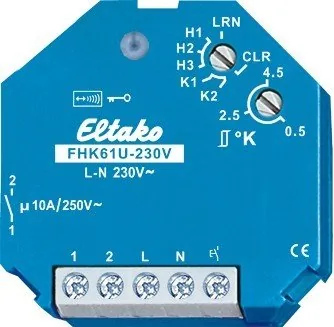
The Eltako FHK61U-230V Radio Actuator Heating-Cooling Relay is a compact switching actuator designed to manage heating and cooling systems through wireless temperature control. Built for flush-mounted installation, it combines a potential-free relay contact with dependable radio communication, making it suitable for modern room-by-room climate control installations.
Operating from a 230 V supply, the unit provides a 10 A / 250 V AC switching capacity while consuming only 0.8 W in standby. Its compact 45 x 45 x 33 mm housing helps it fit into space-conscious electrical installations. The actuator retains its switching state during a power failure and returns to a defined off state when supply voltage is restored, supporting predictable system behavior after interruptions.
Flexible heating and cooling control
The FHK61U-230V evaluates signals from compatible wireless temperature controllers and sensors. It can also work with window and door contacts, motion detectors, wireless pushbuttons, and compatible window handles. This allows an installation to respond not only to room temperature but also to occupancy and open-window conditions.
For heating, the actuator offers frost protection that regulates toward 8 C when the measured temperature falls below this threshold. If paired window or door contacts report an open opening, the output is switched off while frost protection remains active in heating mode. Motion detectors can trigger setback operation when no movement is detected, reducing the target temperature by 2 C for heating or increasing it by 2 C for cooling.
Selectable control methods
Multiple operating modes let installers match control behavior to the connected system. Heating modes include pulse-width modulation with 4-minute or 15-minute cycles, plus two-point control. Cooling modes provide 15-minute pulse-width modulation and two-point control. Pulse-width modulation is particularly useful for matching output cycles to the response characteristics of thermal or motorized valve actuators.
An adjustable rotary setting provides a hysteresis range from 0.5 C to 4.5 C in 0.5 C steps. In PWM operation, this setting defines the temperature difference at which the output reaches 100 percent duty cycle. This creates a practical way to tune performance for radiator size, system inertia, and room comfort requirements.
Wireless integration and feedback
The actuator supports encrypted sensors, bidirectional radio communication, and an optional repeater function. Each change of the relay contact can be confirmed by a radio telegram. These confirmation signals can be learned by other compatible actuators or GFVS software, such as for synchronizing a circulation pump with heating valve activity.
A fault mode improves operational awareness when no temperature-sensor telegram is received for more than one hour. The LED indicates the condition, and heating modes use timed fallback switching while cooling switches off. Once sensor communication returns, normal operation resumes automatically.
Note: Installation on 230 V circuits must be performed by a qualified electrician. Allow the automatic synchronization process to finish before connecting switched loads to the mains.
Search for 67,706 Manuals online


Type-in Brand or Model