
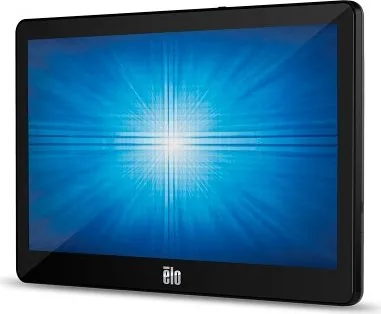
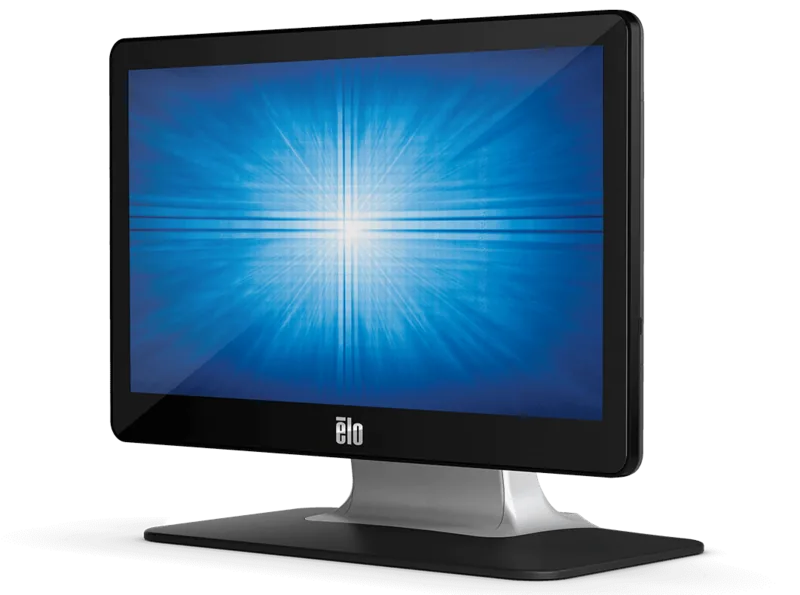
Elo Touch Solutions ET1302L Manual
PDF manual · 35 Pages
English



Quick check
Incorrect answer, please try again.
Chat with your Elo Touch Solutions ET1302L manual using AI
Get instant AI answers from your Elo Touch Solutions ET1302L manual
Ask anything about the Elo Touch Solutions ET1302L. Answers come from this manual, with the pages they are based on.
Ask a Question
Do you recommend ET1302L?
Yes NoFrequently Asked Questions
The native resolution is Full HD 1920 x 1080 pixels. This ensures sharp images and text clarity when the computer output matches the monitor specifications.
Is this answer helpful?
Yes, provided the source supports Power Delivery. You can use a dedicated USB-C to Type-C cable to handle video and power simultaneously for simpler setups.
Is this answer helpful?
No, built-in HID drivers work with Windows 10 and newer. Drivers are only required for older operating systems like Windows XP to enable touch functionality.
Is this answer helpful?
Access the On-Screen Display menu using the rear buttons. Navigate to the luminance submenu to increase or decrease screen brightness levels as needed.
Is this answer helpful?
Yes, the three-year warranty covers defects. Contact local authorized dealers for assistance within your region regarding claim procedures.
Is this answer helpful?
Touching the screen or moving the mouse will bring the host PC out of sleep mode. The power status LED indicates the current state for the user.
Is this answer helpful?
Advantages and Disadvantages
Advantages

- Supports 10 simultaneous touches for collaborative use
- LED backlight reduces power consumption significantly
- VESA mounting compatible for flexible installation
- USB Type-C supports video and power delivery
- No calibration required for projected capacitive tech
Disadvantages

- Some configurations require specific power adapters
- VGA input needs manual clock phase adjustment
- Built-in speaker volume is locked at default 70
- USB-C power delivery depends on source laptop capability
- Stand position must be manually adjusted physically
Product Specification
Diagonal
13.3 in / 34 cm
Resolution
1920x1080, 16:9
Brightness
270 cd/m2
Contrast
800:1 (static), N/A (dynamic)
Response Time
25 ms
Viewing Angle
170 deg / 170 deg
Backlight
White-LED
HDR
N/A
Refresh Rate
60 Hz
Signal Frequency
30-75 kHz (horizontal), N/A (vertical)
Other Connectors
4x USB 2.0 Micro-B (480 Mb/s)
Ergonomics
N/A
VESA
75x75 (mounted)
Power Consumption
N/A (max), 9.8 W (typical), 10 W (Old energy label A+++ to G), 0.8 W (standby)
Old Energy Efficiency Class (A+++ to G)
A
Annual Consumption Old (A+++ to G)
14.60 kWh
Energy Efficiency Class SDR (A to G)
E
Energy Consumption SDR
9 kWh / 1000 h
Manufacturer Warranty
3 Years
Product Description
Enhancing Interaction with the Elo Touch Solutions 1302L
The Elo Touch Solutions 1302L represents a pinnacle of interactive display technology designed specifically for high-traffic environments. This monitor integrates advanced projected capacitive touch technology with a stunning full HD display suitable for diverse professional applications. Whether deployed in retail stores, hospitality venues, or enterprise offices, the unit offers reliable performance powered by an efficient LED backlight. This lighting technology significantly reduces energy consumption compared to older CCFL panels while eliminating mercury concerns entirely within the design.
Key Features and Connectivity
One of the standout aspects of this hardware is the extensive connectivity options. The monitor supports HDMI, VGA, and USB Type-C inputs, making it incredibly versatile for various setups. USB Type-C enables video, touch data, and even power delivery depending on the host capabilities. This flexibility simplifies cabling infrastructure and enhances the overall user experience. The display panel delivers 1920 x 1080 native resolution, ensuring crisp visuals for detailed graphics or small text.
Installation and Mounting Flexibility
Setting up the screen is straightforward with the included accessories provided. The stand can be adjusted between a low profile hostess position and a high profile upright position, offering ergonomic flexibility for different users to choose. VESA mounting interfaces are also provided on the rear, allowing for wall or pole installations where space is limited. Refer to the official Elo Touch Solutions 1302L Manual for detailed wiring diagrams and pinout specifications.
Operation and Maintenance Protocol
The touch interface supports up to ten simultaneous touches, which is ideal for collaborative tasks or multi-user applications. No manual calibration is required for the projected capacitive technology, ensuring consistent operation across Windows and Mac OS environments. Maintenance is simple; use a damp cloth for the cabinet and glass cleaner for the screen. Never use abrasive chemicals that could damage the surface. Regularly check ventilation slots to maintain optimal operating temperatures between zero and forty degrees C.
Reliability and Warranty Coverage
Built for durability, this unit comes with a three-year warranty covering defects in materials and workmanship. It meets various international regulatory standards including FCC and CE compliance, ensuring safety and performance for all users. The monitor also includes software features like panel savers to prevent image sticking during long idle periods of operation. With these robust features, the Elo Touch Solutions 1302L remains a top choice for professional interactive displays requiring stability.
Notes: Always use certified power adapters to maintain warranty conditions effectively. Ensure environmental humidity stays within the specified non-condensing range at all times.
Search for 67,706 Manuals online


Type-in Brand or Model