
Elmo CRB-1 Manual
PDF manual · 36 Pages
English



Quick check
Incorrect answer, please try again.
Chat with your Elmo CRB-1 manual using AI
Get instant AI answers from your Elmo CRB-1 manual
Ask anything about the Elmo CRB-1. Answers come from this manual, with the pages they are based on.
Ask a Question
Do you recommend CRB-1?
Yes NoFrequently Asked Questions
It is used to add interactive pen control to a whiteboard, LCD TV, or projected screen. The system lets users draw, click, and navigate content in a more hands-on way for teaching or presenting.
Is this answer helpful?
It can work with a computer running compatible ELMO software, and it can also be used with supported document camera setups. The exact workflow depends on the connected device and software environment.
Is this answer helpful?
Yes. The system uses a wireless unit and wireless adapter to connect the sensor and the computer or document camera setup without a direct cable between them, which helps keep the workspace neat.
Is this answer helpful?
Yes. Calibration is needed when you first use the system and whenever the screen size changes. It aligns the pen position with the display so pointing and drawing stay accurate.
Is this answer helpful?
No. The CRB-1 is designed for indoor use only. It should be used in the recommended temperature and humidity range for reliable performance.
Is this answer helpful?
The pen uses one AA alkaline battery. Rechargeable batteries are not recommended, and the battery should be removed if the device will not be used for a long time.
Is this answer helpful?
Common causes include poor sensor placement, calibration issues, low battery power, wireless interference, or an unsuitable environment such as strong infrared light, temperature changes, or unstable mounting.
Is this answer helpful?
Advantages and Disadvantages
Advantages

- Turns a whiteboard, LCD TV, or projection screen into an interactive workspace.
- Wireless design reduces clutter and gives more freedom around the teaching area.
- Pen input works like a mouse, making navigation and drawing intuitive.
- Can be used with a computer or compatible document camera setup.
Disadvantages

- Requires careful sensor placement and calibration for accurate use.
- Indoor-only design limits where the system can be deployed.
- Wireless performance can be affected by interference or nearby devices.
- The pen depends on AA batteries and should not use rechargeable cells.
Product Specification
Type
Pen
Product Description
Elmo CRB-1 Interactive Pen: A Portable Way to Make Any Surface Smarter
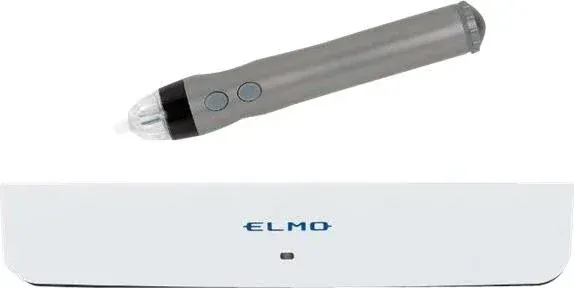
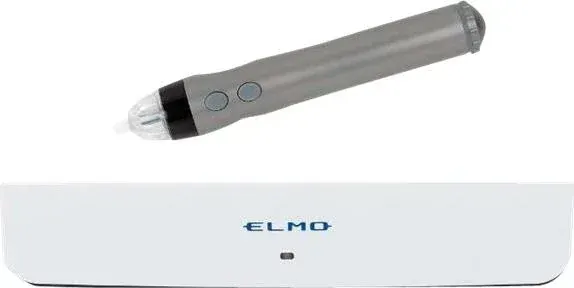
The Elmo CRB-1 interactive pen manual reveals a compact system designed to turn familiar display surfaces into an interactive workspace. With its sensor, wireless unit, adapter, and pen, the CRB-1 helps transform a whiteboard, LCD TV, or projected screen into a responsive teaching and presentation tool. It is a practical choice for classrooms, meeting rooms, and training spaces where flexibility matters.
At the heart of the system is a simple idea: keep the setup portable while still offering precise pen control. The pen behaves like a mouse, letting users click, draw, and navigate on-screen content with natural hand movements. When paired with ELMO software or a compatible document camera, the CRB-1 becomes more than a pointing device—it becomes a bridge between traditional presentation surfaces and digital interaction.
One of the strongest points of the CRB-1 is its wireless workflow. The included wireless unit removes the need for a cable between the sensor and the computer, helping keep the work area tidy and open. This makes it easier to move around the board and maintain a clean setup during lessons or presentations. The system also supports calibration, so the pen can match the screen area accurately after installation or after any change in screen size.
The product is built for indoor use and expects careful setup. The sensor should be aligned with the screen, mounted at the correct height, and kept within the recommended distance from the writing surface. Once configured properly, the experience feels smooth and responsive. For best results, users should also pay attention to battery health, wireless pairing, and environmental conditions such as temperature and interference.
This makes the CRB-1 especially appealing for users who want a portable interactive whiteboard solution without replacing their existing display equipment. It is not a flashy gadget; it is a focused tool that delivers practical classroom and office value. If you are researching the Elmo CRB-1 interaktiver Stift Manual, the key takeaway is that the system rewards careful setup with reliable, pen-based interaction.
Notes
- Indoor use only.
- Use the supplied wireless adapter and AA alkaline battery.
- Calibration is essential after first setup or screen changes.
- Avoid strong wireless interference and unstable mounting surfaces.
Search for 67,706 Manuals online


Type-in Brand or Model