
Elecom EX-G M-XT4DR Manual
PDF manual · 2 Pages
English



Quick check
Incorrect answer, please try again.
Chat with your Elecom EX-G M-XT4DR manual using AI
Get instant AI answers from your Elecom EX-G M-XT4DR manual
Ask anything about the Elecom EX-G M-XT4DR. Answers come from this manual, with the pages they are based on.
Ask a Question
Do you recommend EX-G M-XT4DR?
Yes NoFrequently Asked Questions
It lets you control the pointer with a trackball instead of moving the whole mouse, which can feel more stable and comfortable during long sessions.
Is this answer helpful?
Not fully. The six function buttons are unassigned at purchase, so you need ELECOM Mouse Assistant to customize them and unlock extra functions.
Is this answer helpful?
The mouse supports switchable 750 dpi and 1500 dpi modes, letting you choose between finer control and faster pointer movement.
Is this answer helpful?
It supports Windows 10, 8.1, RT 8.1, 7, Vista, and Macintosh OS X 10.10, though compatibility is not guaranteed for every setup.
Is this answer helpful?
It uses one AA battery and works with alkaline, manganese, or rechargeable nickel-metal hydride AA batteries.
Is this answer helpful?
It works best on non-magnetic surfaces like wood. On metal surfaces, the range is shorter, and interference can also affect performance.
Is this answer helpful?
Advantages and Disadvantages
Advantages

- Six configurable function buttons support a personalized workflow.
- Switchable 750/1500 dpi gives users a choice between precision and speed.
- 2.4 GHz wireless design keeps the desk cleaner and reduces cable clutter.
- AA battery support is flexible, including rechargeable options.
Disadvantages

- Buttons have no default assignments, so setup is needed before full use.
- Wireless range is shorter on metal surfaces and may vary with interference.
- Compatibility is not guaranteed across every device, OS version, or app.
- The device is not waterproof, so it needs careful handling and storage.
Product Specification
Type
Trackball
Buttons
6
Connectivity
wireless (2.40GHz)
Power supply
1x AA
Dimensions (WxHxD)
3.74x1.89x4.88in
Weight
0.28 lb
Special features
storable receiver, for left-handers, Omron switches, battery level indicator
Product Description
Elecom EX-G M-XT4DRBK / EX-G M-XT4DRBK-G: A Practical Wireless Trackball for Everyday Control
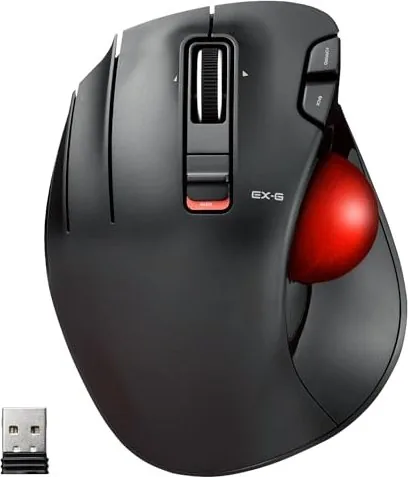
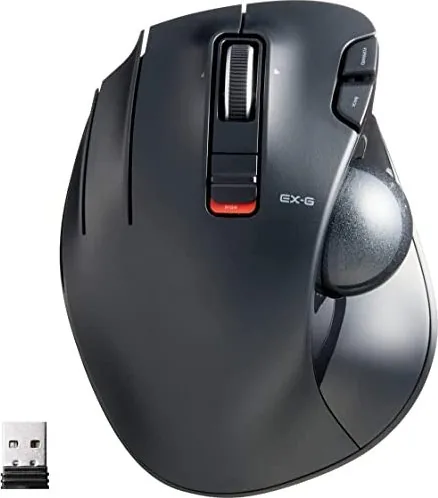
The Elecom EX-G M-XT4DRBK / EX-G M-XT4DRBK-G is a wireless trackball mouse built for people who want precise cursor control without constantly moving a traditional mouse around the desk. Its compact body, thumb-friendly layout, and steady trackball operation make it a smart fit for long work sessions, editing tasks, and general productivity. If you are looking up the Elecom EX-G M-XT4DRBK / EX-G M-XT4DRBK-G Manual, the main story is simple: this device is designed to combine comfort, speed, and customization in one tidy package.
One of its most useful strengths is flexibility. The device includes 6 function buttons, and while none of them are assigned at purchase, they can be customized with ELECOM Mouse Assistant. That software also unlocks high-speed scrolling and button assignment features, helping users tailor the experience to their workflow. For people who spend time browsing, organizing files, or switching between apps, those extra controls can save a surprising amount of time.
Performance is another highlight. The sensor offers switchable 750/1500 dpi resolution, so users can choose between smoother control and faster movement. The 2.4 GHz wireless connection uses a USB receiver and supports a range of up to about 10 meters on non-magnetic surfaces, making it convenient for desks, workstations, and home setups. Battery support is also practical, with compatibility for AA alkaline, manganese, and rechargeable nickel-metal hydride batteries.
The trackball is compatible with Windows and Mac systems, though the notes make it clear that full compatibility cannot be guaranteed for every device or app. That is why this model is best appreciated as a dependable everyday tool rather than a one-size-fits-all solution. For users who value a stable hand position, reduced arm movement, and customizable buttons, it offers a compelling balance of comfort and control.
Notes
- Button functions are not assigned by default.
- Wireless range may drop on metal surfaces.
- Keep the unit dry; it is not waterproof.
- Remove the receiver or battery during long storage.
Search for 67,732 Manuals online


Type-in Brand or Model