
EK Water Blocks EK-Quantum Power2 Kit D-RGB P360 AM5 Manual
PDF manual · 39 Pages
English



Quick check
Incorrect answer, please try again.
Chat with your EK Water Blocks EK-Quantum Power2 Kit D-RGB P360 AM5 manual using AI
Get instant AI answers from your EK Water Blocks EK-Quantum Power2 Kit D-RGB P360 AM5 manual
Ask anything about the EK Water Blocks EK-Quantum Power2 Kit D-RGB P360 AM5. Answers come from this manual, with the pages they are based on.
EK-Quantum Power2 Kit D-RGB P360 AM5 Maintenance Schedule
Clean the dust every 2-3 months using a vacuum cleaner or compressed air. Turn off the computer and unplug the power supply before cleaning.
Once a year, verify that the pump and fans run silently without rattling and react correctly to PWM changes.
Drain the loop, flush the radiator, check and clean the pump, and change the tubing annually.
Free maintenance reminders
Timed to your purchase date. Always free, unsubscribe anytime.
Ask a Question
Do you recommend EK-Quantum Power2 Kit D-RGB P360 AM5?
Yes NoFrequently Asked Questions
Yes, the water block supports both AMD AM5 and Intel LGA 1700 platforms upon modification or initial setup configuration.
Is this answer helpful?
No, you must use distilled water mixed with the provided concentrate. Tap water can damage internal components significantly.
Is this answer helpful?
It is best practice to run the pump for at least twenty-four hours to ensure the system is leak-free before final assembly.
Is this answer helpful?
Fans connect to headers for PWM control using included splitter cables. They require proper orientation with female and male connectors.
Is this answer helpful?
Yes, the system allows loop expansion. You can add GPU blocks or extra radiators to support high-end components.
Is this answer helpful?
Connect the D-RGB header to the motherboard. Ensure it is a 5V header and do not use 12V headers to avoid damage.
Is this answer helpful?
Advantages and Disadvantages
Advantages

- Comprehensive kit with pump-reservoir combo and radiator
- Supports both AMD AM5 and Intel LGA 1700 sockets
- Integrated D-RGB lighting for synchronized system aesthetics
- Includes fittings and coolant concentrate for immediate setup
- Allows for future loop expansion with additional components
Disadvantages

- Requires a 24-hour leak test before full usage
- Installation complexity may deter novice builders
- Distilled water is mandatory for the cooling loop
- Potential warranty risk if installation is improper
- Alcohol-based solvents must not be used for cleaning
Product Specification
Type
Kit
Heatsink
CPU, Copper
Compatibility
AM5
Radiator
14.17 in (Radiator Class), 1.73 in (Radiator Height), Copper
Fan
3x 4.72 x 4.72 x 1.06 in, 500-2300rpm, 77 CFM, 36dB(A), 0.11 inH2O, 3W, hydrodynamic bearing (FDB) (EK-Loop Fan FPT 120 D-RGB, Link)
Reservoir
6.93 fl oz
Pump
12V, 396.26 gal/h, 12.80 ft
Connectors
G1/4"
Lighting
LED (RGB)
Manufacturer Warranty
2 Years
Product Description
High Performance Liquid Cooling
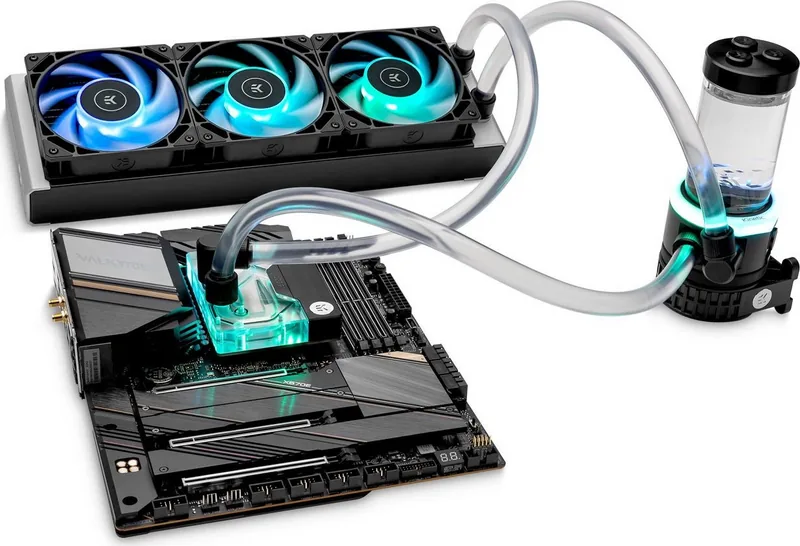
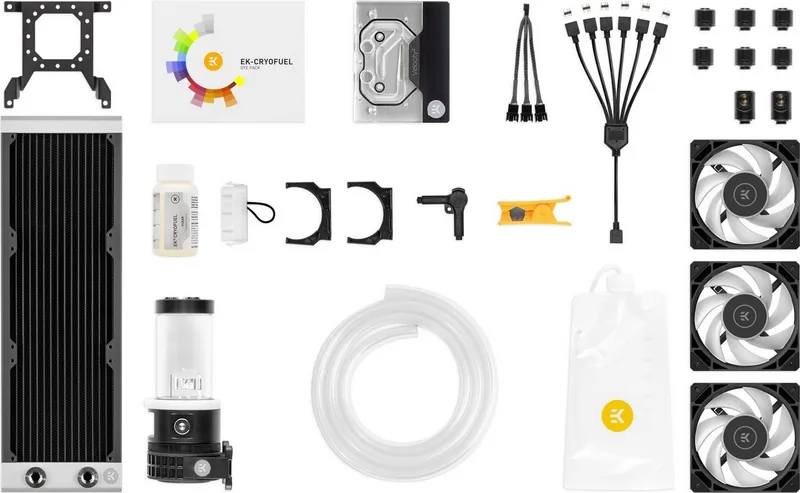
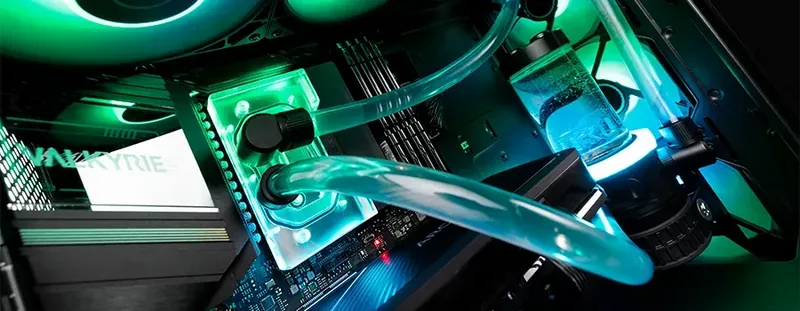
Unlock ultimate cooling performance with the EK Water Blocks Quantum Line EK-Quantum Power 2 Kit D-RGB P360 AM5. This comprehensive set is designed for PC enthusiasts seeking efficient thermal management and aesthetic appeal. The kit includes a pre-assembled pump-reservoir combo, a 360mm radiator, three high-static pressure fans, and a compatible CPU block for AMD AM5 sockets. Integration of D-RGB lighting allows for synchronized visuals across your build. Custom liquid cooling solutions are vital for high-performance computing setups that generate significant heat. Setup is streamlined for modern hardware requirements. The CPU block supports both AM5 and Intel LGA 1700 platforms, ensuring broad compatibility for recent processors. Installation involves securing the block to the motherboard with provided thermal pads and screws. The pump unit features a large reservoir for easy coolant filling and system priming. Users must connect fans to headers for PWM control. Electrical wiring is straightforward with included splitter cables. All connections are designed to minimize clutter inside the chassis. Use a torque screwdriver for optimal tightness values to prevent cracking. Safety is paramount during the build process. Keep the product away from children and check components before starting. If issues arise, contact the shop for a replacement. Using alcohol on components can cause permanent damage. Optimize tube length to prevent bending. Never run the pump dry to avoid bearing failure. Periodically clean the radiator assembly to prevent dust collection. It is best practice to use a soft brush for cleaning fans and radiators. Fluid management is critical for system longevity and safety. The package includes a concentrate coolant. You must mix this with one liter of distilled water from the store. Tap water can damage internal components significantly. Always perform a twenty-four-hour leak test before final assembly to ensure integrity. This ensures no fluid escapes during operation and protects expensive hardware. Proper tube routing prevents kinks that restrict flow and pump strain. Maintenance involves regular dust removal using compressed air or a vacuum cleaner. Cleaning the radiator optimizes airflow and heat dissipation rates. Install fittings on G1/4 openings of the radiator. Use the provided compression fittings carefully. Ensure ports are closed on unused ports. Connect the pump to the PSU safely. For RGB, connect the D-RGB header carefully. Do not use 12V RGB headers. Fill the system while the pump runs to bleed air. Monitor the levels closely. Tilt the chassis to release trapped air bubbles. Draining the loop is straightforward for maintenance. Expand the loop with additional GPU blocks later. For advanced users, the system allows loop expansion with relative ease. Adding a GPU block or extra radiator is possible for maximum efficiency. This flexibility supports high-end graphics processing units and multiple components simultaneously. The included fittings make connections secure and prevent leaks. Safety precautions advise proper training before installation to avoid voiding warranty. Damage claims may be voided by improper use or untrained individuals. The kit offers a two-year warranty for peace of mind. Trust in quality components for a silent and cool system running for years. Include tools to assist in assembly tasks. Ensure all screws are tightened in a cross pattern.
Search for 67,706 Manuals online


Type-in Brand or Model