
EK Water Blocks EK-AIO 120 D-RGB Manual
PDF manual · 84 Pages
English



Quick check
Incorrect answer, please try again.
Chat with your EK Water Blocks EK-AIO 120 D-RGB manual using AI
Get instant AI answers from your EK Water Blocks EK-AIO 120 D-RGB manual
Ask anything about the EK Water Blocks EK-AIO 120 D-RGB. Answers come from this manual, with the pages they are based on.
Ask a Question
Do you recommend EK-AIO 120 D-RGB?
Yes NoFrequently Asked Questions
It supports Intel LGA 115x and LGA 20xx sockets, including LGA 2066, 2011 V3, and 2011, plus AMD AM4. Verify your motherboard socket before installation.
Is this answer helpful?
Yes. The cold plate has pre-applied thermal compound for the first installation, and the package also includes a 1 g tube of EK-TIM Ectotherm. Use additional paste only for remounting or if the pre-applied layer is damaged.
Is this answer helpful?
Use a 3-pin 5 V D-RGB header with the layout +5V, Digital, Empty, Ground. Some compatible motherboards may also support a VDG connection. Do not use a 12 V 4-pin RGB header.
Is this answer helpful?
The included 120 mm PWM fan runs at 600 to 2200 RPM, provides up to 77 CFM airflow, uses a fluid dynamic bearing, and has a listed noise level of 33.5 dB.
Is this answer helpful?
Connect the pump's 4-pin PWM cable to a motherboard header. Connect its separate 3-pin D-RGB cable only to a compatible 5 V digital RGB header, ensuring the connector arrow aligns with +5 V.
Is this answer helpful?
No. Intel LGA 115x installations use the included backplate. Intel LGA 20xx motherboards do not require it because their integrated latch mechanism provides the required mounting points.
Is this answer helpful?
Advantages and Disadvantages
Advantages

- Compact 120 mm radiator fits cases that support a single 120 mm fan mount.
- PWM fan operates from 600 to 2200 RPM and delivers up to 77 CFM airflow.
- PWM pump range of 450 to 2600 RPM supports adaptable cooling behavior.
- Supports Intel LGA 115x, LGA 20xx, and AMD AM4 mounting platforms.
- Includes 5 V 3-pin D-RGB lighting for the pump and EK-Vardar fan.
Disadvantages

- The 120 mm format may offer less cooling headroom than the 240 mm and 360 mm versions.
- Installation is intended for experienced users and incorrect mounting can damage components.
- D-RGB must not be connected to a standard 12 V RGB header.
- Compatibility is limited to the listed Intel and AMD socket families.
- Some LGA 115x installations may require motherboard removal if the case lacks a rear CPU cutout.
Product Specification
Type
internal (closed system)
Heatsink
CPU, copper
Compatibility
1150, 1151, 1155, 1156, 1200, 1700 (see note), 2011-0, 2011-1, 2011-3, 2066, AM2, AM2+, AM3, AM3+, AM4, AM5, FM1, FM2, FM2+
Radiator
4.72 in (radiator class), 1.06 in (radiator height), aluminum
Fan
1x 4.72 x 4.72 in, 600-2500 rpm, 87.69 CFM, 87.69 CFM, 38.4 dB(A)
Reservoir
N/A
Pump
12 V
Connections
G1/4"
Lighting
LED (RGB)
Manufacturer warranty
5 years
Note
Caution! Mounting kit for socket 1700 may not yet be included. 1700 upgrade kit available
Product Description
EK Water Blocks EK-AIO 120 D-RGB - Read, Download & Print Free
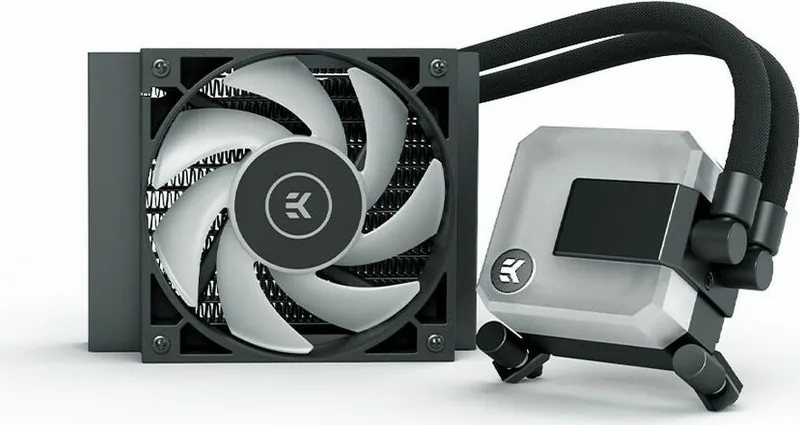
The EK Water Blocks EK-AIO 120 D-RGB is a compact all-in-one liquid CPU cooler designed for builders who want dependable thermal management, PWM control, and customizable digital RGB lighting in a 120 mm radiator format. It combines an integrated pump and cold plate assembly with an EK-Vardar S 120ER D-RGB fan, creating a neat cooling solution for space-conscious gaming PCs, workstations, and performance-oriented everyday systems.
Compact Cooling With PWM Control
The 155 x 120 x 30 mm radiator is suited to cases with a single 120 mm fan mount. Its aluminum and copper fin construction is paired with a 120 x 120 x 25 mm fan capable of 600 to 2200 RPM through PWM control. With up to 77 CFM of airflow, the cooler can adapt its fan speed to workload demands, helping users balance cooling performance and acoustics.
The pump also supports PWM adjustment, operating from 450 to 2600 RPM. EK rates the pump noise level at 23 dB, while the fan is rated at 33.5 dB. Both components list a 50,000-hour life expectancy, making the unit a practical option for a long-term system build when installed and maintained correctly.
Socket Support and Straightforward Hardware
EK includes mounting hardware for Intel LGA 115x and LGA 20xx platforms, plus AMD AM4. Intel LGA 115x installations use the supplied backplate, while LGA 20xx boards use their integrated mounting arrangement. AMD AM4 installation retains the original AMD backplate after removing the stock plastic retention brackets.
The package includes the cooler, an EK-Vardar D-RGB fan, mounting brackets, springs, thumb nuts, screws, a fan Y-splitter, and EK-TIM Ectotherm thermal paste. Thermal compound is pre-applied to the cold plate for an initial installation. The additional paste is intended for remounting or replacing damaged pre-applied compound.
D-RGB Lighting Considerations
The pump and fan use 3-pin 5 V D-RGB connections, enabling compatible motherboard lighting control. Multi-fan versions can use daisy-chain lighting connections, while PWM fan connections can be combined through the included Y-splitter. Carefully verify the header layout before connecting lighting cables.
Note: Never connect the 3-pin 5 V D-RGB connector to a standard 12 V RGB header. Align the connector arrow with the motherboard's +5 V pin to avoid damage to LEDs or motherboard components.
Installation note: Tighten the pump thumb nuts gradually in a cross pattern, and avoid touching the pre-applied thermal compound after removing the cold-plate cover. This cooler is intended for experienced users or installation by a qualified technician.
Search for 67,706 Manuals online


Type-in Brand or Model
Luca Bernardi
6 months ago
Is the 120 mm EK AIO noisy, especially the pump and radiator fan, and can its RGB be controlled through the motherboard?
Manual.ly
6 months ago
Noise levels can vary by installation and fan curve. The pump and ARGB fans can be connected to compatible motherboard headers or an ARGB controller, with software such as MSI Mystic Light used for lighting control. For lower noise, check that the pump is securely mounted, avoid trapped air, and set an appropriate PWM fan curve in the BIOS or motherboard software. Cooling performance should be substantially better than a stock air cooler, although larger radiators generally offer better temperatures and potentially lower fan speeds.