
Eizo PCSK-03R Manual
PDF manual · 1 Pages
English


Quick check
Incorrect answer, please try again.
Chat with your Eizo PCSK-03R manual using AI
Get instant AI answers from your Eizo PCSK-03R manual
Ask anything about the Eizo PCSK-03R. Answers come from this manual, with the pages they are based on.
Ask a Question
Do you recommend PCSK-03R?
Yes NoFrequently Asked Questions
The net weight of the Eizo Thin Client Bracket is approximately 0.5 kg.
Is this answer helpful?
The package includes M4x8 screws and thumb screws, but you must verify if they match your specific PC model's requirements.
Is this answer helpful?
You can download the installation manual from the official EIZO global website at www.eizoglobal.com.
Is this answer helpful?
No, this bracket is specifically designed for the FlexStand 3R Stand and compatible monitors listed in the manual.
Is this answer helpful?
Different PC models require different screw types and numbers. Always follow the specific guidelines for your computer.
Is this answer helpful?
Advantages and Disadvantages
Advantages

- Reduces desk clutter by mounting PC behind monitor
- Lightweight design at approximately 0.5 kg
- Compatible with various compact PC models
- Professional black finish matches most monitors
- Uses standard M4x8 screws for easy adjustment
Disadvantages

- Screw requirements vary by PC model
- Requires separate download of installation manual
- Not suitable for all monitor stand types
- Installation complexity depends on PC hardware
- Limited to compact form factor computers
Product Specification
Type
Mini-PC Mount
Compatibility
Eizo (FlexStand 3R, EV2460, EV2360, DuraVision DX0211-IP), Dell (Wyse 3010TC, Wyse 5010TC, Wyse 5030PCoIP), HP (t310 Zero Client, t310 G2 Zero Client, t520 Thin Client, t530 Thin Client, Z2 Mini G4 Workstation, Z2 Mini G3 Workstation), Lenovo (ThinkStation P320 Tiny)
VESA
75x75/100x100
Weight
1.1 lbs
Color
Black
Product Description
Eizo Thin Client Bracket for FlexStand 3R Stand Overview
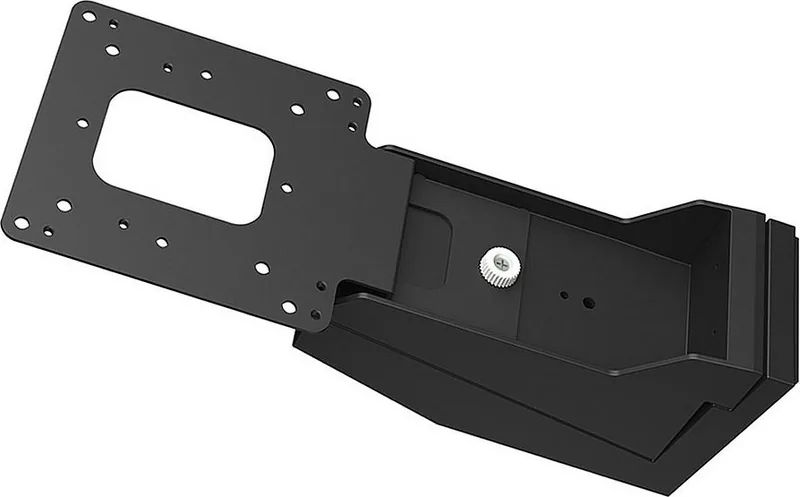
The Eizo Thin Client Bracket for the FlexStand 3R Stand is a specialized mounting solution designed to optimize workspace efficiency. This black metal accessory allows users to securely attach compact PCs directly to the back of compatible monitors, effectively reducing desk clutter and creating a cleaner, more organized environment. By integrating the computer unit with the display, this bracket supports a minimalist aesthetic while ensuring that all necessary hardware remains accessible yet out of the way.
Constructed from durable materials, this bracket weighs approximately 0.5 kg, making it lightweight yet sturdy enough to hold various compact PC models. The design features specific mounting points using M4x8 screws and thumb screws, allowing for flexible installation depending on the specific computer model being used. It is important to note that the types and number of screws required may vary based on the PC manufacturer and model. For detailed compatibility information regarding supported monitors and computers, users should consult the official installation manual available on the EIZO website.
This product is ideal for environments where space is at a premium, such as corporate offices, educational institutions, or home workstations. The black finish ensures it blends seamlessly with most modern monitor designs, maintaining a professional look. Installation requires careful adherence to the provided guidelines to ensure stability and safety. Proper mounting not only protects the equipment but also improves cable management by keeping power and data cables routed neatly behind the monitor stand.
Important Notes
- Always verify PC compatibility before purchase.
- Use the correct screw type for your specific computer model.
- Refer to the online installation guide for step-by-step instructions.
- Ensure the monitor stand can support the combined weight.
- Regularly check screw tightness to maintain secure mounting.
Search for 67,706 Manuals online


Type-in Brand or Model