
Eizo PCSK-03 Manual
PDF manual · 22 Pages
English



Quick check
Incorrect answer, please try again.
Chat with your Eizo PCSK-03 manual using AI
Get instant AI answers from your Eizo PCSK-03 manual
Ask anything about the Eizo PCSK-03. Answers come from this manual, with the pages they are based on.
Ask a Question
Do you recommend PCSK-03?
Yes NoFrequently Asked Questions
The holder supports numerous models including HP t520, HP EliteDesk, Dell Wyse series, Lenovo ThinkStation P320 Tiny, Fujitsu FUTRO S740, Gigabyte BKi series, and Eizo DuraVision displays. Specific requirements vary by device.
Is this answer helpful?
Most installations require a Phillips screwdriver size #2. Some HP models also require a TORX driver T10. Always check the specific instructions for your PC model to ensure you have the correct tools ready.
Is this answer helpful?
Yes, some models like the HP t310 Zero Client or Lenovo ThinkStation require optional mounting brackets such as F7X24AA or 4XF0N03161. These are often sold separately but are essential for a secure fit.
Is this answer helpful?
Yes, many compatible models allow for both vertical and horizontal mounting orientations. Refer to the specific diagram for your device to see available positions and screw hole locations.
Is this answer helpful?
The PCSK-03 kit includes M4x8 thumb screws and M3x10 or M4x8 machine screws. However, some specific PC models come with their own unique screws or brackets that must be used instead.
Is this answer helpful?
Advantages and Disadvantages
Advantages

- Significantly reduces desk clutter by mounting PC directly to monitor
- Supports a vast range of brands including HP, Dell, Lenovo, and Fujitsu
- Includes necessary screws and cable management accessories
- Allows flexible positioning for vertical or horizontal mounting
- Creates a professional and streamlined workspace appearance
Disadvantages

- Requires specific tools like TORX drivers for certain models
- Some devices need additional optional mounting brackets not always included
- Installation can be time-consuming if multiple screw removal steps are needed
- Not all PC models are compatible without custom bracket solutions
- May restrict airflow around the PC if mounted too tightly against the monitor
Product Specification
Type
Mini-PC Mount
Compatibility
Eizo (FlexStand 4, FlexStand 5, EV3895, EV2795, EV2495, EV3285, EV2785, EV2480, EV2760, EV2457, EV2456, EV2451)
VESA
75x75/100x100
Weight
14.11 oz
Color
black
Product Description
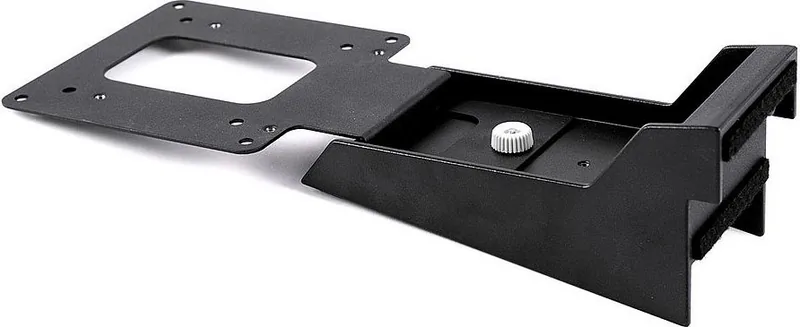
Eizo Thin Client Holder for FlexStand 4/FlexStand 5 Stand
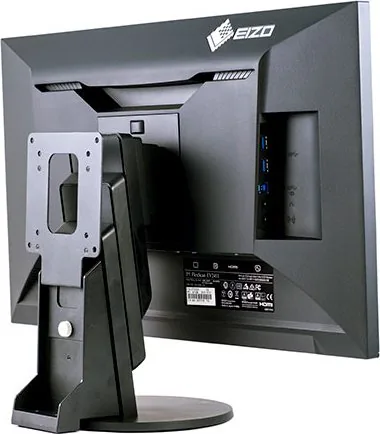
The Eizo Thin Client Holder for FlexStand 4 and FlexStand 5 stands represents a significant leap in workspace organization. Designed specifically to mount compact PCs directly onto compatible monitors, this accessory eliminates the need for messy cables and under-desk clutter. By integrating the computer unit with the display, users achieve a sleek, professional aesthetic that maximizes desk space while maintaining easy access to ports.
This holder is part of the PCSK-03 kit, which supports a wide array of devices from major manufacturers including HP, Dell, Lenovo, Fujitsu, Gigabyte, and Eizo itself. Whether you are deploying thin clients like the HP t520 or workstations such as the HP Z2 Mini, the mounting solution adapts to various form factors. The installation process generally requires standard tools like Phillips screwdrivers and specific TORX drivers depending on the device model. Some units may require optional mounting brackets provided by the PC manufacturer, ensuring a secure fit without damaging the hardware.
The versatility of this system allows for multiple orientation options, enabling users to position their computing units vertically or horizontally based on their monitor stand capabilities. Cable management features, such as included thumb screws and cable holders, keep power and data lines tidy. This setup is ideal for corporate environments, call centers, and home offices where clean lines and efficient use of vertical space are paramount. By attaching the PC to the monitor arm, the entire workstation becomes more mobile and adaptable to different ergonomic needs.
Notes:
- Ensure all rubber feet are removed before installing certain HP models.
- Verify software version compatibility for EIZO DuraVision displays.
- Always use the included screws to prevent stripping threads.
- Optional brackets are required for some specific HP and Lenovo models.
Search for 67,706 Manuals online


Type-in Brand or Model