
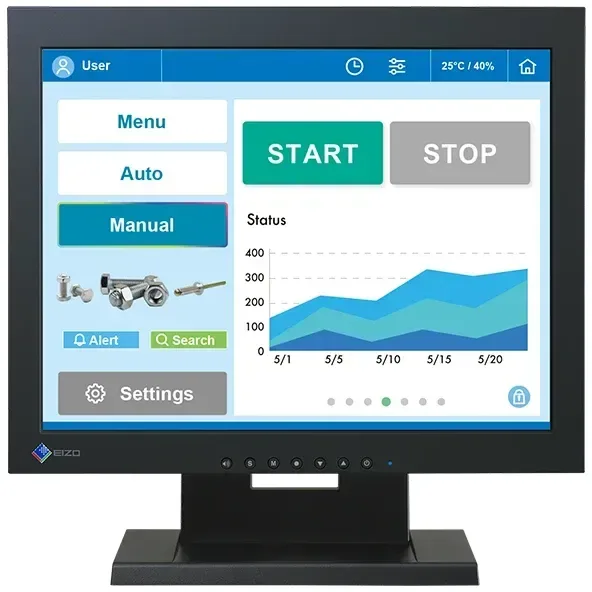

Eizo DuraVision FDX1502T Manual
PDF manual · 26 Pages
English



Quick check
Incorrect answer, please try again.
Chat with your Eizo DuraVision FDX1502T manual using AI
Get instant AI answers from your Eizo DuraVision FDX1502T manual
Ask anything about the Eizo DuraVision FDX1502T. Answers come from this manual, with the pages they are based on.
DuraVision FDX1502T Maintenance Schedule
Periodically check the tightness of mounting screws to ensure the monitor does not detach from the arm or enclosure.
Use a soft cloth moistened with water or EIZO ScreenCleaner to gently wipe stains. Do not use alcohol, thinner, benzene, wax, or abrasive cleaners frequently as they may damage the product.
Ask a Question
Do you recommend DuraVision FDX1502T?
Yes NoFrequently Asked Questions
The unit operates safely between zero and 50 degrees Celsius with humidity maintained below 90 percent relative humidity without condensation present.
Is this answer helpful?
Connect a USB cable between the monitor and PC or use an RS-232C serial cable depending on your controller setup availability.
Is this answer helpful?
Immediately disconnect all power connections and contact EIZO representative for advice attempting use may result in fire or shock hazards.
Is this answer helpful?
No the warranty remains valid only for the original purchaser who acquired the product from an authorized distributor or EIZO directly at sale date.
Is this answer helpful?
Avoid using alcohol disinfectant or thinner as they may cause gloss variation or damage displayed images preferring mild soap and water instead.
Is this answer helpful?
Yes supported operating systems include Windows 11 and Windows 10 32 bit or 64 bit versions as listed in technical specifications.
Is this answer helpful?
Standby mode draws less than 0.3 watts at 12 volts with no external load connected default settings apply unless modified otherwise.
Is this answer helpful?
Advantages and Disadvantages
Advantages

- Robust industrial design suitable for continuous operation in demanding environments
- Multiple video inputs including DisplayPort HDMI and DSub for flexible connectivity
- Resistive touch panel supports stylus and gloved interaction for specific workflows
- Low power consumption features help reduce energy costs during extended uptime periods
- Includes VESA mounting compatibility for secure installation on various stand configurations
Disadvantages

- Limited to 15 inch screen size which may not meet modern large format requirements
- Resistive touch technology offers less precision than capacitive alternatives for fine graphics
- Requires external enclosure for safe standalone operation preventing exposure to hazards
- Touch driver installation mandates administrative privileges which restricts casual user access
- Backlight lifetime varies with usage patterns potentially requiring replacement sooner than expected
Product Specification
Touchscreen
Resistive, Single-Touch
Diagonal
15"
Resolution
1024x768, 4:3
Brightness
320 cd/m2
Contrast
600:1 (Static), Not Specified (Dynamic)
Response Time
8 ms
Viewing Angle
160 deg / 160 deg
Panel
TN
Coating
Non-glare (Matte), Hardness 2H
Backlight
White LED, Flicker-Free
HDR
N/A
Color Depth
8-bit (16.7 Million Colors)
Refresh Rate
60 Hz
Signal Frequency
31-61 kHz (Horizontal), 55-76 Hz (Vertical)
Ports
1x VGA, 1x HDMI, 1x DisplayPort, 1x 3.5mm Jack (Line-Out)
Additional Ports
1x Serial (RS-232), 1x USB-B (Touch Function)
Ergonomics
+30 deg / 0 deg (Tiltable)
VESA
100x100 (Supported)
Power Consumption
19 W (Max), 5 W (Typical), Not Specified (Old Energy Label A+++ to G), 0.5 W (Standby)
Dimensions (WxHxD)
13.62 x 13.74 x 6.18 in
Weight
12.57 lbs
Special Features
Speakers
Manufacturer Warranty
3 Years (On-Site Exchange Service)
Product Description
Comprehensive Guide to Eizo DuraVision FDX1502T Performance
Welcome to your overview of the Eizo DuraVision FDX1502T 15 inch industrial display solution designed for high reliability tasks. Operators utilizing this hardware benefit from advanced color accuracy and robust construction suited for continuous operation cycles. Proper setup begins by referencing the Eizo DuraVision FDX1502T, 15 Manual to ensure all safety regulations are met before powering on the system. This guide covers essential steps for integration into existing automation frameworks without compromising user safety or data integrity.
Technical Specifications Highlight
The monitor features a TN anti-glare LCD panel measuring fifteen inches diagonally with a resolution of 1024 by 768 pixels. Viewing angles reach up to 160 degrees horizontally and vertically offering clear visibility from diverse positions around the workstation. Input options include DisplayPort HDMI and DSub mini connectors providing flexibility for linking to various computer setups including legacy systems requiring analog signals. The resistive touch panel supports stylus or gloved interaction making it ideal for sterile environments where hygiene is paramount.
Installation and Environmental Safety
Unit housing requires proper enclosure placement as specified by safety warnings found in technical documentation. Do not operate the monitor outdoors or in dusty humid locations to prevent internal damage from corrosion or short circuits. Ventilation slots must never be blocked to maintain adequate airflow cooling the internal components effectively during peak load times. Power supply options support both terminal block connections and DC power jacks though simultaneous use is prohibited. Electrical shock risks exist if nonqualified personnel attempt modifications opening the cabinet or repairing electronics without proper training.
Usage Tips and Maintenance Advice
Allow thirty minutes warm up time after turning on the unit to stabilize brightness levels for accurate calibration purposes. Adjust screen luminance to suit environmental lighting conditions reducing eye strain over long shifts. Implement screensavers when idle to prevent afterimages or burnin effects on the glass surface protecting pixel health. Clean the exterior gently with a damp cloth avoiding abrasive materials or strong solvents that degrade coatings. Keep packing bags away from children due to suffocation hazards associated with plastic waste disposal in work zones.
Support and Warranty Details
The manufacturer provides a limited warranty covering defects arising from normal use for a period of three years starting from the date of purchase. Registering products online often expedites service requests ensuring quicker turnaround times for repairs or replacements. Drivers for touch functionality require administrator privileges on Windows platforms to install correctly and maintain stable operation. Updates are available through the official support website allowing users to download the latest software versions compatible with newer operating system releases like Windows 11.
Search for 67,706 Manuals online


Type-in Brand or Model