

Edimax TD-405BP Manual
PDF manual · 13 Pages
English



Quick check
Incorrect answer, please try again.
Chat with your Edimax TD-405BP manual using AI
Get instant AI answers from your Edimax TD-405BP manual
Ask anything about the Edimax TD-405BP. Answers come from this manual, with the pages they are based on.
Ask a Question
Do you recommend TD-405BP?
Yes NoFrequently Asked Questions
The TD-405BP supports up to one 8K@30Hz display or dual 4K@60Hz displays via its Thunderbolt 4 downstream ports when connected with compatible cables and host hardware.
Is this answer helpful?
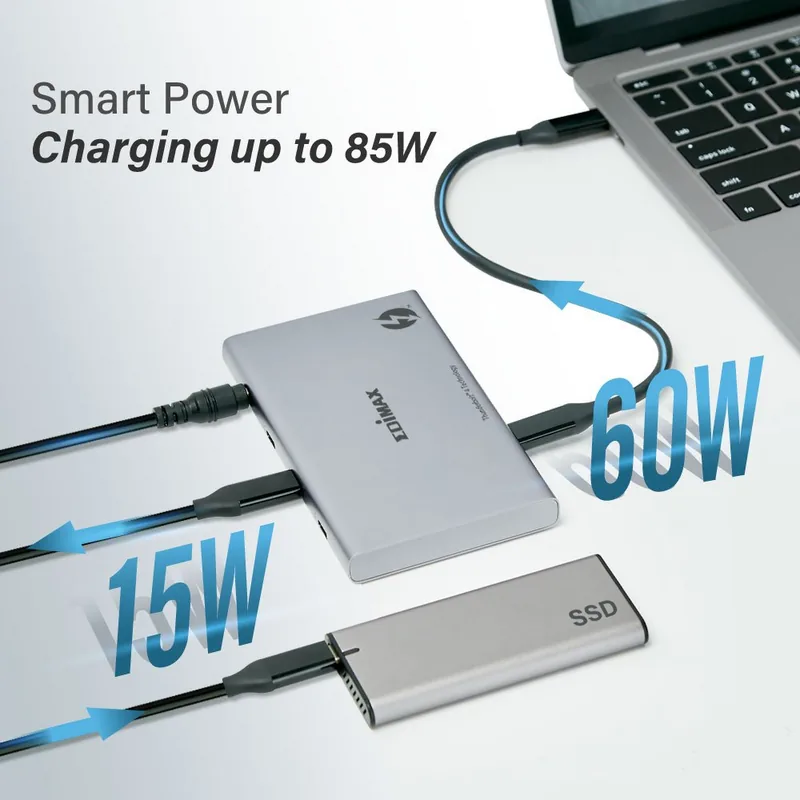
The upstream Thunderbolt 4 port can deliver up to 60W power delivery to the host laptop. The dock’s total power allocation is 85W across upstream and downstream ports, so available power can vary with connected devices.
Is this answer helpful?
For full 40Gbps throughput and video support, use Thunderbolt 4, Thunderbolt 3, or USB4 (USB-C) Gen3 compatible cables. Older or USB2/USB-C cables may limit speed and features.
Is this answer helpful?
Yes. The dock includes a USB-A 3.2 Gen2 downstream port providing up to 10Gbps data transfer and backward compatibility with older USB-A devices, as well as 5V@900mA power output for peripherals.
Is this answer helpful?
Edimax lists compatibility with Windows 10 and macOS 11 or later. Some functionality depends on host Thunderbolt support and OS updates; check Edimax’s download page for model TD-405BP for the latest compatibility and firmware.
Is this answer helpful?
Yes. The TD-405BP supports cascading Thunderbolt 4 or Thunderbolt 3 devices up to six levels, enabling chained expansion of compatible peripherals.
Is this answer helpful?
Documentation, drivers, and firmware are available from Edimax’s support site—visit edimax.com/download and search the model number TD-405BP for all available resources.
Is this answer helpful?
Advantages and Disadvantages
Advantages

- Up to 40Gbps per Thunderbolt port for high-speed data and 8K/dual 4K video output.
- Compact design ideal for mobile professionals and small workspaces.
- 85W total power budget with up to 60W upstream charging for laptops.
- Three downstream Thunderbolt 4 ports plus USB-A 3.2 Gen2 for legacy devices.
- Supports cascading of Thunderbolt devices up to six levels for expansion.
Disadvantages

- 60W upstream PD may be insufficient for some high-power laptops under load.
- Total 85W shared across ports can limit simultaneous high-wattage device charging.
- Requires Thunderbolt 4/3 or USB4 cables for full performance—additional cables may be needed.
- No built-in Ethernet or SD card slot, limiting some workstation needs.
- Some features depend on host OS and hardware compatibility; check requirements.
Product Specification
Type
Thunderbolt Hub, USB Hub
Form factor
1x external wired
Interface
1x Thunderbolt 4 (female, 40Gb/s, USB-C with DisplayPort 1.4, USB PD 3.0 max. 60W)
Ports
3x Thunderbolt 4 (female), 1x USB-A 3.1 (female)
Data transfer
3x Thunderbolt 4 (female, 40Gb/s, USB-C with DisplayPort 1.4, 15W), 1x USB-A 3.1 (female, 10Gb/s, USB BC 1.2 5V/1.5A/7.5W, Apple Charging)
Power supply
Power not via interface, mains connection (1x barrel connector 20V/5A/100W, Passthrough 85W), external power supply required and included (1x barrel connector 20V/5A/100W)
Chipset
Intel Goshen Ridge JHL8440 (Thunderbolt 4)
Dimensions
4.88x0.51x2.91in (WxHxD)
Weight
0.36lb
Housing color
grey
Compatibility
universal
Special features
Metal housing
USB nomenclature
Link
Product Description
Edimax 5-in-1 Thunderbolt 4 Mini-Docking-Station — Compact Power and Connectivity
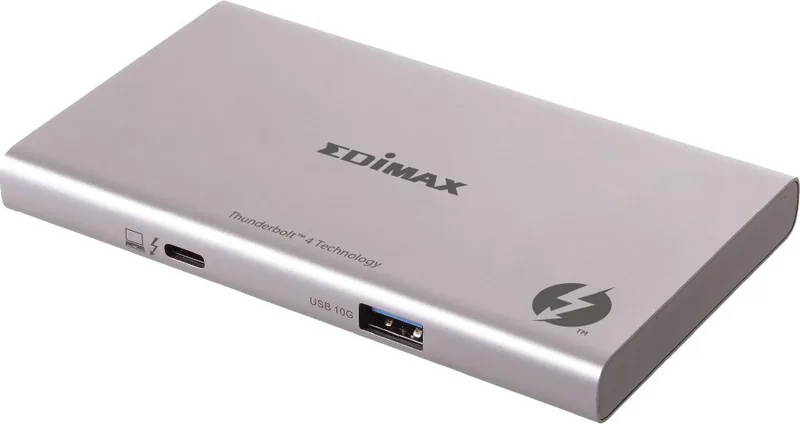
The Edimax 5-in-1 Thunderbolt 4 Mini-Docking-Station is a compact, Intel-certified Thunderbolt 4 hub designed to expand connectivity for modern laptops and USB-C devices. Built around Thunderbolt 4 technology, the TD-405BP delivers up to 40Gbps data and video throughput, supports cascading of Thunderbolt devices up to six levels, and drives high-resolution displays while offering device charging and legacy USB support.
Featuring a single Thunderbolt 4 upstream port to connect to your host PC, three Thunderbolt 4 USB-C downstream ports, and one USB-A 3.2 Gen2 port, the dock balances cutting-edge throughput with everyday compatibility. Use the Thunderbolt ports for ultra-fast external drives, eGPUs, or monitors — it can handle one 8K@30Hz display or dual 4K@60Hz outputs — and rely on the USB-A port for peripherals such as mice, keyboards, or USB storage devices.
Power delivery is a key strength: the upstream port can provide up to 60W to charge your laptop, while the downstream Thunderbolt ports deliver up to 15W each to connected devices. The dock’s total power budget is 85W, so it can supply and manage multiple connected devices simultaneously. Installation is plug-and-play: connect the included power adapter, plug a compatible Thunderbolt 4/3 or USB4 cable into the upstream port, and the dock is ready to use.
Designed with portability in mind, the mini docking station is suitable for remote workers, creators, and professionals who need a small hub that doesn’t compromise on performance. Safety and compliance are covered: the device meets relevant FCC and EU directives, and includes guidance on safe operation, thermal considerations, and proper disposal at end of life. Firmware, drivers, and documentation are available on Edimax’s support site by searching the model number TD-405BP.
Whether you need high-bandwidth connections for external displays and storage or a reliable multiport hub to declutter a workspace, the Edimax 5-in-1 Thunderbolt 4 Mini-Docking-Station offers a practical mix of speed, charging capability, and backward-compatible ports in a compact package.
Notes
- Uses Thunderbolt 4 / Thunderbolt 3 / USB4 compatible cables for full functionality.
- Total PD budget: 85W; upstream port PD max 60W, downstream TB4 ports PD max 15W each.
- Supports cascading of Thunderbolt devices up to six levels.
- Compatible with Windows 10 and macOS 11 or later; check Edimax site for updates and firmware.
Search for 67,732 Manuals online


Type-in Brand or Model