

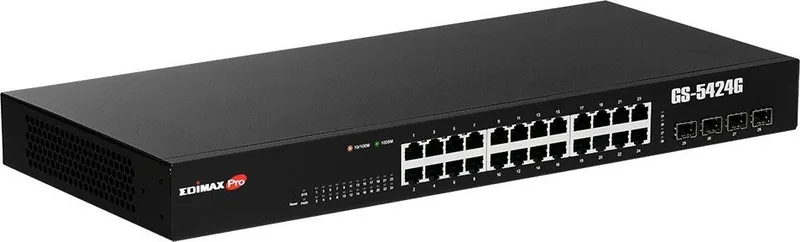

Edimax Pro GS-5424G Manual
PDF manual · 208 Pages
English



Quick check
Incorrect answer, please try again.
Chat with your Edimax Pro GS-5424G manual using AI
Get instant AI answers from your Edimax Pro GS-5424G manual
Ask anything about the Edimax Pro GS-5424G. Answers come from this manual, with the pages they are based on.
Ask a Question
Do you recommend Pro GS-5424G?
Yes NoFrequently Asked Questions
The factory default IP address for the Edimax Pro GS-50 is 192.168.2.1. Users must change this address if deploying multiple switches to prevent IP conflicts.
Is this answer helpful?
No, the GS-50 model does not provide Power over Ethernet functionality. It is designed strictly for data transmission, so external power adapters are required for connected devices.
Is this answer helpful?
You can configure Link Aggregation by navigating to the Port menu in the web interface. Choose between Static Link Aggregation or LACP based on your network needs and select the desired ports to group them together.
Is this answer helpful?
Yes, the switch supports Voice VLAN features which allow you to prioritize voice traffic. You can configure OUI settings to automatically detect and classify VoIP packets for optimal performance.
Is this answer helpful?
Absolutely. The GS-50 is designed to fit into standard 19-inch racks and occupies one rack unit of space. A rack-mount kit is included in the package for easy installation.
Is this answer helpful?
Advantages and Disadvantages
Advantages

- High-performance 24 Gigabit RJ-45 ports combined with 4 SFP uplinks for versatile connectivity
- Comprehensive web-based management interface simplifies complex network configurations
- Advanced security features including RADIUS, 802.1x, and ACLs protect against threats
- Energy Efficient Ethernet support reduces power consumption and operational costs
- Flexible installation options allow for easy desktop or rack mounting
Disadvantages

- Default IP address configuration requires manual adjustment when adding multiple units
- No built-in PoE+ capability on the RJ-45 ports limits direct device powering
- Web interface may have limitations with older browser versions regarding IPv6
- Fan noise might be noticeable in very quiet office environments
- Advanced LACP configuration steps require careful planning to avoid conflicts
Product Specification
Function
Switch
Type
Standalone, Rackmount (via mounting bracket)
Network Ports
24x RJ-45, 4x SFP+
Speeds
24x RJ-45 (10/100/1000Base-T), 4x SFP+ (1G/10Gb/s)
PoE
N/A
Backplane
128Gb/s, 95.2Mp/s, 12KB Jumboframes, 12Mb Packet Buffer, 16K MAC Addresses
Officially Supported Standards
802.1AB, 802.1AX, 802.1D, 802.1Q, 802.1p, 802.1s, 802.1w, 802.1x, 802.3, 802.3ab, 802.3ae, 802.3az, 802.3u, 802.3x, 802.3z, IGMPv3
Configuration
Web interface, Console, serial (RJ-45)
Cooling
Passive
Dimensions (WxDxH)
17.36x1.77x7.80 inches, 1U
Weight
5.38 lbs
Color
Anthracite
Features
Metal housing, removable mounting brackets, firmware updates possible, surge protection (6kV)
Manufacturer Warranty
Five years
Note
For this device, link aggregation was officially specified with the obsolete standard IEEE802.3ad. The function has been managed since 2008 not by the IEEE Working Group 3 (IEEE 802.3, CSMA/CD - Ethernet), but by Working Group 1 (IEEE 802.1, High Level Interface - Internetworking) and is technically defined unchanged via IEEE 802.1AX.
Product Description
Empowering Your Network with the Edimax Pro GS-50 Rackmount Gigabit Smart Switch
The Edimax Pro GS-50 Rackmount Gigabit Smart Switch represents a significant leap forward for modern network infrastructures requiring robust performance and flexible management. Designed specifically for demanding environments, this switch combines 24 high-speed RJ-45 ports with four dedicated SFP slots to deliver unparalleled connectivity options. Whether you are managing a small business office or a large enterprise data center, this device ensures that your critical applications run smoothly without bottlenecks.
At the heart of the GS-50 lies its powerful hardware architecture. The twenty-four Gigabit Ethernet ports support auto-negotiation, allowing seamless integration with various devices ranging from legacy systems to modern workstations. For high-bandwidth requirements, the four SFP ports offer uplink capabilities, enabling connections to fiber optic networks or other high-speed switches. This hybrid approach provides the versatility needed to adapt to evolving network topologies while maintaining cost-effectiveness.
Management has never been more intuitive. The web-based configuration utility offers a user-friendly interface that simplifies complex tasks like VLAN setup, link aggregation, and security policies. Administrators can easily monitor system status, view real-time bandwidth utilization, and manage port configurations through a centralized dashboard. Features such as Energy Efficient Ethernet help reduce power consumption during low-traffic periods, contributing to a greener and more sustainable IT environment.
Security is paramount in today's digital landscape, and the GS-50 addresses this with comprehensive protection mechanisms. From RADIUS authentication and MAC address filtering to advanced storm control and DoS prevention, this switch safeguards your network against unauthorized access and malicious attacks. The ability to configure Access Control Lists (ACLs) allows for granular traffic control, ensuring that sensitive data remains protected at all times.
Installing the switch is straightforward, with options for both desktop placement and standard 19-inch rack mounting. The included rack-mount kit and detailed guidelines ensure a secure fit within any server room setup. With its reliable build quality and extensive feature set, the Edimax Pro GS-50 stands as an essential tool for anyone seeking to optimize their network performance and reliability.
Key Notes
- Supports both static and dynamic link aggregation for enhanced throughput.
- Includes advanced QoS features to prioritize voice and video traffic effectively.
- Compatible with IPv6 for future-proofing your network infrastructure.
Search for 67,732 Manuals online


Type-in Brand or Model