
Edimax Pro GS-50 Manual
PDF manual · 228 Pages
English



Quick check
Incorrect answer, please try again.
Chat with your Edimax Pro GS-50 manual using AI
Get instant AI answers from your Edimax Pro GS-50 manual
Ask anything about the Edimax Pro GS-50. Answers come from this manual, with the pages they are based on.
Ask a Question
Do you recommend Pro GS-50?
Yes NoFrequently Asked Questions
The factory default address is 192.168.2.1. Default username is "admin" and default password is "1234". You are required to change the password on first login for security.
Is this answer helpful?
The unit provides a total PoE+ budget of 400W. The web UI allows per-port power limiting, priority levels (critical/high/low), scheduling, and live power monitoring so you can allocate power dynamically and prioritize critical devices when budget is constrained.
Is this answer helpful?
The switch includes six SFP+ ports for 10Gb fiber or DAC uplinks, enabling high-speed aggregation to servers or core switches and flexible fiber connectivity for longer-distance links.
Is this answer helpful?
Yes—IGMP and MLD snooping, querier configuration, throttling, filtering profiles, and AV-over-IP specific settings are supported to optimize video streaming, reduce multicast flooding, and enable large-scale streaming deployments.
Is this answer helpful?
The switch supports RADIUS and TACACS+ authentication, management ACLs, DHCP snooping with Option 82, IP Source Guard, port security, ACLs, DoS protection, storm control and logging/diagnostics to detect and mitigate security issues.
Is this answer helpful?
Yes. The switch supports voice VLAN with OUI detection and remarking, surveillance VLAN, protocol VLANs, MAC VLANs, static and dynamic 802.1Q VLANs, hybrid/trunk/access port modes and PVID configuration for granular segmentation.
Is this answer helpful?
The web UI offers per-port statistics, bandwidth utilization charts, error-disabled recovery, port mirroring, copper/fiber diagnostics, LLDP neighbor views, system logs, ping and traceroute tools to help troubleshoot and monitor link health and traffic.
Is this answer helpful?
Advantages and Disadvantages
Advantages

- High port density: 48 Gigabit RJ-45 ports plus 6 SFP+ uplinks for flexible aggregation and fiber connectivity.
- 400W PoE+ budget with per-port prioritization and scheduling to power APs, cameras and VoIP devices reliably.
- Extensive Layer 2/L2+ features: VLANs, LACP, STP/MSTP/RSTP, QoS, ACLs, IGMP/MLD snooping and LLDP/LLDP-MED.
- Comprehensive security: RADIUS/TACACS+, DHCP snooping, IP Source Guard, port security, DoS and storm controls.
- Web UI and management tools: SNMP v1/v2/v3, firmware backup/restore, logging, diagnostics and per-port statistics.
Disadvantages

- Complex feature set may require experienced administrators for optimal configuration and tuning.
- 400W PoE budget can be limiting for very large PoE device counts at higher wattages.
- Smart (web-managed) class may lack full feature parity with high-end fully managed enterprise switches.
- Initial default credentials and IP require immediate change to avoid security risks if left unchanged.
- Documentation depth means a steep learning curve for some multicast, STP and advanced QoS settings.
Product Specification
Function
Switch
Type
Standalone, Rackmount (via mounting brackets)
Network ports
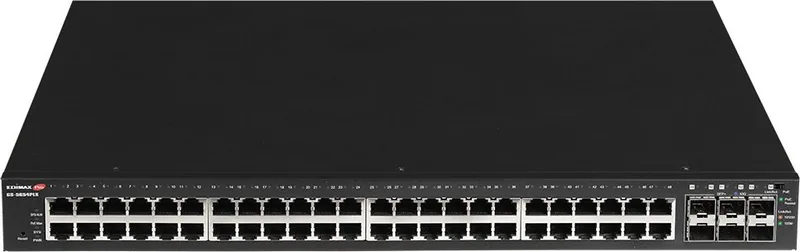
48x RJ-45, 6x SFP+
Speeds
48x RJ-45 (10/100/1000Base-T), 6x SFP+ (1G/10Gb/s)
PoE
48x RJ-45 PoE+ (48x 30W), total: 400W
Backplane
216Gb/s, 160.7Mpps, 12KB Jumboframes, 16Mb packet buffer, 32K MAC addresses
Officially supported standards
802.1AB, 802.1AX, 802.1D, 802.1Q, 802.1p, 802.1s, 802.1w, 802.1x, 802.3, 802.3ab, 802.3ae, 802.3af, 802.3at, 802.3az, 802.3u, 802.3x, 802.3z, IGMPv3
Configuration
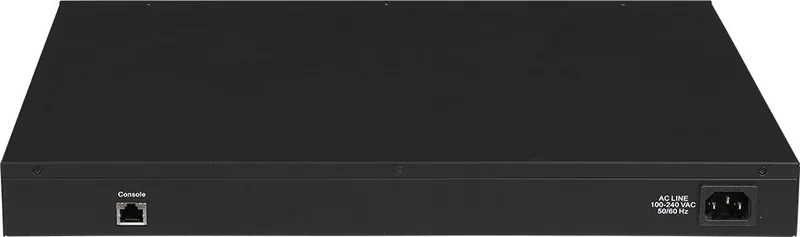
Web interface, Console, Serial (RJ-45, rear)
Cooling
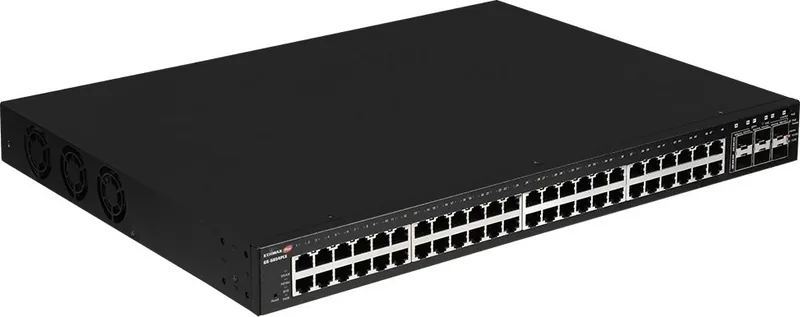
active, 4x fans (1.57 in)
Dimensions (WxHxD)
17.36x1.77x12.99 in, 1U
Weight
12.35 lb
Color
anthracite
Special features
Metal housing, removable mounting brackets, firmware updates possible, overvoltage protection (6kV), long-range mode (10Mb/s PoLRE over 656.17 ft distance)
Manufacturer's warranty
five years
Note
For this device, "link aggregation" was officially specified with the obsolete standard IEEE802.3ad. Since 2008, this function is no longer managed by IEEE "Working Group 3" (IEEE 802.3, CSMA/CD - Ethernet), but by "Working Group 1" (IEEE 802.1, High Level Interface - Internetworking) and defined technically unchanged via IEEE 802.1AX.
Product Description
Edimax Pro GS-50 Rackmount Gigabit Smart Switch — Overview
The Edimax Pro GS-50 Rackmount Gigabit Smart Switch, 48x RJ-45, 6x SFP+, 400W PoE+ Manual addresses the needs of small- to mid-sized deployments that require high port density, reliable PoE power, and advanced L2/L2+ management. Built for rackmount environments, the GS-50 series combines 48 Gigabit copper ports with six SFP+ uplinks for flexible fiber connectivity and high-speed aggregation. With a 400W PoE+ budget, it reliably powers numerous access points, cameras, and VoIP phones while offering smart features to optimize network performance and security.
Key features and product highlights
The switch provides a comprehensive web-based management interface covering port configuration, VLANs, LACP link aggregation, QoS, IGMP/MLD snooping, LLDP/LLDP-MED, STP/MSTP/RSTP, SNMP v1/v2/v3, ACLs, port security, DHCP snooping, IP Source Guard and extensive monitoring tools. The manual documents LED indicators, rack and desktop installation, power connection, and step-by-step procedures for launching the web UI and changing default credentials.
Management capabilities include per-port and LAG settings (speed/duplex/flow control), jumbo frames, Energy Efficient Ethernet (EEE), PoE scheduling and per-port power prioritization, and PoE power limit controls. VLAN functionality is robust: static and dynamic VLAN creation, hybrid/trunk/access modes, voice VLAN with OUI matching and remarking, protocol- and MAC-based VLAN mapping, and surveillance VLAN support tailored for camera deployments.
Multicast and AV-over-IP features include IGMP/MLD snooping with querier configuration, throttling, filtering profiles and router-port control — ideal for video distribution and low-latency AV workflows. Discovery features (LLDP/LLDP-MED) enable network policy, location, and inventory advertisement for IP phones and endpoints.
Security and reliability are covered through RADIUS/TACACS+ support, management ACLs, DoS and storm controls, port isolation, port security, DHCP snooping with Option 82, IP Source Guard, and extensive logging and diagnostics (ping, traceroute, mirror, copper/fiber tests, UDLD). Firmware management, SNMP configuration, backups and configuration save/restore ensure operational continuity.
Why it matters
For integrators, campus IT teams, and SMBs, the GS-50 delivers a balanced mix of power (400W PoE+), port density, and smart features to deploy converged services—voice, video, Wi‑Fi and surveillance—on a single managed switch platform. The manual’s clear UI walkthroughs and detailed feature mapping make deployment and tuning straightforward for administrators.
Notes:
- Default access: IP 192.168.2.1, username "admin", password "1234" (change on first login).
- PoE scheduling and per-port priority help manage constrained power budgets.
- Manual contains step-by-step guidance for physical installation, rack mounting, and LED/port behavior.
Search for 67,732 Manuals online


Type-in Brand or Model