
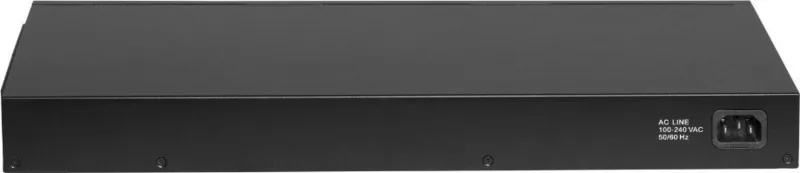
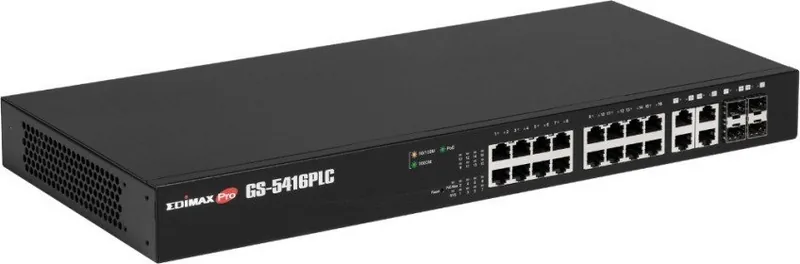
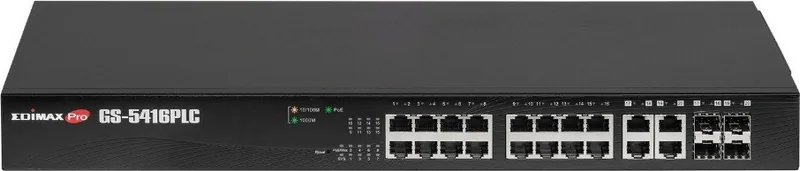
Edimax Pro GS-50 16 Port 280W Manual
PDF manual · 221 Pages
English



Quick check
Incorrect answer, please try again.
Chat with your Edimax Pro GS-50 16 Port 280W manual using AI
Get instant AI answers from your Edimax Pro GS-50 16 Port 280W manual
Ask anything about the Edimax Pro GS-50 16 Port 280W. Answers come from this manual, with the pages they are based on.
Ask a Question
Do you recommend Pro GS-50 16 Port 280W?
Yes NoFrequently Asked Questions
It provides 16 Gigabit RJ-45 access ports and 4 combo RJ-45/SFP uplink ports, giving you both copper connections and flexible expansion options.
Is this answer helpful?
The switch offers up to 280W of usable PoE power, which is enough for many common edge devices such as phones, cameras, and wireless access points.
Is this answer helpful?
It is designed for IEEE 802.3af/at devices, including IP phones, IP cameras, and Wi-Fi access points. It can automatically detect compatible powered devices.
Is this answer helpful?
Yes. It includes a web-based management interface with tools for VLANs, QoS, monitoring, security, multicast handling, and PoE control.
Is this answer helpful?
Yes. It is built for standard 19-inch rack installation and can also be placed on a desktop if needed.
Is this answer helpful?
The combo ports can work as RJ-45 or SFP connections, so you can choose copper or fiber uplinks depending on your network layout.
Is this answer helpful?
Advantages and Disadvantages
Advantages

- 16 Gigabit RJ-45 ports plus 4 combo RJ-45/SFP uplinks provide flexible network expansion.
- 280W PoE+ budget supports cameras, phones, and access points on a single switch.
- Web management includes VLAN, QoS, ACL, diagnostics, and port monitoring tools.
- Rackmount metal chassis fits standard 19-inch installations cleanly.
- Security features like port security, DHCP snooping, and IP source guard improve control.
Disadvantages

- PoE power must be planned carefully to avoid exceeding the shared budget.
- Advanced settings may feel complex for users who only need basic switching.
- No 10GbE uplinks are listed, so it is not aimed at higher-speed backbone use.
- Best value is strongest in PoE-rich environments, not simple low-demand setups.
- Full benefit depends on using the web UI and understanding managed switch settings.
Product Specification
Function
Switch
Type
Standalone, Rackmount (via mounting brackets)
Network ports
16x RJ-45, 4x RJ-45/SFP
Speeds
20x RJ-45 (10/100/1000Base-T), 4x SFP (1Gb/s)
PoE
16x RJ-45 PoE+ (16x 30W), total: 280W, PoE extender (additional 328.08 ft)
Backplane
40Gb/s, 35.7Mp/s, 9KB Jumboframes, 1Mb Packet Buffer, 8K MAC addresses
Officially supported standards
802.1AX, 802.1D, 802.1Q, 802.1p, 802.1w, 802.1X, 802.3, 802.3ab, 802.3af, 802.3at, 802.3az, 802.3u, 802.3x, 802.3z, IGMPv3
Configuration
Web interface
Cooling
active, 2x fans (1.57in)
Dimensions (WxHxD)
17.36x1.77x7.76in, 1U
Weight
7.05lb
Color
black
Special features
Metal housing, removable mounting brackets, firmware updates possible, long-range mode (10Mb/s over 656.17 ft distance)
Manufacturer warranty
five years
Note
For this device, "link aggregation" was officially specified with the obsolete standard IEEE802.3ad. Since 2008, the function is no longer managed by the IEEE "Working Group 3" (IEEE 802.3, CSMA/CD - Ethernet), but by "Working Group 1" (IEEE 802.1, High Level Interface - Internetworking) and technically defined unchanged via IEEE 802.1AX.
Product Description
Edimax Pro GS-50 Rackmount Gigabit Smart Switch, 16x RJ-45, 4x RJ-45/SFP, 280W PoE+
The Edimax Pro GS-50 Rackmount Gigabit Smart Switch is designed for businesses that need dependable wired connectivity with flexible PoE delivery. With 16 Gigabit RJ-45 ports and 4 combo RJ-45/SFP uplinks, it offers a balanced mix of access ports and expansion options for backbone links, servers, or longer-distance runs. It is a strong fit for offices, surveillance setups, VoIP deployments, and mixed-device networks where stability matters.
One of its biggest advantages is the PoE+ capability. The switch can provide up to 280W of usable PoE power, giving network teams the ability to connect IP cameras, wireless access points, and phones without adding separate power adapters. That simplifies installation, reduces clutter, and makes endpoint deployment much more efficient. Automatic detection of powered devices also helps streamline setup.
This model is more than just a power source. It includes a broad set of Layer 2 management tools such as VLAN segmentation, link aggregation, jumbo frames, IGMP snooping, STP, QoS, and ACL support. These features help improve traffic organization, enhance security, and keep network performance predictable as the environment grows.
For administrators, the web-based interface provides practical visibility into status, logs, port activity, bandwidth, and PoE behavior. Security options such as port security, DHCP snooping, IP source guard, and management access controls add another layer of protection at the edge. That makes the switch suitable for networks that need both simplicity and control.
In day-to-day use, the GS-50 series is built for easy deployment. It supports desktop placement or standard 19-inch rack mounting, and its rackmount metal chassis is well suited for structured IT rooms. The combo uplinks offer useful flexibility when you need to move beyond copper connections and integrate fiber into the network design.
Notes
- Best suited for PoE-heavy edge networks
- Good choice for managed switching without unnecessary complexity
- Careful PoE budgeting will help maximize port usage
Search for 67,732 Manuals online


Type-in Brand or Model