
Edimax Pro GS-3005P Manual
PDF manual · 40 Pages
English



Quick check
Incorrect answer, please try again.
Chat with your Edimax Pro GS-3005P manual using AI
Get instant AI answers from your Edimax Pro GS-3005P manual
Ask anything about the Edimax Pro GS-3005P. Answers come from this manual, with the pages they are based on.
Ask a Question
Do you recommend Pro GS-3005P?
Yes NoFrequently Asked Questions
It is a strong fit for small offices, home networks, and compact surveillance or VoIP setups that need Gigabit speed plus PoE power in a simple desktop design.
Is this answer helpful?
The PoE capability is centered on the first four RJ-45 ports, which can power compatible devices such as IP cameras, phones, and access points.
Is this answer helpful?
Open a web browser on a device in the same subnet and enter the switch IP address. The default address is typically 192.168.2.1 unless it has been changed.
Is this answer helpful?
VLAN, QoS, IGMP snooping, link aggregation, port mirroring, storm control, rate limiting, and loop prevention all help fine-tune traffic and stability.
Is this answer helpful?
Yes. The management area supports configuration backup, restore, firmware upgrades, reset, and reboot options, which makes maintenance easier over time.
Is this answer helpful?
Use quality Ethernet cabling, keep the switch ventilated, respect the cable length limit, and make sure the power source matches the rated input range.
Is this answer helpful?
Advantages and Disadvantages
Advantages

- Five Gigabit RJ-45 ports deliver fast connectivity for modern small-network setups.
- PoE+ support reduces cable clutter by powering compatible devices through Ethernet.
- Web management adds VLAN, QoS, IGMP snooping, mirroring, and loop control.
- Compact desktop design fits neatly into offices, workbenches, or home networks.
Disadvantages

- PoE power budget is limited, so multiple high-demand devices may need careful planning.
- Best features are aimed at users who understand switching basics and web management.
- Not ideal for large enterprise networks that require more ports or deeper automation.
- Browser-based setup may feel dated compared with newer cloud-managed switch platforms.
Product Specification
Function
Switch
Type
Standalone
Network ports
5x RJ-45
Speeds
5x RJ-45 (10/100/1000Base-T)
PoE
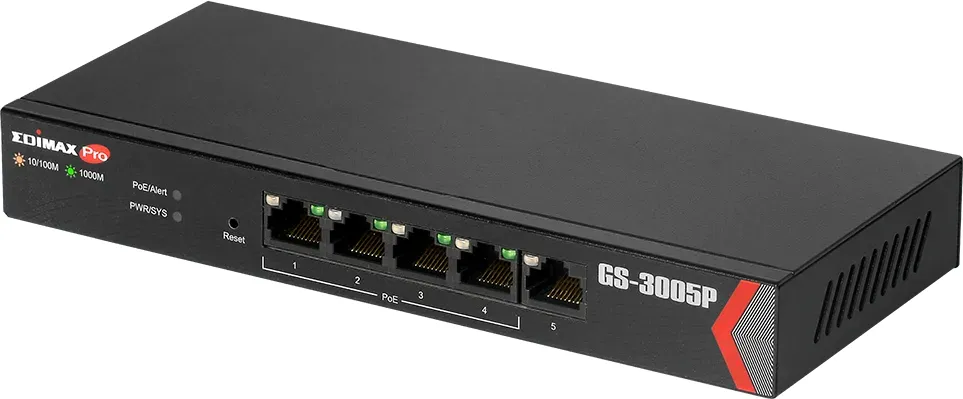
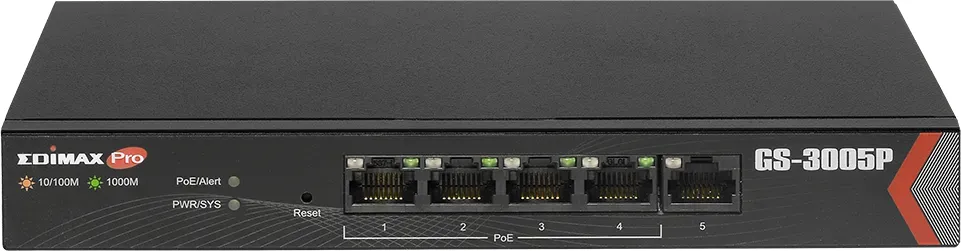
4x RJ-45 PoE+ (4x 30W), total: 60W
Backplane
10Gb/s, 7.4Mp/s, 9KB Jumbo frames, 128KB packet buffer, 2K Mac addresses
Officially supported standards
802.1AX, 802.1Q, 802.1p, 802.3, 802.3ab, 802.3af, 802.3at, 802.3az, 802.3u, 802.3x, IGMPv3
Configuration
Web interface
Cooling
passive
Dimensions (WxHxD)
7.60x1.02x3.31in
Weight
1.30 lb
Color
anthracite
Special features
Metal housing, external power supply, firmware updates possible, long-range mode (10Mb/s over 656 ft distance)
Manufacturer warranty
five years
Note
For this device, "link aggregation" was officially specified with the obsolete standard IEEE802.3ad. Since 2008, this function is no longer managed by IEEE "Working Group 3" (IEEE 802.3, CSMA/CD - Ethernet), but by "Working Group 1" (IEEE 802.1, High Level Interface - Internetworking) and is technically defined unchanged via IEEE 802.1AX.
Product Description
Edimax Pro GS-3000 Desktop Gigabit Smart Switch, 5x RJ-45, 60W PoE+ Manual
The Edimax Pro GS-3000 Desktop Gigabit Smart Switch is a compact choice for small offices, home labs, and mixed-device networks that need reliable speed and simple control. With five RJ-45 Gigabit ports and PoE+ support on the key ports, it is designed to connect everyday network gear while also powering devices such as IP cameras, VoIP phones, and wireless access points.
Compact design, serious networking
This switch keeps the desktop form factor practical and space-friendly, but it does not feel basic. Gigabit connectivity helps avoid bottlenecks when sharing files, streaming media, or linking several busy endpoints. The switch also supports automatic speed negotiation, so connected devices can establish the best possible link without complicated setup.
PoE+ that simplifies installations
One of the biggest advantages of the GS-3000 is its PoE+ focus. Instead of placing cameras or access points near power outlets, you can run data and power over the same Ethernet cable. That makes deployment cleaner and often faster, especially in locations where extra adapters would be inconvenient. The switch includes detection and protection features intended to help manage power delivery safely and efficiently.
Management features that add flexibility
Beyond basic switching, the web-based interface offers tools that are useful in real networks. VLAN support helps separate traffic for better organization and security. QoS options can prioritize sensitive traffic, while IGMP snooping improves multicast handling. Add link aggregation, port mirroring, storm control, rate limiting, and loop protection, and the result is a small switch that behaves more like a smart network control point than a simple hub.
Easy to deploy and maintain
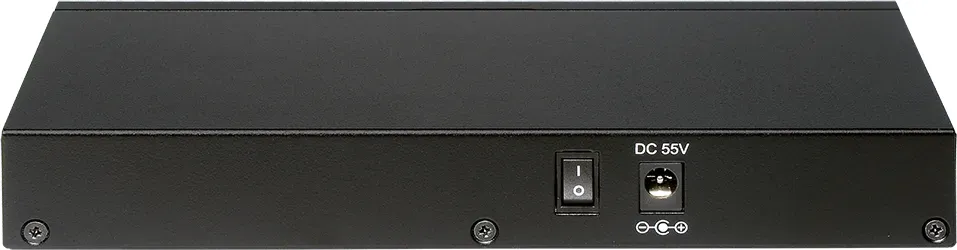
Setup is straightforward: place it on a desktop, connect the included power adapter, and access the browser-based utility from the local network. From there, administrators can check status, adjust ports, back up settings, restore configurations, and update firmware. The default credentials are simple to replace on first login, which is an important step for keeping the network secure.
Notes
- Best suited for compact installations that need a mix of speed and PoE convenience.
- Four PoE-enabled ports make it a strong fit for cameras, phones, and access points.
- Advanced features are helpful, but the interface is most valuable to users comfortable with basic networking terms.
- For stable performance, use quality Ethernet cabling and keep the unit well ventilated.
Search for 67,732 Manuals online


Type-in Brand or Model