
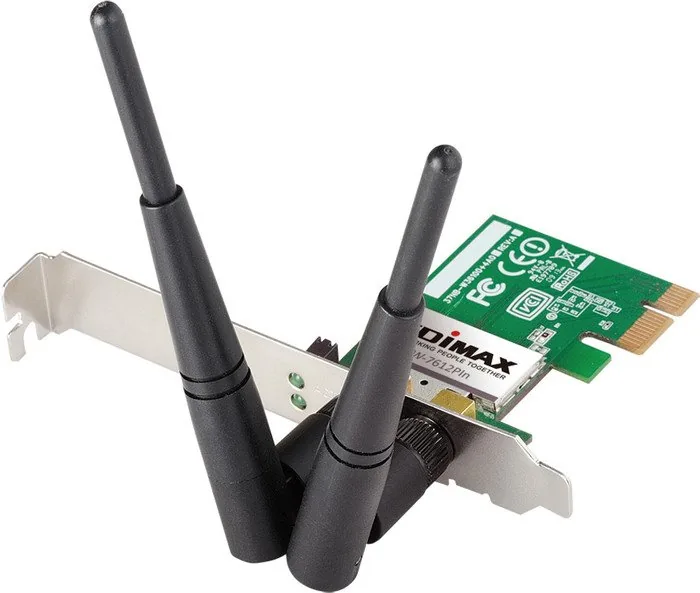
Edimax nMax EW-7612PIn Manual
PDF manual · 36 Pages
English



Quick check
Incorrect answer, please try again.
Chat with your Edimax nMax EW-7612PIn manual using AI
Get instant AI answers from your Edimax nMax EW-7612PIn manual
Ask anything about the Edimax nMax EW-7612PIn. Answers come from this manual, with the pages they are based on.
Ask a Question
Do you recommend nMax EW-7612PIn?
Yes NoFrequently Asked Questions
The adapter supports data rates up to 300 Mbps when connected to a 300Mbps wireless 802.11n device.
Is this answer helpful?
Yes, it supports Windows XP Vista 7 and Linux operating systems for broad compatibility.
Is this answer helpful?
It supports 64/128 bit WEP Data Encryption WPA and WPA2 for network protection.
Is this answer helpful?
Yes Wi-Fi Protected Setup enables simple secure connection setup without complex configuration.
Is this answer helpful?
It operates within the 2.4000 to 2.4835GHz Industrial Scientific Medical band.
Is this answer helpful?
Wireless products perform the same function as LAN products supporting file or printer sharing.
Is this answer helpful?
Reorient the antenna or connect to a different circuit if interference occurs per FCC guidelines.
Is this answer helpful?
Advantages and Disadvantages
Advantages

- High speed data transfer up to 300 Mbps for smooth streaming
- Supports multiple operating systems including Windows and Linux
- Easy installation with EZMAX Setup Wizard included
- Advanced encryption support with WPA2 and AES security
- Integrated 3dBi antenna for reliable signal strength
Disadvantages

- Only supports 2.4GHz frequency band limiting speed potential
- US version restricted to channels one through eleven only
- No external high gain antenna option for long range
- Driver installation requires CD or manual download steps
- Configuration utility is Windows centric with limited features
Product Specification
Type
Wireless Adapter
Form Factor
1x PCIe Card (removable bracket: full height and low profile bracket included)
Connection Interface
1x PCIe x1
Connectivity
1x WLAN 802.11b/g/n (1x 2.4GHz, WPS Button), 1x Power Amplifier (2x RP-SMA Antenna Connector, 16dBm), 2x Antenna (RP-SMA, individually adjustable, 2x electrical, 3dBi)
Transmission
1x 2.4GHz WLAN (300 Mbps, 2x2)
Power Supply
Power supply solely via interface
Chipset
Realtek RTL8191SE
Dimensions
3.46x4.76x0.83in (WxHxD)
Compatibility
universal
Warranty
two years
Product Description
Enhancing Desktop Wireless Performance
The Edimax nMax EW-7612PIn, 2.4GHz, PCIe x1 Manual serves as a vital resource for users seeking reliable wireless expansion for their personal computer systems. This wireless PCI Express adapter offers a straightforward solution for adding or upgrading wireless connectivity on desktop machines. Many desktop towers lack built-in wireless cards making this add-on card perfect for home offices and gaming rooms. By supporting higher data rates up to 300 Mbps it ensures that multimedia streaming and internet browsing remain smooth and uninterrupted. The 300Mbps 802.11n standard allows for robust performance when paired with compatible access points providing stability during high bandwidth usage.
Essential Features and Specifications
Users can expect compatibility with a vast array of operating systems including Windows XP Vista 7 and various Linux distributions. The adapter operates on the 2.4000 to 2.4835GHz frequency band ensuring broad coverage within homes and offices globally. Security is paramount which is why the device supports WPA WPA2 and 64 bit WEP encryption standards effectively. Automatic fallback mechanisms help maintain data security while increasing reliability during connection drops. The package includes a CD containing drivers utilities and this manual alongside a quick guide for initial setup processes.
Installation and Configuration
Setting up the hardware requires inserting the CD and executing the Setup Wizard found on the disc. EZMAX provides a guided process for network setup helping beginners navigate the configuration steps easily. Alternatively manual installation is possible for those who prefer custom configurations over the wizard. The Configuration Utility allows users to monitor link status and statistics easily with a simple interface. It provides access to available networks profile management and Wi-Fi Protected Setup for simplified connections without complex password entry required each time.
Security and Troubleshooting
Integrating this PCIe adapter simplifies network access for desktops lacking internal wireless capabilities. The 3dBi integrated antenna ensures adequate signal strength without bulky external setups necessary for stability. Federal Communication Commission guidelines are adhered to for the US market restricting channels 1 through 11 only. European models comply with ETSI directives allowing use in authorized member states. Overall this product empowers users to join networks freely and securely with minimal effort. The 802.11n technology ensures backward compatibility with older 802.11b and 802.11g devices for mixed environments.
Notes on Usage
Always refer to the official manual for detailed safety guidelines regarding electric shock and static electricity. Ensure antennas are securely connected to the Reverse SMA connector to maintain optimal performance levels. Regular updates to the configuration utility can enhance compatibility with newer security protocols available in the ecosystem. Proper installation prevents harmful interference in residential installations as per FCC rules.
Search for 67,732 Manuals online


Type-in Brand or Model
Michael Weiss
8 months ago
I am concerned about the advertised speed. Can this adapter sustain 300 Mbps upload and download rates based on user feedback?
Manual.ly
8 months ago
Based on user reports, this model uses 1T2R configuration which limits upload speeds to 150 Mbps while download can reach 300 Mbps. Windows may display 150 Mbps as the connection speed. Additionally, some users experienced driver issues with hibernation causing system instability. We recommend checking for firmware updates regularly.