
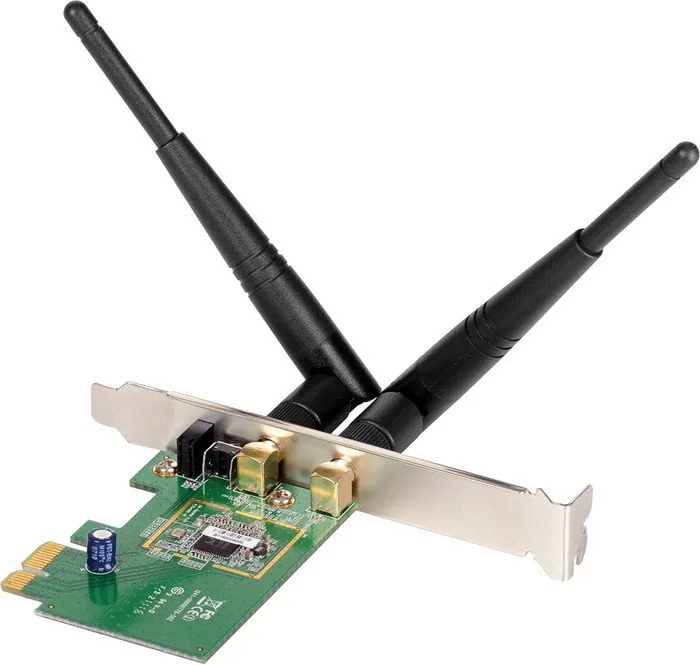
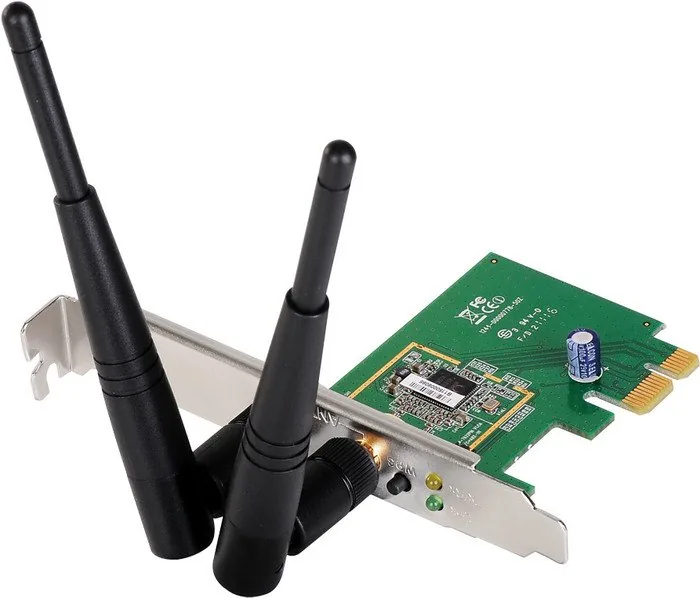
Edimax nMax EW-7612PIn V2 Manual
PDF manual · 52 Pages
English



Quick check
Incorrect answer, please try again.
Chat with your Edimax nMax EW-7612PIn V2 manual using AI
Get instant AI answers from your Edimax nMax EW-7612PIn V2 manual
Ask anything about the Edimax nMax EW-7612PIn V2. Answers come from this manual, with the pages they are based on.
Ask a Question
Do you recommend nMax EW-7612PIn V2?
Yes NoFrequently Asked Questions
It is made for desktop computers with an available PCI Express x1 slot. The card installs internally, then uses external antennas to provide wireless connectivity.
Is this answer helpful?
It supports 802.11b/g/n networking, with up to 300Mbps on 802.11n when using 40MHz channels and favorable network conditions.
Is this answer helpful?
Yes. It supports WEP, WPA, WPA2, and IEEE 802.1X-based authentication. It also includes WPS for simpler secure pairing with compatible routers.
Is this answer helpful?
Yes. The adapter includes a Soft-AP function, which lets a desktop computer share a wireless connection with other devices through software-based access point mode.
Is this answer helpful?
The WPS button makes setup faster by allowing a secure connection with a compatible router without manually entering full wireless settings.
Is this answer helpful?
The text mentions Windows XP, Vista, and Windows 7. Those systems are the main focus of the installation and utility instructions.
Is this answer helpful?
Advantages and Disadvantages
Advantages

- Up to 300Mbps on 802.11n for solid everyday wireless performance.
- PCIe x1 design makes it easy to install in a desktop PC.
- Two detachable 3dBi antennas help improve reception and placement.
- Supports WPS, profile saving, and Soft-AP mode for added flexibility.
Disadvantages

- Works only on the 2.4GHz band, so it lacks 5GHz support.
- Driver support is centered on older Windows versions like XP, Vista, and 7.
- Performance depends on antenna placement and signal conditions.
- Soft-AP and security setup may be intimidating for beginners.
Product Specification
Type
WLAN Adapter
Form Factor
1x PCIe card (interchangeable bracket: full height and low profile bracket included)
Interface
1x PCIe x1
Connectivity
1x WLAN 802.11b/g/n (1x 2.4GHz, WPS button), 1x Transmitter amplifier (2x RP-SMA antenna connector, 16dBm), 2x Antenna (RP-SMA, individually adjustable, 2x electrical, 3dBi)
Transmission
1x 2.4GHz WLAN (300Mb/s, 2x2)
Power Supply
Power supply only via interface
Dimensions
3.46x4.76x0.83in (WxHxD)
Compatibility
universal
Manufacturer Warranty
two years
Product Description
Edimax nMax EW-7612PIn V2: Practical Wi-Fi Expansion for Desktop PCs
The Edimax nMax EW-7612PIn V2, 2.4GHz, PCIe x1 is a straightforward way to bring wireless networking to a desktop computer without adding clutter or complexity. Built for the 2.4GHz band and designed to fit a PCI Express x1 slot, it aims to deliver fast everyday connectivity while keeping installation simple. For users upgrading an older PC or building a compact system, it offers a familiar, flexible route into Wi-Fi.
One of its most appealing traits is support for 802.11b/g/n, with wireless speeds reaching up to 300Mbps under ideal conditions. That makes it suitable for browsing, streaming, file transfers, and general home or office use. The adapter also includes two detachable 3dBi antennas, which help improve signal reception and give users the freedom to adjust antenna positioning for better stability.
The Edimax nMax EW-7612PIn V2 Manual highlights several convenience-focused features, including a hardware WPS button, an EZmax setup wizard, and support for both the Edimax utility and Windows Zero Configuration. This means users can choose between a guided installation experience or a more traditional configuration path. The adapter also supports profile management, which is useful when switching between home, work, and public networks.
Beyond basic client mode, the card can also operate as a Soft-AP, allowing a desktop to act like a wireless hotspot for nearby devices. That adds extra value for users who want more than simple internet access. Security support is broad too, with compatibility for WEP, WPA, WPA2, and IEEE 802.1X, making it easier to connect to modern protected networks.
Notes
- Best suited for indoor desktop use on 2.4GHz networks.
- Installation is easiest when a PCIe x1 slot is available.
- Useful for users who need both client connectivity and software AP features.
- Ideal for stable everyday networking rather than cutting-edge dual-band performance.
Search for 67,732 Manuals online


Type-in Brand or Model
Leon Weber
10 months ago
Is this Wi-Fi card 5GHz capable, and will it stay stable for online gaming if my router is a few rooms away (about 10 m)?
Manual.ly
10 months ago
This model is designed for the 2.4GHz band only, so 5GHz is not supported. For gaming and online calls, stability depends heavily on signal strength. Several buyers report good performance when the router is close or the path is simple, but more frequent drops and speed swings when the PC is farther away and walls/obstacles are in between (for example around 10 m). To improve reliability: place the antennas for best reception, keep the PC closer if possible, and update the latest driver from the manufacturer (many users use the default Windows driver, but newer drivers can help). If you need consistently low latency, consider using Ethernet or a better Wi-Fi adapter for long distances.