
Edimax GS-1005BE Manual
PDF manual · 9 Pages
English



Quick check
Incorrect answer, please try again.
Chat with your Edimax GS-1005BE manual using AI
Get instant AI answers from your Edimax GS-1005BE manual
Ask anything about the Edimax GS-1005BE. Answers come from this manual, with the pages they are based on.
Ask a Question
Do you recommend GS-1005BE?
Yes No
Archie Morgan
6 months ago
What are the exact dimensions of this unit?
error_et
7 months ago
Is this device truly compact enough for travel while still delivering strong performance?

Manual.ly
7 months ago
Yes, our device is designed to be both compact and powerful. It fits easily into bags or pockets without sacrificing processing speed or battery life, making it ideal for travelers who need reliable performance on the go.
Frequently Asked Questions
Each of the five ports on the Edimax GS-1005BE supports speeds up to 2.5 Gigabits per second. It also automatically adjusts to support 1000 Mbps and 100 Mbps connections for older devices.
Is this answer helpful?
No, the Edimax GS-1005BE is a plug-and-play device. It does not require any driver installation, software configuration, or special settings to function correctly.
Is this answer helpful?
Yes, the switch is backward compatible. It will automatically negotiate the best available speed with older devices, supporting 100 Mbps Fast Ethernet and 1000 Mbps Gigabit Ethernet.
Is this answer helpful?
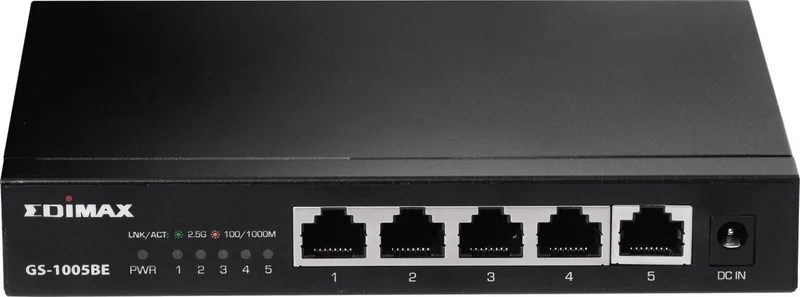
You can check the LED status lights on the front of the unit. Green indicates a 2.5G connection, yellow indicates 100/1000M, and blinking lights show active data transmission.
Is this answer helpful?
Absolutely. Its robust performance and ability to handle multiple devices make it perfect for small offices, home studios, and small to medium-sized businesses needing reliable connectivity.
Is this answer helpful?
Advantages and Disadvantages
Advantages

- Supports ultra-fast 2.5Gbps speeds on all five ports
- Fully backward compatible with 100Mbps and 1Gbps devices
- Plug-and-play setup requiring no software or configuration
- Intelligent LED indicators for easy connection monitoring
- Compact desktop form factor suitable for tight spaces
Disadvantages

- Does not include Power over Ethernet (PoE) capabilities
- No web-based management interface for advanced settings
- Limited to five ports which may require expansion for larger networks
- Requires external power adapter included in the box
- No fan cooling system which relies on passive heat dissipation
Product Specification
Function
Switch
Type
Standalone
Network Ports
5x RJ-45
Speeds
5x RJ-45 (100/1000/2.5GBase-T)
PoE
N/A
Backplane
25Gb/s, 18.6Mpps, 12KB Jumboframes, 1.5MB Packet Buffer, 16K MAC Addresses
Officially Supported Standards
802.3, 802.3ab, 802.3an, 802.3az, 802.3u, 802.3x
Configuration
unmanaged
Cooling
passive
Dimensions (WxDxH)
6.3x1.1x4.3 in
Weight
15.7 oz
Color
black
Features
Metal enclosure, external power supply, front-facing network connection
Manufacturer Warranty
two years
Product Description
Upgrade Your Network Speed with the Edimax GS-1005BE
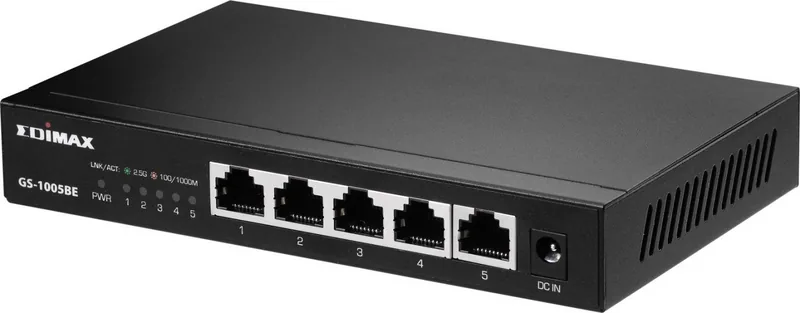
The Edimax GS-1005BE is a compact and powerful desktop switch designed to modernize your local area network. This device features five RJ-45 ports, each capable of supporting speeds up to 2.5 Gigabits per second. It serves as an ideal solution for users who need faster data transfer rates without the complexity of enterprise-grade networking equipment. Whether you are setting up a home office, a small business, or a gaming rig, this switch ensures that your high-speed internet connection is fully utilized.
One of the standout features of the GS-1005BE is its backward compatibility. While it supports blazing-fast 2.5G connections, it automatically negotiates down to standard 100 Mbps Fast Ethernet or 1000 Mbps Gigabit Ethernet speeds. This flexibility means you can connect older devices alongside new ones without worrying about compatibility issues. The plug-and-play design requires no software installation or complex configuration, making it accessible for users of all technical skill levels.
The hardware is built for reliability and ease of monitoring. Each port is equipped with intelligent LED indicators that provide real-time status updates. A green light indicates a 2.5G connection, while a yellow light signifies a 100/1000M link. The power LED confirms the unit is active, and the activity lights show data transmission in progress. This visual feedback helps users quickly diagnose connectivity problems.
Designed for quiet operation and space-saving efficiency, the GS-1005BE fits perfectly on any desk. It complies with various international safety and electromagnetic compatibility standards, ensuring safe usage in both residential and commercial environments. By upgrading to this switch, you eliminate bottlenecks in your network, allowing for seamless file transfers, smoother video streaming, and reduced latency during online activities.
Search for 67,732 Manuals online


Type-in Brand or Model
Tamia O'Connell
5 months ago
Is this device actually powerful despite its small size?
Manual.ly
5 months ago
Yes, the device is designed to be compact yet highly efficient. Users consistently report excellent performance for its size, making it ideal for portable use without sacrificing power.