
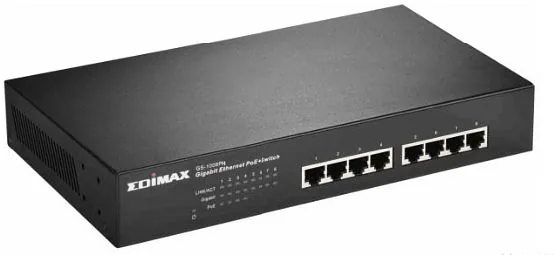
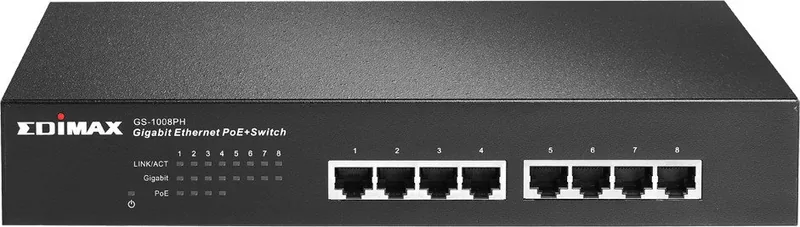
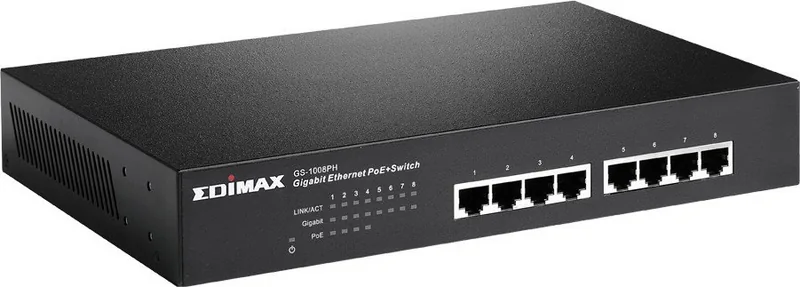
Edimax GS-10 8 Port PoE Manual
PDF manual · 8 Pages
English



Quick check
Incorrect answer, please try again.
Chat with your Edimax GS-10 8 Port PoE manual using AI
Get instant AI answers from your Edimax GS-10 8 Port PoE manual
Ask anything about the Edimax GS-10 8 Port PoE. Answers come from this manual, with the pages they are based on.
Ask a Question
Do you recommend GS-10 8 Port PoE?
Yes NoFrequently Asked Questions
The available models include ES-1008PH, ES-1008P, GS-1008PH, and GS-1008P with varying Fast and Gigabit options.
Is this answer helpful?
Each model features eight RJ-45 Ethernet ports for connecting network devices locally.
Is this answer helpful?
Yes, it supports PoE and PoE+ standards for powering devices directly through the network cable.
Is this answer helpful?
The unit operates within a temperature range of zero to fifty degrees Celsius for optimal function.
Is this answer helpful?
You can install it on a desk with rubber feet or mount it in a rack using the provided brackets.
Is this answer helpful?
The power connector supports an input voltage range from one hundred to two hundred forty volts AC.
Is this answer helpful?
Verify the network cable type complies with specifications and ensure the connected device is turned on.
Is this answer helpful?
Advantages and Disadvantages
Advantages

- Supports Gigabit Ethernet speeds for fast data transmission.
- Provides PoE+ power to connected devices like IP cameras.
- Allows flexible desktop or rack-mount installation options.
- Low power consumption ensures energy-saving operation.
- Complies with FCC Class B and CE safety markings.
Disadvantages

- Limited power budget may restrict heavy PoE device loads.
- Basic LED troubleshooting requires manual verification of connections.
- Buffer memory size restricts heavy traffic handling capacity.
- Does not include advanced managed features in base model.
- Physical dimensions limit placement flexibility in tight spaces.
Product Specification
Function
Switch
Type
Standalone, Rackmount (via mounting bracket)
Network Connections
8x RJ-45
Speeds
8x RJ-45 (10/100/1000Base-T)
PoE
4x RJ-45 PoE+ (4x 30W), total: 75W
Backplane
16Gbps, 11.9Mbps, 9KB Jumbo Frames, 128Kb Packet Buffer, 8K MAC Addresses
Officially Supported Standards
802.3, 802.3ab, 802.3af, 802.3at, 802.3az, 802.3u, 802.3x
Configuration
Unmanaged
Cooling
Passive
Dimensions (WxHxD)
10.47 x 1.73 x 7.24 in, 1U
Weight
2.98 lbs
Color
Black
Features
Metal chassis, removable mounting brackets
Manufacturer Warranty
Two years
Product Description
Exploring the Edimax GS-10 Desktop Gigabit Switch, 8x RJ-45, PoE+
Networking infrastructure needs reliability and speed for any modern enterprise or home setup. The Edimax GS-10 Desktop Gigabit Switch, 8x RJ-45, PoE+ offers a robust solution for users who demand high performance. This device ensures high-speed data transmission across multiple ports while delivering power directly to connected devices simultaneously. Integrating the Edimax GS-10 Desktop Gigabit Switch, 8x RJ-45, PoE+ Manual specifications into your workflow provides clarity on setup procedures without needing a physical booklet or external resources for reference.
At the heart of this switch lies the Gigabit Ethernet standard which supports up to one thousand megabits per second. With eight ports available, users gain immense flexibility in connecting computers, printers, or servers. The Power over Ethernet Plus feature simplifies cabling by powering compatible devices like IP cameras or wireless access points through the single network cable itself. This reduces clutter and installation costs significantly while maintaining a clean aesthetic. Security is maintained through Flow Control mechanisms that manage network traffic efficiently to prevent data loss.
Installation is incredibly versatile for various environments. You can place the unit on a desk using the included rubber feet for a stable, non-slip surface that protects the casing. Alternatively, rack-mount brackets allow integration into server cabinets for a professional appearance and organized cable management. Proper ventilation is crucial, requiring at least a twenty-five millimeter gap around the unit to prevent overheating during extended operation. The device supports a wide voltage range from one hundred to two hundred forty volts AC, ensuring compatibility across different global regions without conversion issues.
Specifications highlight the efficiency and design of the hardware. Power consumption remains low at a maximum of five Watts for smaller models ensuring energy savings over time. The buffer memory supports efficient data handling, and jumbo frames enable large packet transmission for better throughput on larger file transfers. Safety compliance includes Federal Communication Commission Class B certification and CE marking for radio frequency standards. Troubleshooting is straightforward with LED indicators for power, link, and activity status visible at all times. If the power light is off, check the cord connection carefully. If the link light is dead, verify the network cable type and device status immediately.
This equipment operates within a temperature range of zero to fifty degrees Celsius for standard conditions. It accommodates humidity levels from ten to ninety percent relative humidity. Maintaining a clean environment free from electronic noise ensures optimal performance and longevity. Users should always verify power budget requirements against connected devices to avoid overloading the system unnecessarily. Whether for business applications or personal use, this switch delivers consistent performance and stability. It represents a solid investment for expanding network capabilities without significant expense or complexity.
Search for 67,732 Manuals online


Type-in Brand or Model