
Edimax ES-10 Manual
PDF manual · 14 Pages
English



Quick check
Incorrect answer, please try again.
Chat with your Edimax ES-10 manual using AI
Get instant AI answers from your Edimax ES-10 manual
Ask anything about the Edimax ES-10. Answers come from this manual, with the pages they are based on.
Ask a Question
Do you recommend ES-10?
Yes NoFrequently Asked Questions
It is used to connect and power network devices such as IP cameras, access points, and VoIP phones through PoE+, while also handling data traffic over RJ-45 ports.
Is this answer helpful?
PoE+ lets the switch deliver electrical power and network data through the same Ethernet cable, reducing the need for separate power adapters near each device.
Is this answer helpful?
They let you enable extended range on selected ports, isolate traffic with VLAN-style behavior, or prioritize voice and video using QoS-style handling.
Is this answer helpful?
In extended mode, selected PoE ports can support power and data delivery up to about 200 meters, but the speed is reduced to 10 Mbps on those ports.
Is this answer helpful?
Check the front LEDs. Power should be on, link/activity should light when a device is connected, and the PoE indicator should show when power is being delivered.
Is this answer helpful?
The alert means total PoE demand is exceeding the available budget. Disconnect some powered devices, redistribute load, or confirm that connected equipment fits within the switch's power limits.
Is this answer helpful?
No. It is designed for simple setup. Use standard Cat5 cabling, connect devices to the RJ-45 ports, plug in power, and verify status with the LEDs.
Is this answer helpful?
Advantages and Disadvantages
Advantages

- Eight RJ-45 PoE+ ports combine network data and power in one cable.
- DIP switch modes add extend, VLAN, and QoS flexibility.
- LED indicators make status checks and troubleshooting quick.
- Auto-MDI/MDI-X support simplifies cabling and installation.
Disadvantages

- Extended mode reduces selected ports to 10 Mbps.
- DIP switch changes require a reboot to take effect.
- PoE budget must be managed carefully with multiple devices.
- Best suited for indoor use within moderate temperature and humidity limits.
Product Specification
Function
Switch
Type
Standalone, Rackmount (via mounting brackets)
Network ports
8x RJ-45
Speeds
8x RJ-45 (10/100Base-T)
PoE
8x RJ-45 PoE+ (8x 30W), total: 130W
Backplane
1.6Gb/s, 1.19Mp/s, 56Kb packet buffer, 1K Mac addresses
Officially supported standards
802.1p, 802.3, 802.3af, 802.3at, 802.3az, 802.3u, 802.3x
Configuration
unmanaged
Cooling
passive
Dimensions (WxHxD)
8.48x1.65x5.24in, 1U
Weight
3.55lb
Color
black
Special features
Metal housing, removable mounting brackets
Manufacturer's warranty
two years
Product Description
Edimax ES-10 Desktop Switch, 8x RJ-45, PoE+, V2: Compact PoE for Everyday Networks
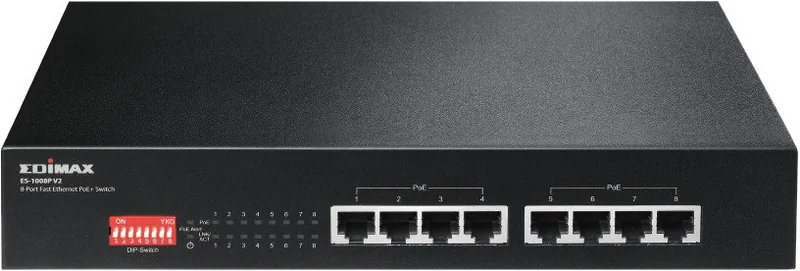
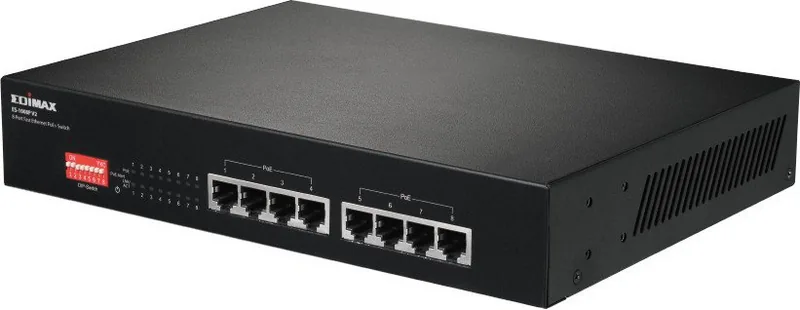
The Edimax ES-10 Desktop Switch, 8x RJ-45, PoE+, V2 is a practical pick for small offices, smart-home installs, and light commercial networks that need data and power in one place. With eight RJ-45 ports and PoE+ support, it can help simplify setups for IP cameras, wireless access points, and VoIP phones while reducing cable clutter and the need for separate power adapters.
What makes this switch especially useful is its flexible operating behavior. The front-panel DIP switches let you choose between standard switching, extended reach on selected ports, VLAN-style isolation, and QoS prioritization. In real-world terms, that means you can adapt the device to different layouts: extend power and data farther for distant endpoints, keep traffic segments separated, or give voice and video traffic higher priority. Even a quick look at the Edimax ES-10 Desktop Switch, 8x RJ-45, PoE+, V2 Manual highlights how focused the design is on straightforward deployment rather than complicated setup.
The unit is also easy to monitor. LED indicators show power status, link activity, PoE output, and overload alerts, so you can spot problems without digging through software menus. If the PoE budget is exceeded, the alert light gives an immediate warning, helping you balance connected devices before performance becomes unstable.
Installation is kept simple with Auto-MDI/MDI-X support and standard Cat5 cabling, which makes it easier to connect common network devices without worrying about cable direction. The switch also follows typical indoor operating limits, so proper placement, airflow, and moderate temperature conditions are important for reliable use. For networks that need dependable switching with built-in power delivery, this model offers a clean and efficient approach.
Another advantage is the product family itself. The Fast Ethernet ES-1008P V2 suits basic deployments, while the Gigabit GS-1008P V2 is better for environments that need more bandwidth. That gives buyers a choice based on workload, whether the priority is powering a few devices, improving network organization, or supporting faster uplinks.
Notes
- Reboot the switch after changing DIP switch settings.
- Extended mode improves reach, but limits selected ports to 10 Mbps.
- Check the PoE budget before adding multiple powered devices.
- Keep vents clear and avoid heat, moisture, and blocked airflow.
Search for 67,732 Manuals online


Type-in Brand or Model