
Edimax EN-9235TX-32 Manual
PDF manual · 16 Pages
English



Quick check
Incorrect answer, please try again.
Chat with your Edimax EN-9235TX-32 manual using AI
Get instant AI answers from your Edimax EN-9235TX-32 manual
Ask anything about the Edimax EN-9235TX-32. Answers come from this manual, with the pages they are based on.
Ask a Question
Do you recommend EN-9235TX-32?
Yes NoFrequently Asked Questions
It is a gigabit Ethernet PCI adapter used to add or upgrade wired network connectivity on compatible desktop computers. It supports fast data transfer, stable connections, and common Ethernet features for home or office use.
Is this answer helpful?
Yes. The adapter supports 10/100/1000Mbps networking. To reach 1000Mbps, you also need a suitable Ethernet cable and a gigabit-capable switch or router.
Is this answer helpful?
Use CAT-5e or CAT-6 Ethernet cables for gigabit networking. Some CAT-5 cables may only deliver 100Mbps or may not reliably support 1000Mbps speeds.
Is this answer helpful?
It includes a setup wizard for Windows users and manual driver options for other systems. Hardware installation is straightforward, but you may need to restart the computer after driver setup.
Is this answer helpful?
The adapter supports a range of systems, including several Windows versions, Novell 5.x/6.x, and Linux 2.4.x. Driver installation method may vary by operating system.
Is this answer helpful?
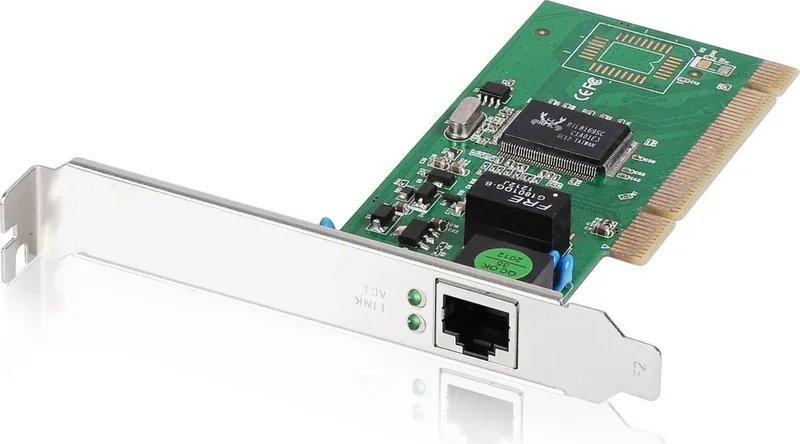
The link LED shows whether the adapter is connected to a network device, while the activity LED blinks during data transfer. These indicators help confirm basic network status at a glance.
Is this answer helpful?
Advantages and Disadvantages
Advantages

- Fast 10/100/1000Mbps performance with auto-negotiation for flexible network use.
- Supports useful extras like jumbo frames, VLAN tagging, Wake on LAN, and MSI.
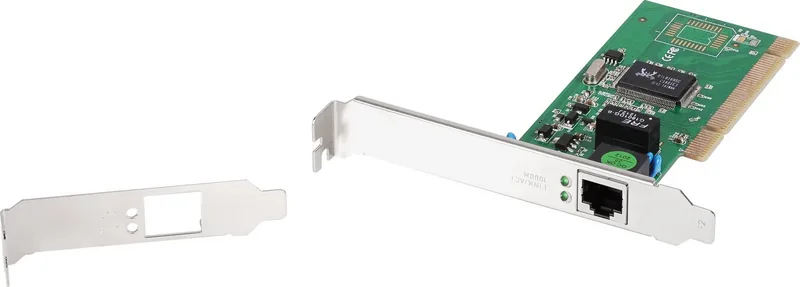
- Includes a low-profile bracket, making it suitable for compact desktop cases.
- Offers broad driver support across Windows, Linux, and Novell systems.
Disadvantages

- Gigabit performance depends on CAT-5e or CAT-6 cabling and a 1000Mbps switch.
- Some operating systems require manual driver installation, which may take extra steps.
- Legacy PCI compatibility may limit use in newer systems without the right slot.
- Older hardware setup can involve troubleshooting if the adapter is not detected immediately.
Product Specification
Type
LAN Adapter
Form Factor
1x PCI card (exchangeable bracket: full height and low profile bracket included)
Interface
1x PCI 2.1
Port
1x RJ-45
Transmission
1x RJ-45 (10/100/1000Base-T)
Power Supply
Power supply only via interface
Chipset
Realtek RTL8169SC (LAN Adapter, RJ-45)
Dimensions
4.49x2.05x0.63in (WxHxD, without bracket)
Compatibility
universal
Special Features
VLAN, Wake on LAN
Product Description
Edimax LAN Adapter, RJ-45, PCI: A Practical Gigabit Upgrade
The Edimax LAN Adapter, RJ-45, PCI Manual highlights a straightforward network upgrade for desktop users who want faster and more reliable wired connectivity. Built around the EN-9235TX-32 gigabit Ethernet adapter, this card is designed to bring modern networking performance to compatible systems without adding unnecessary complexity.
At its core, the adapter focuses on speed and stability. It supports 10/100/1000Mbps operation, auto-negotiation, full-duplex communication, and jumbo frames, making it a solid fit for file transfers, streaming, backups, and everyday office networking. The RJ-45 port ensures broad compatibility with standard Ethernet cabling, while features such as VLAN tagging, Wake on LAN, and MSI support add value for both home and business environments.
Another strong point is flexibility. The package includes a low-profile bracket, which helps the adapter fit smaller desktop cases and compact builds. The included setup wizard and driver CD make installation easier for Windows users, while manual driver options are available for Linux and Novell systems. That makes the card appealing to users who still maintain older machines or need a dependable wired connection on legacy platforms.
The LED indicators are simple but useful. A green link light confirms network connection, while the activity light shows data transfer in real time. For users who like quick visual status checks, this is a small but practical detail. The adapter also supports plug-and-play behavior and common Ethernet standards, reinforcing its value as a dependable, no-frills networking component.
For best results, the adapter should be paired with the right infrastructure. A CAT-5e or CAT-6 Ethernet cable is recommended for gigabit speeds, and the network switch should also support 1000Mbps. If speed is capped at 100Mbps, the issue is often related to the cable or the connected switch rather than the card itself.
Notes
- Ideal for desktop systems that need a wired gigabit connection.
- Manual driver installation may be necessary on some operating systems.
- Check cable quality and switch capability before troubleshooting speed issues.
Search for 67,732 Manuals online


Type-in Brand or Model