
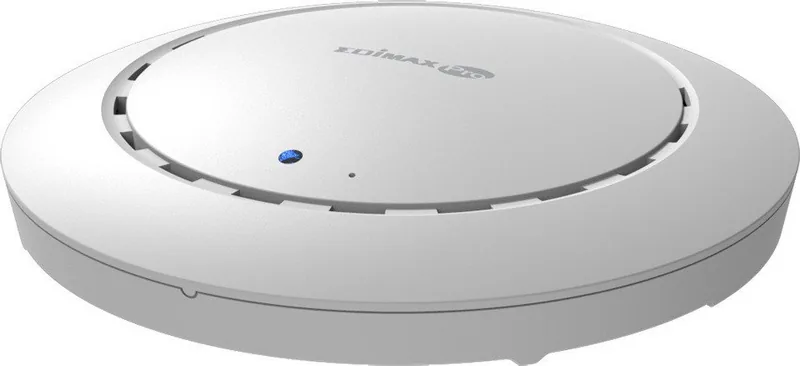
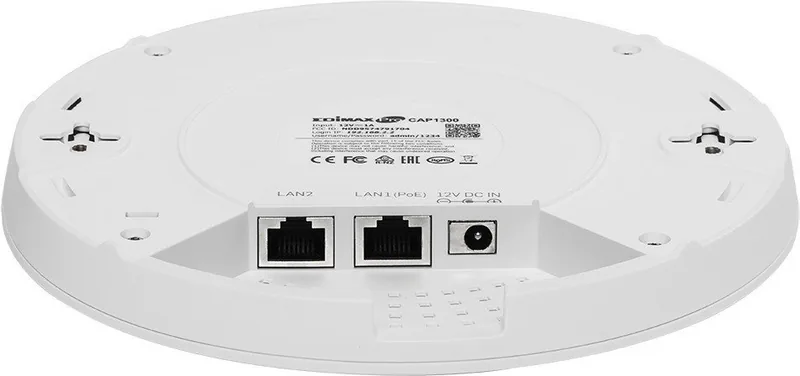

Edimax CAP1300 Manual
PDF manual · 381 Pages
English



Quick check
Incorrect answer, please try again.
Chat with your Edimax CAP1300 manual using AI
Get instant AI answers from your Edimax CAP1300 manual
Ask anything about the Edimax CAP1300. Answers come from this manual, with the pages they are based on.
Ask a Question
Do you recommend CAP1300?
Yes NoFrequently Asked Questions
The device operates in Access Point, Repeater, Managed AP, AP Controller, and Client Bridge modes.
Is this answer helpful?
Press and hold the reset button for at least 10 seconds until the LED flashes quickly. The device restarts with default credentials.
Is this answer helpful?
The default IP address is 192.168.2.2. The username is admin and the password is 1234.
Is this answer helpful?
Yes, LAN port 1 supports Power over Ethernet (PoE) input. Do not use the power adapter if using PoE.
Is this answer helpful?
The Edimax Pro NMS controller can manage up to 16 access points centrally without additional wireless controllers.
Is this answer helpful?
Supported protocols include WPA2, WPA, WEP, RADIUS, MAC filtering, and 802.1x authentication methods.
Is this answer helpful?
Yes, the package includes a T-Rail mounting kit for secure installation in grid ceilings.
Is this answer helpful?
Advantages and Disadvantages
Advantages

- Supports five distinct operation modes for flexible deployment scenarios
- Integrated Power over Ethernet for simplified cable management
- Central management via Edimax Pro NMS for up to 16 devices
Disadvantages

- Configuration interface can be complex for novice users
- Requires hardware reset for password recovery
- Limited to 16 managed access points within NMS
Product Specification
LAN
2x 1000Base-T (PoE PD)
Wireless
Wi-Fi 802.11a/b/g/n/ac (Wi-Fi 5), simultaneous
Data Rate
400 Mbps (2.4 GHz), 867 Mbps (5 GHz)
Security
64/128-bit WEP, WPA, WPA2
Antennas
Internal
Ports
N/A
Power Consumption
11 W (Consumption, Operation), N/A (max. power supply wattage)
Dimensions
6.93 x 6.93 x 1.26 inches
Features
MU-MIMO, VLAN, IPv6, VPN passthrough (IPSec/PPTP/L2TP)
Band Support
Dual Band (simultaneous)
Product Description
Unlocking Wireless Potential with the Edimax CAP1300
The Edimax CAP1300 stands as a robust solution for modern network infrastructure to provide seamless connectivity across diverse environments. Whether you are managing a small office or a larger enterprise setup, this device adapts to your specific needs through its versatile operation modes. It supports Access Point, Repeater, Managed AP, AP Controller, and Client Bridge functionalities out of the box. Installing the Edimax CAP1300 Manual ensures you understand every aspect of setup.
Power over Ethernet support simplifies wiring, allowing for flexible placement in ceiling mounts or T-Rail fixtures. The unit features dual-band capabilities for optimal performance in both 2.4GHz and 5GHz frequencies. Users can customize up to 32 SSIDs independently, catering to guest networks or dedicated employee segments. Security is paramount, with support for WPA2, RADIUS authentication, and MAC filtering to keep unauthorized users at bay. The device allows for granular control over encryption types including TKIPAES mixed modes for enhanced data protection.
Management is streamlined through the Edimax Pro Network Management Suite. This tool allows a single controller to oversee up to 16 access points centrally. This reduces overhead and minimizes the complexity of routine maintenance tasks. The interface offers detailed monitoring logs and traffic shaping options to maintain bandwidth quality for critical applications. Voice over IP traffic receives priority handling through Wi-Fi Multimedia support. You can also monitor active clients and rogue devices to ensure network integrity.
Physical setup includes a reset button for quick recovery and clear LED indicators for status checking. The device accommodates both wooden and non-wooden ceiling mounting with provided hardware kits. Safety guidelines recommend indoor use only to prevent environmental damage. Regular updates ensure firmware remains secure and functional. The system supports NTP for time synchronization and allows for custom syslog server integration for deeper logging capabilities.
With its combination of flexibility, security, and manageability, this access point serves as a cornerstone for reliable wireless deployment. It integrates easily into existing IP networks and supports standard DHCP and static IP configurations. Administrators appreciate the ability to reboot or reset settings remotely via the browser interface. The web-based configuration panel provides access to advanced features like VLAN settings and IGMP snooping for complex network topologies.
In conclusion, the Edimax CAP1300 delivers a comprehensive feature set suitable for varied networking requirements. Its ability to switch between modes allows it to grow with your network demands. Planning your deployment helps avoid common pitfalls. This unit represents a significant investment in network stability and performance. For detailed instructions on how to configure specific zones or manage firmware updates, extensive resources are available to assist during the implementation phase.
Search for 67,732 Manuals online


Type-in Brand or Model