
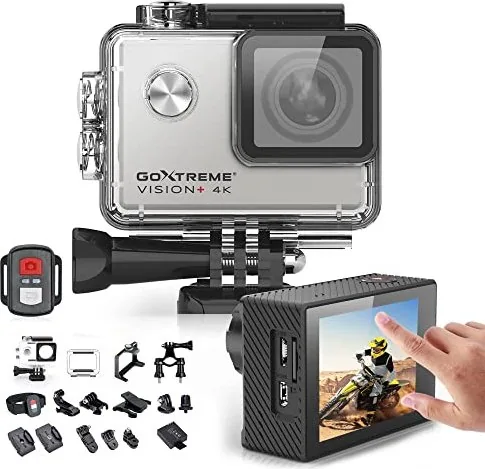
Easypix GoXtreme Vision+ Manual
PDF manual · 28 Pages
English



Quick check
Incorrect answer, please try again.
Chat with your Easypix GoXtreme Vision+ manual using AI
Get instant AI answers from your Easypix GoXtreme Vision+ manual
Ask anything about the Easypix GoXtreme Vision+. Answers come from this manual, with the pages they are based on.
Ask a Question
Do you recommend GoXtreme Vision+?
Yes No
SkeptischerKäufer
5 months ago
How reliable is the camera? I am worried about system crashes during use.

Caesar Ruecker
5 months ago
Is the included remote control waterproof for underwater use?

Manual.ly
5 months ago
Thank you for your question. The standard remote control provided with this camera is not designed for underwater use. However, the package includes a dedicated underwater housing case that allows you to take photos and videos while submerged. For underwater operations, we recommend using the camera inside the protective case without the remote.
QuisQuia47
4 months ago
How long does the battery last during recording?
Frequently Asked Questions
The Easypix GoXtreme Vision+ supports recording videos in 4K resolution at 30 frames per second, ensuring high-quality footage for professional-looking results.
Is this answer helpful?
No, the camera itself is not waterproof. However, it comes with a protective housing that makes it waterproof up to 30 meters when properly sealed.
Is this answer helpful?
Wireless transmission via the app is limited to videos under 1080p. To transfer 4K files, you must remove the MicroSD card and use a computer or card reader.
Is this answer helpful?
Under optimal conditions, the battery provides up to 90 minutes of continuous recording time, though this can decrease with higher settings or extreme temperatures.
Is this answer helpful?
For best results, especially with 4K video, use a high-quality Class 10 MicroSD card with U3 High Speed or higher specifications.
Is this answer helpful?
Yes, the camera offers slow-motion capabilities at 1080p (up to 4x speed) and 720p (up to 8x speed) for dramatic effect.
Is this answer helpful?
Advantages and Disadvantages
Advantages

- Captures high-resolution 4K video and 16MP photos with a wide 170-degree angle
- Includes a waterproof housing rated for depths up to 30 meters
- Features an intuitive 2-inch touch screen for easy navigation
- Supports various shooting modes including slow motion and time lapse
- Connects seamlessly to smartphones via Wi-Fi for live viewing
Disadvantages

- MicroSD card is not included in the box
- Wi-Fi file transfer is limited to resolutions below 1080p
- Battery life may vary significantly based on usage settings and temperature
- Requires specific U3 Class 10 cards for reliable 4K recording
- Waterproof housing must be used as the camera itself is not waterproof
Product Specification
Effective Megapixel
12.0 MP
Sensor
CMOS
Video Function
H.264, 3840x2160@30p (16:9), 1920x1080@120p (16:9)
Photo Resolution
JPEG
Viewing Angle
170°
Digital Zoom
No
Display
2" LCD
Waterproof
up to 98 ft with case
Removable Storage
microSD/microSDHC/microSDXC
Connections
USB 2.0, HDMI
Wireless
Wi-Fi (WLAN)
Power Supply
Li-Ion battery (1050mAh, removable)
Color
Silver
Dimensions
2.36x1.61x1.18 in (WxHxD)
Product Description
Capturing Life in Stunning 4K with Easypix GoXtreme Vision+
The Easypix GoXtreme Vision+ is a versatile action camera designed for adventurers who demand high-quality footage without the bulk. This device captures crisp 4K video at 30 frames per second and stunning 16-megapixel photos, all while utilizing an ultra-wide 170-degree lens to encompass every detail of your surroundings. Whether you are mountain biking, surfing, or simply documenting your daily life, this camera adapts to your needs with ease.
One of the standout features is the intuitive 2-inch touch screen interface. It allows users to navigate settings, switch between modes, and review content effortlessly. The camera comes equipped with a robust waterproof housing that protects the unit up to depths of 30 meters, making it perfect for underwater exploration. Additionally, the package includes a wrist-worn remote control, enabling hands-free operation for dynamic shots.
Setup is straightforward, guiding users through charging the included 1050mAh battery, formatting a MicroSD card, and connecting via Wi-Fi to the dedicated XDV PRO app for live viewing and file transfer. With multiple mounting options like helmet, bicycle, and body mounts, the GoXtreme Vision+ ensures you never miss a moment. Its advanced functions include slow-motion recording, time-lapse photography, loop recording, and burst mode, providing creative flexibility for various scenarios. Always remember to use high-speed U3 Class 10 memory cards for optimal 4K performance.
Important Notes
- Ensure the battery is fully charged before first use.
- Format the MicroSD card inside the camera before the initial recording session.
- Do not expose the camera directly to water; always use the provided waterproof housing.
- Use only manufacturer-approved chargers to maintain battery safety.
Search for 67,706 Manuals online


Type-in Brand or Model
WasserFotograf
4 months ago
Is the included remote control waterproof for underwater use?
Manual.ly
4 months ago
Thank you for your inquiry. Based on customer feedback, the standard remote control is not designed for underwater use. However, the camera package includes a dedicated underwater housing that allows you to shoot safely below the surface. For extended recording sessions, we recommend purchasing an additional battery as the single unit typically lasts around 60 minutes.