
Easypix GoXtreme Pioneer Manual
PDF manual · 10 Pages
English



Quick check
Incorrect answer, please try again.
Chat with your Easypix GoXtreme Pioneer manual using AI
Get instant AI answers from your Easypix GoXtreme Pioneer manual
Ask anything about the Easypix GoXtreme Pioneer. Answers come from this manual, with the pages they are based on.
Ask a Question
Do you recommend GoXtreme Pioneer?
Yes NoFrequently Asked Questions
It supports Video, Photo, Burst Photo, Time Lapse, and Playback modes. These cover everyday recording, quick action shots, and interval-based creative clips, making the camera useful for both casual and active shooting.
Is this answer helpful?
Switch the camera to Video mode using the Power/Mode button, then press the Shutter/Select button to begin recording. Press it again to stop. The camera gives beep and light feedback while recording.
Is this answer helpful?
The camera supports 16GB and 32GB microSD, microSDHC, and microSDXC cards. A Class 10 speed rating is required for reliable performance, especially during video recording and high-movement activities.
Is this answer helpful?
Yes. It works with the iSmart DV app, which allows remote camera control, live preview, playback, and sharing of selected content. To connect, enable Wi‑Fi on the camera and join the Pioneer network from your mobile device.
Is this answer helpful?
Yes. Burst Photo mode captures 3 photos in 1.5 seconds. Time Lapse mode can shoot at intervals of 2, 3, 5, 10, 20, 30, or 60 seconds, depending on the settings you choose.
Is this answer helpful?
Charging the battery takes about 5 hours when connected to a computer or USB power supply. The charging light stays on during charging and turns off once the battery is fully charged.
Is this answer helpful?
Advantages and Disadvantages
Advantages

- Simple button layout makes mode switching and recording easy for beginners.
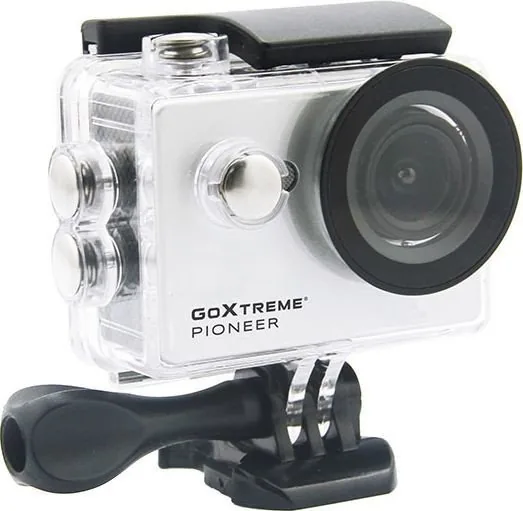
- Waterproof housing and mount support make it suitable for sports and outdoor use.
- Burst Photo and Time Lapse modes add creative flexibility beyond basic recording.
- App connectivity enables remote control, live preview, and convenient playback.
Disadvantages

- Battery charging takes around 5 hours, which may feel slow for frequent use.
- Storage support is practical but limited to specific microSD sizes and Class 10 cards.
- Playback and media access can vary depending on the device used.
- Video recording has file-size and time limits due to the FAT32 format.
Product Specification
Effective Megapixels
5.0 Megapixel
Sensor
CMOS
Video recording
MOV, 3840x2160@10p (16:9), 1920x1080@30p (16:9)
Photo resolution
JPEG
Viewing angle
140°
Digital zoom
no
Display
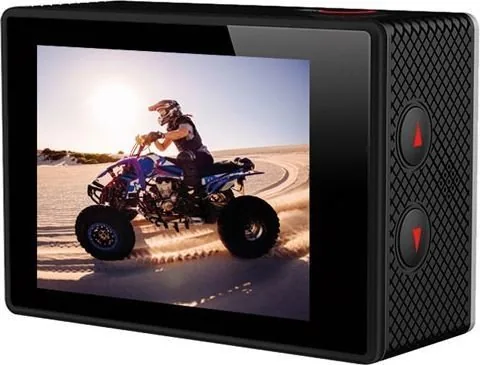
2" LCD
Waterproof
up to 98.43 ft with case
Storage media
microSD/microSDHC/microSDXC
Ports
USB 2.0
Wireless
Wi-Fi (WLAN)
Power supply
Li-ion battery (900mAh, replaceable)
Color
white
Dimensions
2.32x1.57x0.94in (WxHxD)
Product Description
Easypix GoXtreme Pioneer: A Compact Action Camera for Everyday Adventures
The Easypix GoXtreme Pioneer is designed for users who want a simple, rugged camera that can keep up with active days. With its waterproof housing and mount-friendly design, it suits helmet use, sports gear, travel scenes, and outdoor moments where a regular camera would feel impractical. The overall experience is centered on quick operation, reliable capture, and easy access to core shooting modes.
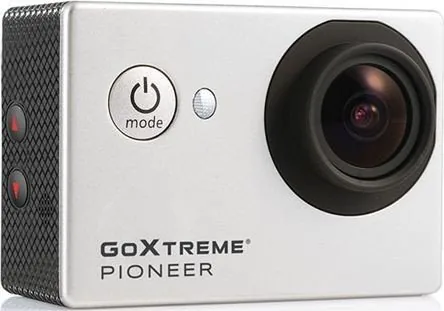
What makes the Easypix GoXtreme Pioneer Manual especially useful is how clearly the camera’s functions are organized. The Power/Mode button lets you move through video, photo, burst photo, time lapse, and playback modes, while the Shutter/Select button handles shooting and menu confirmation. This straightforward layout makes the camera approachable for beginners, yet flexible enough for users who want to experiment with different recording styles.
The settings menu adds practical customization without becoming overwhelming. Users can adjust photo resolution, exposure, timestamps, language, sound indicators, display rotation, screen saver, and power saver behavior. These options help tailor the camera to different shooting environments, especially when it is mounted upside down or used for extended sessions.
Video recording is easy to start and stop, and the camera provides clear audio and light feedback while recording. For still images, it offers standard photo capture as well as Burst Photo mode, which takes three shots in 1.5 seconds. Time Lapse mode is another highlight, allowing interval shooting from 2 seconds up to 60 seconds, making it useful for creative sequences, changing scenery, or action highlights.
The camera also supports microSD storage and works with a companion app for remote control, live preview, playback, and sharing on a smartphone or tablet. That combination adds convenience when the camera is mounted in hard-to-reach places. Overall, the GoXtreme Pioneer feels like a practical everyday action camera for users who want easy operation, essential features, and dependable mobility.
Notes
- A full battery charge takes about 5 hours.
- Use a Class 10 microSD card for stable recording.
- Branded memory cards are recommended for better reliability.
- Wi‑Fi can be turned on or off directly from the camera.
Search for 67,706 Manuals online


Type-in Brand or Model