
Easypix GoXtreme Impulse 4K Manual
PDF manual · 22 Pages
English



Quick check
Incorrect answer, please try again.
Chat with your Easypix GoXtreme Impulse 4K manual using AI
Get instant AI answers from your Easypix GoXtreme Impulse 4K manual
Ask anything about the Easypix GoXtreme Impulse 4K. Answers come from this manual, with the pages they are based on.
GoXtreme Impulse 4K Maintenance Schedule
After using the camera in salt or chlorinated water, clean the housing and let it dry. Leave the housing open after underwater use to prevent condensation or rust.
Ensure the memory card is formatted within the camera (Settings > Format) before the first use to guarantee compatibility and optimal function.
Ask a Question
Do you recommend GoXtreme Impulse 4K?
Yes NoFrequently Asked Questions
The Easypix GoXtreme Impulse supports MicroSD cards with a maximum capacity of 64GB. Using cards larger than this may cause file errors.
Is this answer helpful?
No, wireless transfer via the app is limited to 1080p. To access 4K files, you must remove the memory card and use a card reader connected to a computer.
Is this answer helpful?
You can activate WiFi by pressing and holding the UP/WiFi button for 3-5 seconds until the LED flashes yellow, or by swiping down on the screen and tapping the WiFi icon.
Is this answer helpful?
The camera itself is not waterproof. It requires a specific underwater housing that must be properly sealed before entering water to prevent damage.
Is this answer helpful?
For best results with 4K video, use a high-quality Class 10 MicroSD card with a U3 High Speed rating or higher to ensure sufficient data transfer speeds.
Is this answer helpful?
Advantages and Disadvantages
Advantages

- Supports 4K video recording for high-quality output
- Intuitive touchscreen interface for easy navigation
- Includes multiple shooting modes like slow-motion and time-lapse
- Wireless connectivity allows remote control via smartphone app
- Compatible with standard MicroSD cards up to 64GB
Disadvantages

- Wireless transfer limited to 1080p resolution only
- Requires specific U3 rated cards for optimal 4K performance
- Battery life may decrease significantly in cold temperatures
- Waterproofing requires careful sealing of all lids and closures
- No internal storage necessitates frequent card management
Product Specification
Effective Megapixel
12.0 MP
Sensor
CMOS
Video Function
MPEG-4, 3840x2160@30p (16:9), 1920x1080@120p (16:9)
Photo Resolution
JPEG
Viewing Angle
170 deg
Digital Zoom
No
Display
2 in LCD, Touchscreen
Waterproof
Up to 98 ft with case
Removable Storage
microSD/microSDHC/microSDXC
Connections
USB 2.0, HDMI
Wireless
Wi-Fi (WLAN)
Power Supply
Li-Ion Battery (1050 mAh, replaceable)
Color
Black
Dimensions
2.36x1.61x1.18 in (WxHxD)
Product Description
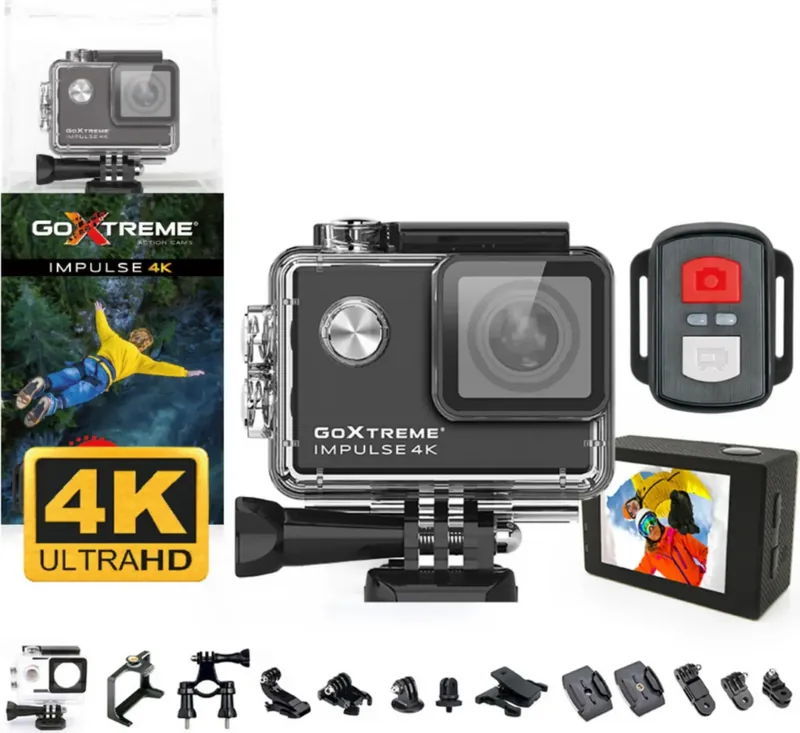
Easypix GoXtreme Impulse: Capture Life in Stunning 4K
The Easypix GoXtreme Impulse is a versatile action camera designed for adventurers who demand high-quality footage without complexity. This device delivers crisp 4K video recording, making it perfect for capturing fast-paced sports, travel vlogs, or everyday moments with exceptional clarity. With its intuitive touchscreen interface and compact design, the Impulse fits easily into any adventure kit.
One of the standout features of this camera is its robust connectivity options. Users can wirelessly connect to smartphones via the XDV Pro app to control settings, view live feeds, and transfer files. However, please note that wireless transfers are limited to resolutions up to 1080p; for 4K content, a direct card reader connection to a computer is required. The camera supports MicroSD cards up to 64GB, though using Class 10 U3 cards is recommended to handle the data throughput of 4K video smoothly.
For those who love time-lapse photography or need continuous monitoring, the Impulse offers specialized modes like Loop Recording, Lapse mode, and Burst photo capabilities. The built-in remote control allows for hands-free operation, while safety features ensure the device remains protected from water damage when used in its underwater housing. Always remember to clean the housing after saltwater use to prevent corrosion and maintain optimal performance.
Key Highlights
- 4K Video Resolution: Record stunning high-definition videos suitable for professional editing.
- Intuitive Controls: Navigate settings and switch modes effortlessly using the touchscreen.
- Wireless Connectivity: Connect to mobile devices for remote viewing and control.
- Versatile Modes: Includes slow-motion, time-lapse, loop recording, and burst photo options.
- Durable Design: Built to withstand rugged environments with proper waterproof housing.
Important Usage Notes
Always format your memory card within the camera before first use to prevent file errors. Ensure the battery is fully charged before long trips, as usage can vary based on temperature and settings. Keep the device away from strong magnetic fields and avoid exposing it to extreme heat to preserve image quality and hardware longevity.
Search for 67,706 Manuals online


Type-in Brand or Model