
Easypix GoXtreme GX3 Manual
PDF manual · 29 Pages
English



Quick check
Incorrect answer, please try again.
Chat with your Easypix GoXtreme GX3 manual using AI
Get instant AI answers from your Easypix GoXtreme GX3 manual
Ask anything about the Easypix GoXtreme GX3. Answers come from this manual, with the pages they are based on.
GoXtreme GX3 Maintenance Schedule
Perform a full charge and discharge cycle every 3 months to keep the battery active.
Check that the gimbal battery is fully charged before starting operation.
If the device will not be used for more than 10 days, reduce battery level to 40-65% to extend lifespan.
Free maintenance reminders
Timed to your purchase date. Always free, unsubscribe anytime.
Ask a Question
Do you recommend GoXtreme GX3?
Yes NoFrequently Asked Questions
The GX3 supports smartphones with a narrow-side width of 6 to 8.5 cm. It also supports action cameras using the included adapter, provided they are no larger than 6.5 x 4.5 x 2.7 cm and do not exceed 250 g.
Is this answer helpful?
No. Mount and balance the smartphone or action camera first, then turn on the GX3. The balance screw and adjustable arm should be used to center the device as closely as possible before startup.
Is this answer helpful?
The GX3 includes All Follow, Half Follow, Lock Full, and FPV modes. It also offers a fast-follow option. These modes vary how the pan, tilt, and roll axes respond to movement of the handle.
Is this answer helpful?
Yes. After pairing a smartphone with the GX3 through Bluetooth, the shutter button can start and stop supported recordings. The Bluetooth device name listed for pairing is GP5-MCB0.
Is this answer helpful?
The built-in 4000 mAh battery has an advertised operating time of about 10 to 12 hours. Charging takes approximately 4 to 5 hours. Actual runtime can vary with use, connected devices, and operating conditions.
Is this answer helpful?
Yes. The USB output on the gimbal handle can charge a smartphone or camera while in use. When a phone is mounted horizontally, an L-shaped charging connector may be required for convenient cable clearance.
Is this answer helpful?
Advantages and Disadvantages
Advantages

- 3-axis stabilization helps produce smoother handheld video with smartphones and compatible action cameras.
- Supports phones 6 to 8.5 cm wide and action cameras up to 250 g with the included adapter.
- Four main gimbal modes, joystick control, re-centering, and portrait switching offer flexible shooting control.
- The 4000 mAh battery runs for about 10 to 12 hours and can charge a phone or camera through its USB output.
Disadvantages

- The gimbal must be carefully balanced before powering on, and changing device position during operation may cause damage.
- It is not waterproof or water-resistant, so it is unsuitable for wet conditions.
- App-dependent features such as tracking, zoom, and motion time-lapse require the Gimbal Pro app.
- Portrait switching is not available in FPV mode, which may limit some dynamic vertical shots.
Product Specification
Compatibility
Smartphone, action camera
Pan axis
330 degrees (+155 degrees to -155 degrees controllable)
Roll axis
180 degrees (+30 degrees to -30 degrees controllable)
Tilt axis
330 degrees (+155 degrees to -155 degrees controllable)
Max. payload
8.82 oz
Display
No
Connection
Bluetooth
Power supply
Rechargeable battery
Operating time
10 h
App control
Yes
Handling
One-handed
Special features
Control wheel, charging function for external devices (USB-A), accessory mount (1 x 1/4 in)
Dimensions
4.25 x 2.76 x 11.38 in
Weight
16.16 oz
Product Description
Easypix GoXtreme GX3 Manual: Smooth Video for Phones and Action Cams
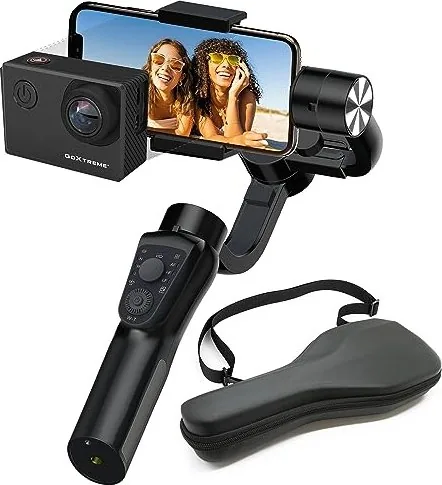
The Easypix GoXtreme GX3 is a versatile 3-axis gimbal designed to help creators capture steadier footage with a smartphone or compatible action camera. Whether you are filming travel clips, vlogs, live streams, sports moments, or social media content, it reduces unwanted shake and supports more balanced camera movement. The Easypix GoXtreme GX3 Manual highlights the importance of mounting and balancing the device before switching it on for reliable operation.
Flexible support for everyday filming
The adjustable clamp accepts smartphones measuring 6 to 8.5 cm on their narrow side. An included adapter also lets users fit action cameras up to 6.5 x 4.5 x 2.7 cm, with a maximum supported payload of 250 g. This dual compatibility makes the GX3 useful for creators who switch between phone footage and compact action-camera shots.
Before recording, the adjustable arm and balance screw help center the mounted device. Correct balance supports smooth stabilization and helps protect the gimbal motors. The unit should only be powered on after the phone or camera has been firmly installed and aligned.
Stabilization modes and practical controls
The GX3 provides several operating modes for different shooting styles. All Follow mode lets the pan and tilt axes follow handle movement, while Half Follow keeps tilt and roll locked for controlled horizontal panning. Lock Full mode holds the camera position steady, and FPV mode follows movement across all three axes for a more dynamic viewpoint. A fast-follow option is also available by holding the shutter button.
A joystick controls camera direction, while simple button presses change modes, re-center the mounted device, or switch between landscape and portrait orientation. Portrait switching is unavailable in FPV mode. Bluetooth pairing with a smartphone enables recording control from the handle, allowing users to start or stop supported recordings without touching the phone.
Battery, app features, and portability
Its 4000 mAh battery provides an advertised operating time of around 10 to 12 hours and recharges in approximately 4 to 5 hours. The USB output can also charge a connected phone or camera, making the gimbal useful as a power bank during longer sessions. Through the Gimbal Pro app for compatible iOS and Android devices, users can access zoom control, object tracking, motion time-lapse, and additional creative tools.
Notes
- Use the GX3 only in dry conditions and between 0 C and 40 C.
- Keep the axes clear of obstructions while the gimbal is powered on.
- For long-term storage, partially discharge the battery and recharge it periodically.
- The package includes the gimbal, action-camera adapter, carrying case, and USB cable.
Search for 67,706 Manuals online


Type-in Brand or Model