
Easypix GoXtreme GX2 Manual
PDF manual · 20 Pages
English



Quick check
Incorrect answer, please try again.
Chat with your Easypix GoXtreme GX2 manual using AI
Get instant AI answers from your Easypix GoXtreme GX2 manual
Ask anything about the Easypix GoXtreme GX2. Answers come from this manual, with the pages they are based on.
Ask a Question
Do you recommend GoXtreme GX2?
Yes NoFrequently Asked Questions
It is a motorized 3-axis smartphone gimbal for capturing steadier videos, photos, and selfies. It detects unwanted movement and compensates for shake to improve the appearance of handheld recordings.
Is this answer helpful?
The GX2 provides Following Mode, Pan Following Mode, and Lock Mode. Following Mode responds across all axes, Pan Following Mode follows panning movement while holding tilt and roll, and Lock Mode keeps the camera direction stable.
Is this answer helpful?
Yes. A short press of the power button changes the smartphone orientation between horizontal and vertical positions. This makes it suitable for both wide video framing and portrait-oriented social content.
Is this answer helpful?
Yes. After Bluetooth pairing, compatible smartphones can use the gimbal release button to take photos or start video recording without an additional app. Android 6.0 or later and iOS 10.0 or later are required for this Bluetooth function.
Is this answer helpful?
The Gimbal Pro app provides additional creative controls, including face tracking, Dolly Zoom, panoramic video, and time-lapse functions. It connects through Bluetooth after the phone is paired with the listed stabilizer device.
Is this answer helpful?
It supports smartphones with a maximum 18 cm diagonal, a width from 5.5 to 9 cm, and a maximum thickness of 0.9 cm. The total supported carrying weight is up to 280 g.
Is this answer helpful?
Its built-in 2000 mAh battery offers about 4.5 to 5 hours of working time. Charging takes about three hours through the micro-USB port, and four battery LEDs show the approximate charge level.
Is this answer helpful?
Advantages and Disadvantages
Advantages

- Three-axis stabilization helps reduce shake for smoother smartphone video and photo capture.
- Foldable 348 g design is easy to carry, with compact folded dimensions of 15.2 x 11 x 4.6 cm.
- Bluetooth 5.0 supports remote photo and video control with compatible Android and iOS phones.
- Gimbal Pro app adds face tracking, Dolly Zoom, panoramas, and time-lapse functions.
- Includes a tripod, pouch, and USB cable for convenient setup and transport.
Disadvantages

- Battery life is approximately 4.5 to 5 hours, so longer shoots may require recharge planning.
- Charging uses micro-USB rather than USB-C.
- Phone compatibility is limited to 5.5-9 cm width, 0.9 cm thickness, and 280 g maximum weight.
- The gimbal must be kept dry and is not intended for underwater or wet-condition use.
- Motors can be damaged if obstructed, dropped, or forced during operation.
Product Specification
Compatibility
Smartphone
Pan Axis
340 degrees
Roll Axis
325 degrees
Tilt Axis
160 degrees
Max. Payload
9.88 oz
Display
No
Connection
Bluetooth 5.0
Power Supply
Rechargeable battery
Operating Time
5 hr
App Control
Yes
Handling
One-handed
Features
Accessory mount (1 x 1/4 in)
Dimensions
10.24 x 5.12 x 3.46 in
Weight
12.28 oz
Product Description
Easypix GoXtreme Dual Gimbal GX2 - Read, Download & Print Free
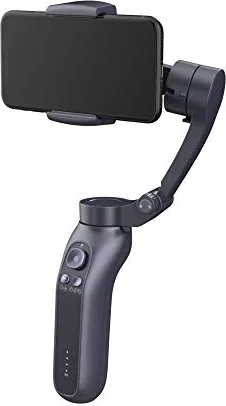
The Easypix GoXtreme Dual Gimbal GX2 is a compact 3-axis smartphone gimbal designed to help creators capture smoother videos, photos, and selfies. By using electronic sensors to detect unwanted movement, it compensates for shakes and judder, helping mobile footage look more stable and polished. Its foldable construction makes it a practical companion for travel, events, everyday vlogging, and spontaneous creative sessions.
Smooth control for mobile filming
The GX2 supports three operating modes to match different shooting styles. Following Mode allows the axes to respond to handle movement, Pan Following Mode keeps tilt and roll steadier while following panning motion, and Lock Mode holds the camera direction in place. A joystick gives users direct control over framing, while the mode button quickly cycles through the available settings.
A short press of the power button changes the phone between horizontal and vertical orientation, making it easy to switch from landscape videos to portrait-focused social content. Double-pressing the mode button returns the smartphone to its starting position, helping users reset their composition without interruption.
Bluetooth connection and creative app tools
Bluetooth 5.0 connectivity lets the Easypix GoXtreme Dual Gimbal GX2 pair with compatible Android and iOS smartphones. Once connected, the gimbal release control can be used for photos and video recording without requiring an additional app. For expanded creative options, the Gimbal Pro app offers features such as face tracking, Dolly Zoom, panoramic video, and time-lapse shooting.
The adjustable smartphone cradle supports phones up to 18 cm diagonally, with a width between 5.5 and 9 cm and a maximum thickness of 0.9 cm. Its carrying capacity reaches 280 g, allowing it to accommodate many modern smartphones while keeping the setup balanced.
Portable design and dependable power
Weighing 348 g, the GX2 folds down to 15.2 x 11 x 4.6 cm for convenient storage in a bag or larger pocket. The built-in 2000 mAh battery provides approximately 4.5 to 5 hours of working time and recharges in about three hours through micro-USB. A set of battery LEDs makes it simple to monitor remaining power.
Notes
For best calibration, insert and center the smartphone before switching on the gimbal. Unlock the axis limiters before use, keep the device dry, and avoid blocking or forcing the motors during operation. The package includes a tripod, pouch, and USB cable for a more flexible mobile filming setup.
Search for 67,706 Manuals online


Type-in Brand or Model