
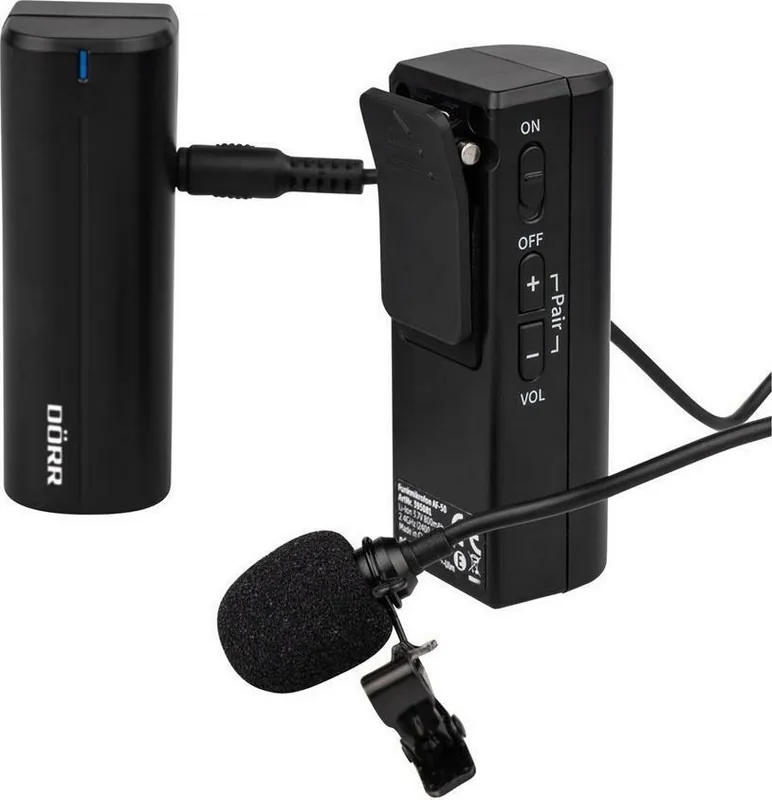
Dorr AF-50 Manual
PDF manual · 32 Pages
English



Quick check
Incorrect answer, please try again.
Chat with your Dorr AF-50 manual using AI
Get instant AI answers from your Dorr AF-50 manual
Ask anything about the Dorr AF-50. Answers come from this manual, with the pages they are based on.
AF-50 Maintenance Schedule
Use a soft, slightly damp lint-free microfiber cloth. Do not use aggressive cleaners or benzine. Switch off and disconnect USB before cleaning.
If the device is not used for a long period, charge the built-in Li-Po battery to about 75% to preserve its lifespan.
Ask a Question
Do you recommend AF-50?
Yes NoFrequently Asked Questions
Turn on both units. Press the Pair button on the transmitter while simultaneously holding the volume plus and minus buttons on the receiver for two seconds until the blue LEDs stay lit constantly.
Is this answer helpful?
Yes, the kit includes a TRRS cable specifically designed to connect the receiver to the headphone jack of most smartphones for direct audio recording.
Is this answer helpful?
The device offers a range of up to 50 meters outdoors in open spaces, though indoor range is typically around 20 meters depending on obstacles.
Is this answer helpful?
Yes, the transmitter has a dedicated Mute button that instantly stops audio capture while you hold it down, allowing for silent pauses during recording.
Is this answer helpful?
With a fully charged internal lithium polymer battery, the system provides approximately 8 hours of continuous operation.
Is this answer helpful?
Yes, you can connect an external audio source like a music player to the Line-In port on the transmitter to mix audio with your video recordings.
Is this answer helpful?
No, the microphone should never be submerged in water. Clean it gently with a dry or slightly damp microfiber cloth only.
Is this answer helpful?
Advantages and Disadvantages
Advantages

- Long battery life of up to 8 hours with convenient USB-C charging support.
- Wide compatibility with cameras, smartphones, and various recording devices.
- Reliable 2.4 GHz wireless connection with a range of up to 50 meters.
- Includes necessary cables for both TRS camera inputs and TRRS smartphone connections.
- Features real-time audio monitoring via the receiver headphone jack.
Disadvantages

- Battery cannot be replaced externally as it is built into the units.
- No dedicated carrying case hard shell provided, only a soft bag.
- Range may be reduced significantly by thick walls or metal obstacles.
- Requires manual pairing process every time if automatic reconnection fails.
- Not waterproof and must be kept away from liquids and rain.
Product Specification
Type
Microphone system (lavalier)
Battery life
8h
Audio transmission range
50Hz-15kHz
Consists of
1 receiver, 1 bodypack transmitter, 1 lavalier microphone
Product Description
Unlock Crystal Clear Audio with the Dorr AF-50 Wireless Microphone Kit
The Dorr AF-50 is a versatile clip-on wireless microphone system designed for creators who demand professional sound quality without the hassle of tangled cables. This compact kit operates on a reliable 2.4 GHz frequency, ensuring a transmission range of up to 50 meters outdoors and 20 meters indoors. Whether you are conducting interviews, recording documentaries, streaming webinars, or capturing high-quality video content for social media, this device delivers clear audio with minimal interference.
Designed for seamless integration with modern devices, the AF-50 supports smartphones, tablets, DSLR cameras, camcorders, and laptops. The system includes a transmitter that clips discreetly to your clothing and a receiver that connects directly to your recording gear. Both units feature built-in lithium polymer batteries offering an impressive operating time of approximately eight hours on a single charge via the included USB-C cable. The kit comes complete with specific spiral cables for both camera inputs (TRS) and smartphone headphone jacks (TRRS), along with a protective carrying bag and a windscreen for the microphone to reduce noise in windy conditions.
Setting up the Dorr AF-50 is intuitive. After fully charging the units, simply pair the transmitter and receiver by pressing the designated buttons, after which they will reconnect automatically upon future use. The transmitter features a mute button for quick silencing during pauses and a line-in port for connecting external audio sources like music players. The receiver allows for real-time monitoring through a headphone jack, giving you full control over your audio levels. With its omnidirectional pickup pattern and low self-noise, the AF-50 ensures your voice is captured faithfully from any angle.
Important Notes
- Always charge the battery to about 75% if storing the device for long periods to preserve battery life.
- Keep a distance of at least 30 cm from individuals with pacemakers due to magnetic fields generated by the unit.
- Do not expose the device to water or extreme temperatures.
- Clean the exterior only with a soft, slightly damp microfiber cloth.
Pros and Cons
Pros
- Long battery life of up to 8 hours with convenient USB-C charging support.
- Wide compatibility with cameras, smartphones, and various recording devices.
- Reliable 2.4 GHz wireless connection with a range of up to 50 meters.
- Includes necessary cables for both TRS camera inputs and TRRS smartphone connections.
- Features real-time audio monitoring via the receiver headphone jack.
Cons
- Battery cannot be replaced externally as it is built into the units.
- No dedicated carrying case hard shell provided, only a soft bag.
- Range may be reduced significantly by thick walls or metal obstacles.
- Requires manual pairing process every time if automatic reconnection fails.
- Not waterproof and must be kept away from liquids and rain.
Frequently Asked Questions
How do I pair the transmitter and receiver? Turn on both units. Press the Pair button on the transmitter while simultaneously holding the volume plus and minus buttons on the receiver for two seconds until the blue LEDs stay lit constantly.
Can I use this with my iPhone or Android phone? Yes, the kit includes a TRRS cable specifically designed to connect the receiver to the headphone jack of most smartphones for direct audio recording.
What is the maximum wireless range? The device offers a range of up to 50 meters outdoors in open spaces, though indoor range is typically around 20 meters depending on obstacles.
Does the microphone have a mute function? Yes, the transmitter has a dedicated Mute button that instantly stops audio capture while you hold it down, allowing for silent pauses during recording.
How long does the battery last? With a fully charged internal lithium polymer battery, the system provides approximately 8 hours of continuous operation.
Can I record external music with this system? Yes, you can connect an external audio source like a music player to the Line-In port on the transmitter to mix audio with your video recordings.
Is the microphone washable? No, the microphone should never be submerged in water. Clean it gently with a dry or slightly damp microfiber cloth only.
Search for 67,706 Manuals online


Type-in Brand or Model