
devolo dLAN pro 1200 DINrail Manual
PDF manual · 25 Pages
English



Quick check
Incorrect answer, please try again.
Chat with your devolo dLAN pro 1200 DINrail manual using AI
Get instant AI answers from your devolo dLAN pro 1200 DINrail manual
Ask anything about the devolo dLAN pro 1200 DINrail. Answers come from this manual, with the pages they are based on.
Ask a Question
Do you recommend dLAN pro 1200 DINrail?
Yes No
Nina Schmidt
7 months ago
I have a Devolo DIN-rail Powerline adapter. How can I set it up correctly in my electrical cabinet so it works reliably and improves my LAN/WiFi speeds?

Manual.ly
7 months ago
To get stable performance, install the DIN-rail adapter correctly in the main distribution (follow the manual). If you are not comfortable working in the cabinet, have an electrician do it. For best results, place it so it is connected in the intended supply area (many users benefit from being behind the main fuses and, where applicable, before local RCDs). Make sure the wiring supports range+ (use correct phase, neutral, and PE as required by the installation). Then connect your network gear (LAN to the router or WiFi adapter) and pair the Powerline adapters using the pairing button or the Devolo software/app. If speeds are lower, avoid installing or using the adapter near strong electrical noise sources.
Video Manual
PowerLAN Phasenkoppler einbauen
Frequently Asked Questions
It provides DIN-rail mounted HomePlug AV2 powerline networking to connect devices (e.g., intelligent meters, gateways) via existing electrical wiring, supporting up to 1200 Mbps for data, voice, and video in commercial or utility installations.
Is this answer helpful?
Security can be applied instantly by pressing the hardware encryption button on devices (press each device’s button within two minutes to share a randomly generated 128-bit AES password). For mixed or advanced setups, use the dLAN AVpro manager to assign encryption and policies centrally.
Is this answer helpful?
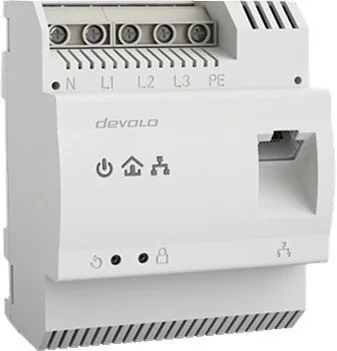
Yes. The unit supports single-phase and optional three-phase connections (terminals N, L1, L2, L3). Power is supplied via N and L1; connecting PE (earth) is optional and can improve range and MIMO performance.
Is this answer helpful?
Devolo’s dLAN AVpro manager (Windows/Linux) provides centralized configuration, real-time monitoring, VLAN and QoS configuration, MDU/master-slave modes, and global or per-device security settings for professional deployments.
Is this answer helpful?
Install on a top-hat rail within overvoltage category 3 or lower, in dry, ventilated indoor locations. A qualified electrician should perform wiring; use appropriate circuit protection and follow local electrical codes.
Is this answer helpful?
A master can manage segments with up to 63 slave devices per master, allowing structured networks suitable for larger installations and multi-dwelling setups.
Is this answer helpful?
To remove a device, press and hold its encryption button for at least ten seconds; the device will generate a new random password and will no longer join the existing network until re-paired.
Is this answer helpful?
Advantages and Disadvantages
Advantages

- DIN-rail form factor for neat integration into distribution cabinets and control panels.
- HomePlug AV2 powerline connectivity up to 1200 Mbps for high-bandwidth applications.
- Hardware encryption button and 128-bit AES ensure quick and secure network pairing.
- dLAN AVpro manager offers centralized monitoring, VLAN, QoS, and MDU/master-slave support.
- Gigabit RJ-45 port with Auto MDI/X and optional PE connection for improved range and stability.
Disadvantages

- Requires qualified electrician for installation and adherence to local electrical codes.
- Performance depends on the quality and topology of existing powerline wiring; results vary.
- Not intended for wet or outdoor locations; ventilation and cabinet space required.
- Some advanced features require dLAN AVpro manager and compatible devices for full use.
- Wiring and protective devices (circuit breakers) are necessary; additional infrastructure work possible.
Product Specification
Type
Powerline Adapter (Standalone)
Form Factor
1x external wired (DIN rail)
Interface
1x RJ-45 (10/100/1000Base-T)
Connectivity
1x HomePlug AV2 (3-wire screw terminals)
Transmission
1x HomePlug AV2 (200/500/600/1200Mb/s, 2x2 MIMO, OFDM 4096/1024/256/64 QAM, QPSK, BPSK, 128bit AES)
Dimensions
2.87x3.54x2.60in (WxHxD)
Compatibility
HomePlug AV2
Manufacturer Warranty
three years
Product Description
devolo dLAN pro 1200 DINrail — High-performance DIN-rail Powerline Adapter
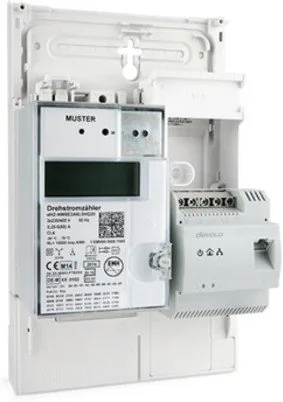
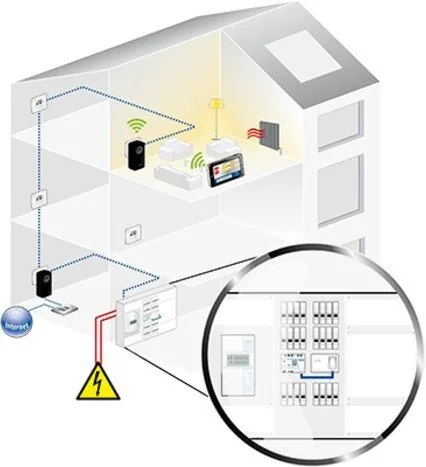
The devolo dLAN pro 1200 DINrail is a DIN-rail mountable HomePlug AV2 powerline adapter designed for business and industrial installations that need reliable data transmission over existing electrical wiring. Built for installation in distribution cabinets and control panels, the unit brings Gigabit Ethernet connectivity to devices like intelligent meters (MUCs), gateways, or network appliances without running new network cables. Rated for up to 1200 Mbps physical throughput, it supports single-phase and three-phase connections and can be used on power grids and coax or two-wire lines in some deployments.
The device emphasizes robust security and manageability. It offers 128-bit AES encryption that can be applied instantly via a hardware encryption button, or centrally configured using devolo’s dLAN AVpro manager software. The AVpro manager provides centralized configuration, monitoring, VLAN and QoS support, MDU modes (master/slave or peer-to-peer), and remote device management—useful for multi-dwelling units, utilities, or buildings with many endpoints.
Key features include a gigabit RJ-45 port with Auto MDI/X, quality-of-service prioritization, a multi-color link-quality LED for quick diagnostics, a reset button, and optional PE (earth) connection to enhance range and stability using MIMO principles. The product is engineered for up to 400 meters of powerline range and supports segments with up to 63 slaves per master, making it suitable for both meter data collection and high-bandwidth applications like high-speed Internet or video streaming.
Installation is aimed at qualified electricians: the unit mounts to a top-hat rail and accepts conductor cross-sections from 0.18 mm² to 6 mm². It supports both single-phase and three-phase wiring, with the device powered via N and L1 terminals. Safety guidance calls for proper ventilation, dry installation, and protection via circuit breakers. The product complies with relevant EMC and regulatory standards for EU markets.
For network security, encryption pairing is simple: press the encryption buttons on devices within two minutes to create a shared, randomly generated network password. To remove a device from a network, hold its encryption button for ten seconds to assign a new random password. For advanced deployments, use dLAN AVpro manager (Windows/Linux) for device discovery, real-time monitoring, policy assignment, VLANs, and subnet management.
With industrial-grade mounting, advanced management, and plug-and-play encryption, the devolo dLAN pro 1200 DINrail is a versatile choice for utilities, building automation, and commercial networks that need to leverage existing power infrastructure while keeping performance and security high.
Notes
- Intended for installation in overvoltage category 3 environments and similar building electrical installations.
- Do not install in wet locations; follow all local electrical codes and disconnect power before wiring.
- Disposal must follow WEEE rules in applicable regions.
Search for 67,706 Manuals online


Type-in Brand or Model
Sabine Hesse
8 months ago
I am struggling to set up this Devolo DINrail Powerline adapter. How should I install it correctly and pair it so I get stable LAN/WiFi speeds across the house?
Manual.ly
8 months ago
For best results, connect the DINrail adapter correctly in the main electrical distribution (ideally behind the upstream fuses, and if possible so it is not limited by separate local FI switches). The manual-based install is sufficient if you can work safely in the breaker panel and read wiring diagrams. After installation, complete the Powerline setup: plug adapters in where you want network coverage, then use the pairing/config procedure from the manual (typically a pair button or app-based setup). For higher performance, use newer 1200+ PRO Powerline adapters to enable features like QoS and packet prioritization. Avoid switching on strong noise sources near the adapters (for example vacuum cleaners or some kitchen appliances) and confirm correct wiring of phase, neutral, and PE so the system can use all conductors when supported.