
devolo dLAN 650+ Manual
PDF manual · 29 Pages
English



Quick check
Incorrect answer, please try again.
Chat with your devolo dLAN 650+ manual using AI
Get instant AI answers from your devolo dLAN 650+ manual
Ask anything about the devolo dLAN 650+. Answers come from this manual, with the pages they are based on.
Ask a Question
Do you recommend dLAN 650+?
Yes NoVideo Manual
Installation – devolo Magic WiFi Starter Kit
Frequently Asked Questions
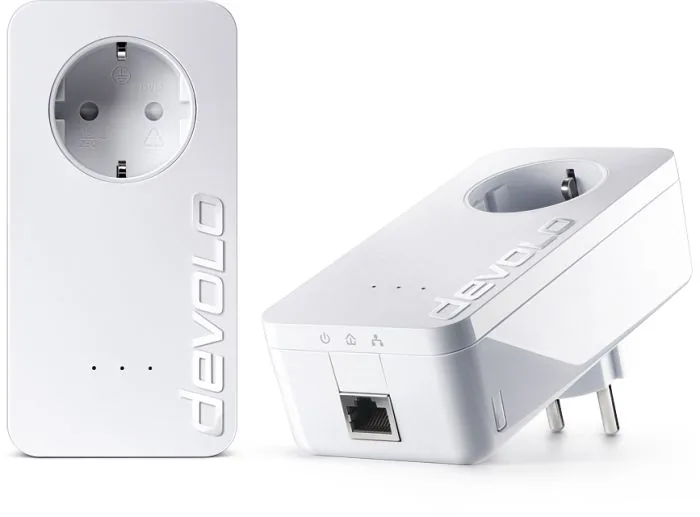
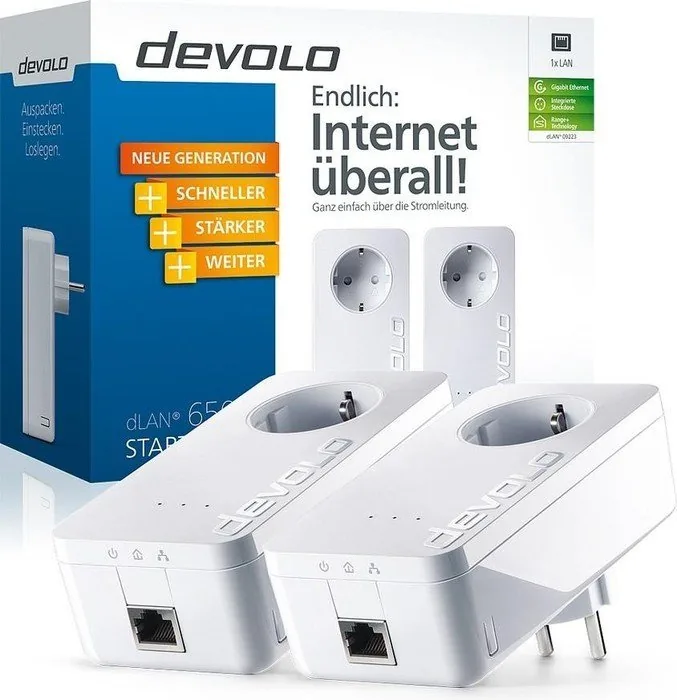
The 2-pack Starter Kit typically includes two dLAN 650+ adapters, two RJ-45 network cables, and a quick installation guide. Each adapter has an integrated filtered power socket, an Ethernet RJ-45 port, status LEDs and an encryption button.
Is this answer helpful?
Plug one adapter into a wall outlet and connect it to your router via the included Ethernet cable. Plug the second adapter into any other outlet where you need connectivity and attach your device. For secure pairing, press the encryption button on both adapters within two minutes or use dLAN Cockpit to add and password-protect adapters.
Is this answer helpful?
Adapters can be secured using 128-bit AES encryption. If adapters have a hardware encryption button, pressing the button generates and shares a random network password. For adapters without buttons or for manual control, use the dLAN Cockpit app to set or generate a shared network password.
Is this answer helpful?
The dLAN 650+ advertises up to 600 Mbps theoretical speed over HomePlug AV2, with QoS to prioritize latency-sensitive traffic. Real-world speeds depend on wiring quality, distance, and electrical interference; typical throughput is lower than the theoretical maximum.
Is this answer helpful?
Plug adapters directly into wall outlets (avoid unfiltered multi-socket strips), and when using a power strip, plug it into the adapter’s integrated outlet to benefit from the filter. Minimize noisy appliances on the same circuit and keep adapter-to-adapter distances and wiring conditions favorable.
Is this answer helpful?
Yes. The dLAN 650+ includes a patented power-saving mode that reduces power consumption automatically when connected network devices are idle or switched off, lowering energy use without manual intervention.
Is this answer helpful?
dLAN Cockpit is available for Windows, macOS and Linux (Ubuntu). It discovers reachable adapters, displays connection quality, and allows password management, adapter naming, factory resets and firmware-related options where supported.
Is this answer helpful?
Advantages and Disadvantages
Advantages

- Easy plug-and-play setup over existing electrical wiring—no new cables required.
- Integrated filtered mains socket preserves an outlet and improves network stability.
- Up to 600 Mbps theoretical speeds with QoS for smoother video and voice streaming.
- One-touch 128-bit AES encryption and dLAN Cockpit software for secure, centralized management.
- Patented power-saving mode reduces energy use automatically when idle.
Disadvantages

- Actual throughput depends on home wiring and may be lower than theoretical 600 Mbps.
- Performance can degrade if adapters are plugged into unfiltered multi-sockets or noisy circuits.
- Requires at least two adapters to form a dLAN network—single unit not sufficient alone.
- Older or incompatible network devices may limit maximum achievable speeds.
- Firmware or software updates may be needed; setup varies slightly across OS platforms.
Product Specification
Type
Powerline adapter (standalone), Bundle
Form factor
2x socket adapter
Connectivity
1x RJ-45 (10/100/1000Base-T, 2 devices)
Connection
1x HomePlug AV2 (2-68MHz, 2 devices)
Transmission
1x HomePlug AV2 (200/500/600Mb/s, OFDM 4096/1024/256/64 QAM, QPSK, BPSK, 128bit AES, 2 devices)
Dimensions
2.60x5.16x1.65in (WxHxD)
Compatibility
HomePlug AV2
Special features
integrated socket (2 devices), Bundle (2x Powerline adapter)
Manufacturer's warranty
three years
Note
EU version: 9229
Product Description
devolo dLAN 650+ Starter Kit, HomePlug AV2, RJ-45, 2-pack Manual
The devolo dLAN 650+ Starter Kit brings reliable HomePlug AV2 powerline networking to ordinary home electrical wiring. Designed for simple plug-and-play installation, this 2-pack lets you extend wired network access to rooms without running new Ethernet cable. Each adapter offers an RJ-45 LAN port, an integrated filtered power socket so you don’t lose an outlet, and an easy encryption button for secure 128-bit AES protection.
The dLAN 650+ focuses on practical home-network features: up to 600 Mbps theoretical transfer rate for bandwidth-hungry applications, Quality of Service (QoS) to prioritize voice and video, and a patented power-saving mode that reduces consumption automatically when devices are idle. A built-in mains filter improves data transmission by reducing noise from connected appliances, while compatibility across devolo dLAN ranges (200/500/650 Mbps) ensures you can mix adapters when expanding an existing network.
Installation is straightforward: connect one adapter to your router, plug a second adapter into any other outlet and attach a device via the included RJ-45 cable. For additional control and diagnostics, devolo provides the dLAN Cockpit software for Windows, macOS and Linux (Ubuntu). Cockpit discovers reachable adapters, displays connection quality visually (green/orange/red), lets you set or generate strong network passwords, and manage devices centrally. If adapters include hardware encryption buttons, you can secure the network in seconds by pressing buttons on paired devices.
Beyond setup, the manual guides bandwidth optimization—plug adapters directly into wall sockets (not multi-socket strips) and use the adapter’s integrated outlet for any connected power strips to maximize filter benefits. Safety and disposal instructions are included, plus a three-year warranty and guidance on adding or excluding adapters from a network. The dLAN 650+ is aimed at users who want reliable wired connectivity without rewiring, with energy-saving and security features that keep the setup practical and safe.
Notes
- The integrated socket features a mains filter—plug any multi-socket into the dLAN 650+ to preserve filtering benefits.
- Use the encryption button for quick network pairing; use dLAN Cockpit to manage adapters without a hardware button.
- For best throughput, plug adapters into wall outlets directly and avoid daisy-chaining through unfiltered power strips.
Search for 67,706 Manuals online


Type-in Brand or Model
awehner39
7 months ago
I installed Devolo Cockpit and it offered a firmware update. Can this reduce my transfer speed or cause issues like freezing or slow shutdowns? Can I avoid it or roll back?
Manual.ly
7 months ago
Devolo Cockpit is not required for basic use of the dLAN adapters. If the Cockpit update changes behavior, it can be due to the new firmware settings or driver/services on your PC. For troubleshooting, you can (1) stop using Cockpit and manage the adapters only via their built-in options, (2) reinstall drivers and reboot, and (3) check for background services that could block shutdown. If you experience a major performance drop or stability problems after the update, contact support so we can guide you through the correct recovery steps. Rolling back firmware is not always possible for end users, but support can advise on the safest method for your specific adapter model and firmware version.