
devolo dLAN 500 WiFi Manual
PDF manual · 81 Pages
English



Quick check
Incorrect answer, please try again.
Chat with your devolo dLAN 500 WiFi manual using AI
Get instant AI answers from your devolo dLAN 500 WiFi manual
Ask anything about the devolo dLAN 500 WiFi. Answers come from this manual, with the pages they are based on.
Ask a Question
Do you recommend dLAN 500 WiFi?
Yes No
Lena Schneider
10 months ago
Can I use the Devolo dLAN 500 WiFi if I plug it into a power strip or multi-socket, or does it have to be connected directly to a wall outlet?

Manual.ly
10 months ago
For best reliability, connect the Devolo directly to a wall socket (single outlet). Some users report it may not work correctly or performance drops when it is plugged into a multi-socket/power strip. Power strips and some socket combinations can add extra electrical noise or reduce the connection quality. If you need to place it elsewhere, try a short, quality extension only if a direct wall outlet is not possible, but expect more variability. Also make sure the adapter is on a stable, properly connected outlet (and avoid setups where the socket setup affects the electrical path).
Frequently Asked Questions
It supports data transmission speeds of up to 500 Mbps for stable connections used in your home network.
Is this answer helpful?
Yes, it is compatible with Windows XP, 7, 8 and other major systems including Mac and Linux.
Is this answer helpful?
You can use the dLAN Cockpit App for smartphones or the desktop software for full control.
Is this answer helpful?
Use the encryption button or configure WPA2 and WPS settings in the web interface.
Is this answer helpful?
It automatically syncs Wi-Fi settings between multiple adapters for seamless roaming.
Is this answer helpful?
Advantages and Disadvantages
Advantages

- High speed up to 500 Mbps for streaming and gaming.
- WiFi Move Technology synchronizes settings across adapters automatically.
- Simple setup using encryption button for network security.
Disadvantages

- Power line quality affects speed and consistency significantly.
- Requires two devices minimum to establish network connection.
- Wi-Fi range can be limited by physical walls and distance.
Product Specification
Type
Powerline adapter, Wi-Fi access point
Connection
1x RJ-45 (10/100Base-T)
Connectivity
HomePlug AV2, 1x Wi-Fi 802.11b/g/n (1x 2.4GHz, WPS button)
Transfer Rate
1x HomePlug AV2 (500 Mbps, 128-bit AES), 1x 2.4GHz Wi-Fi (150 Mbps)
Compatibility
HomePlug AV2
Band Capability
Single Band
Security
128-bit AES, WEP, WPA, WPA2, WPS
Note
Advance exchange and premium hotline only for dLAN 500 Wi-Fi ES! EU version: 9080
Product Description
Transform Your Wireless Connectivity
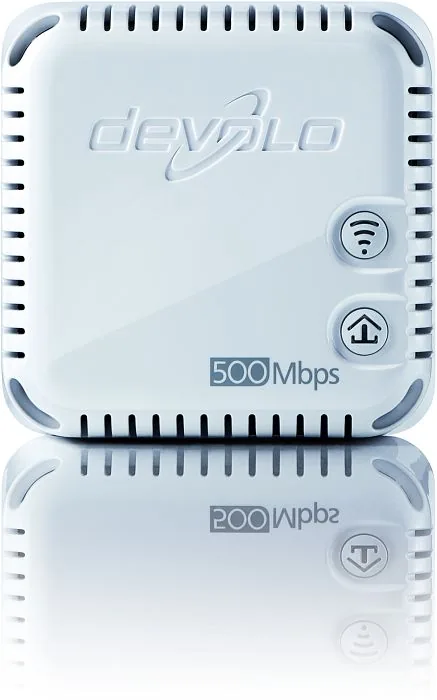
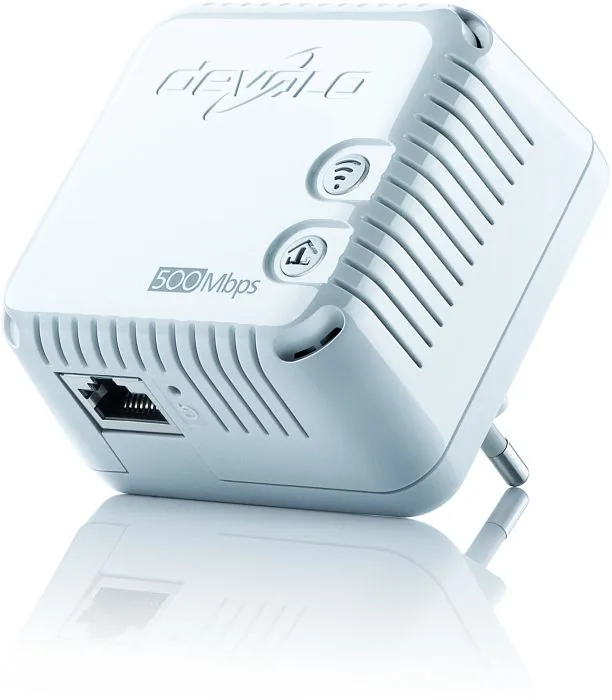
Are you struggling with dead zones in your home network? The devolo dLAN 500 WiFi provides an effective solution for expanding your internet reach without drilling holes or laying new ethernet cables. This advanced adapter leverages your existing electrical wiring to transmit data signals, effectively turning every power outlet into a network port. With speeds reaching up to 500 Mbps, it supports bandwidth-intensive activities such as streaming HD video or downloading large files rapidly. One of the most impressive capabilities is the integration of WiFi Move Technology. This feature allows all connected adapters to synchronize their Wi-Fi settings automatically. As a result, you experience seamless roaming without the need to manually adjust security keys or network names on every floor.
Security is a top priority for any connected device. The dLAN 500 WiFi supports WPA2 encryption standards and includes WPS functionality for quick device pairing. You can manage the entire home network using the dLAN Cockpit App available for iOS and Android. This application lets you monitor connection status and encrypt the powerline network with a single button press. The hardware also includes a Gigabit Ethernet port for direct wired connections to computers or game consoles. For advanced configurations, users can access the built-in web interface to set up guest accounts or implement parental controls. While the physical design is compact, the software integration offers significant depth for customization.
Installation is designed to be user-friendly for non-tech-savvy individuals. The system requires at least two devices to establish a working powerline network. Once plugged in, the green LED indicates readiness. If you encounter complex settings, referring to comprehensive guides helps clarify the process. Some enthusiasts prefer the detailed devolo dLAN 500 WiFi Manual to understand every nuance of network encryption or time control features. The device operates on standard household currents and is safe for indoor use. It supports multiple operating systems including Windows, Linux, and Mac OS X. Package variants exist to suit different deployment sizes. Whether you buy a single unit or a network kit, the core functionality remains robust. Proper placement away from power strips ensures maximum signal integrity. With these tools, keeping your home connected becomes effortless and secure for all family members. Additionally, the product comes with a three-year warranty period from the date of delivery. This ensures protection against manufacturing defects. Proper disposal according to local regulations is required as it is electronic equipment. Bandwidth optimization rules suggest direct wall socket usage. Understanding these guidelines prevents signal loss. The LED indicators provide visual feedback on connection quality, showing green for HD streaming suitability or orange for standard data. Resetting the device restores factory defaults if issues persist. Finally, keeping the firmware updated via the management interface ensures longevity. Even without a full devolo dLAN 500 WiFi Manual on hand, the device is intuitive. Ultimately, this solution bridges the gap between power outlets and high-speed internet availability.
Search for 67,706 Manuals online


Type-in Brand or Model
Klaus_D
8 months ago
Does this adapter reliably expand internet coverage through multiple floors and thick walls? Are there long-term reliability concerns?
Manual.ly
8 months ago
Yes, most reviews confirm strong signal expansion through concrete floors and into basements or attics. Installation is plug-and-play with existing Powerline setups. However, performance depends on the electrical wiring quality. Some users reported device failures after several years, and connection drops can occur if using power strips. Connecting directly to the wall outlet is recommended. While the official software can be unstable, the hardware itself is effective for range extension. If issues appear, resetting the device or updating firmware usually resolves them. Overall, it effectively solves weak signal areas despite minor long-term instability risks.